



















































QCommerce – Real-Time Order Management for Fast-Paced WooCommerce Stores

Quick Commerce (QCommerce) is a cutting-edge WooCommerce plugin designed for businesses that need fast, accurate, and flexible order tracking. Whether you're managing deliveries, handling high order volumes, or need custom workflows, QCommerce empowers your store with real-time visibility, smart automation, tipping, feedback, and much more.

Live Order Tracking

Live Order Tracking

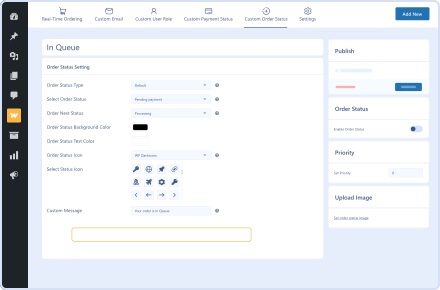
Custom Order & Payment Statuses

Custom Order & Payment Statuses

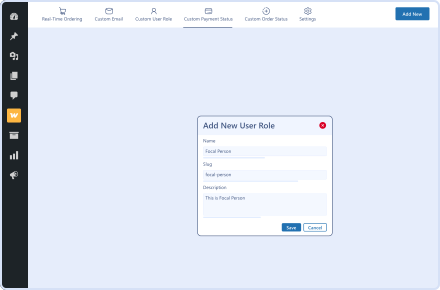
Custom User Roles

Custom User Roles

Tipping System

Tipping System

Customer Feedback Collection

Customer Feedback Collection

Smart Email Notifications

Smart Email Notifications

14 Day Money Back Guarantee
Woo Pro Partner
Safe and Secure Checkout
80+ Clutch reviews

Enjoy Up to 80% OFF on Our All Access Pass Lifetime Plan — Limited-Time NEW YEAR Deal

Real-Time Order
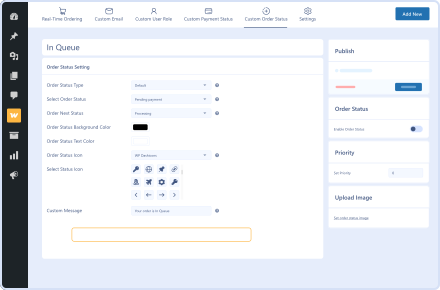
Custom Order Status Management
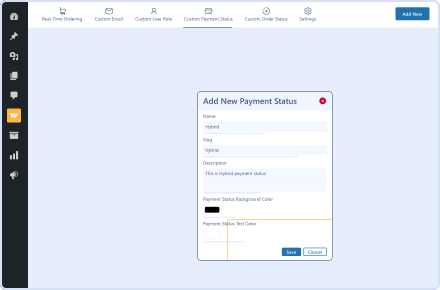
Custom Payment Status Options
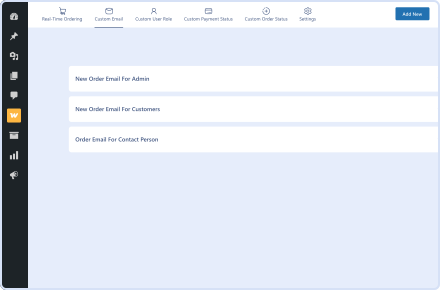
Personalized Email Notifications
Role-Based Access with Custom User Roles

Pricing Plan

Basic

$99.99/Billed Annually

Single Site

Priority Support
Regular Plugin Updates
All Core Features Included
Auto-Renew Subscription
lightning bolt

POPULAR

50% Off

Pro

$299.97

$149.99/Billed Annually

3 Sites

Priority Support
Regular Plugin Updates
All Core Features Included
Auto-Renew Subscription

Agency

$9999

$199.99/Billed Annually

100 Sites

Priority Support
Regular Plugin Updates
All Core Features Included
Auto-Renew Subscription
14 days money back guarantee

14 Day Money-Back Guarantee

We are committed to your satisfaction that our products will elevate your online store’s performance, backed by our 14-day money-back guarantee. Please review our Refund Policy for more details.

QCommerce for WooCommerce Features

Smart Tipping System

Smart Tipping System

Enable forced or optional tipping at checkout and cart level, encouraging customer appreciation for your team.

Order Tracking Block

Order Tracking Block

Let customers track their orders via a dedicated tracking block added to any page of your choice.

Admin Notifications

Admin Notifications

Enable instant notifications when a new order is placed to ensure prompt action from your team.

Feedback Collection

Feedback Collection

Collect customer feedback post-delivery, tied directly to the contact person’s profile.

Contact Profile Dashboard

Contact Profile Dashboard

Allow contact persons to view their order history, tips, feedback, and update their profile info.

Order Tracking Page

Order Tracking Page

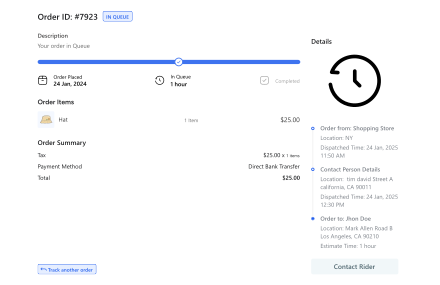
The Order Tracking Page contains the full order details, including the assigned contact person and rider information.

Contact Rider Button

Contact Rider Button

Customers can easily contact the rider by clicking the "Contact Rider" button.

Plugin Screenshots

QCommerce – Real-Time Order Management for Fast-Paced WooCommerce Stores

Version :

Version History :

Version History

N = new

U = update

D = dev

F = fix

R = remove

O = other

Last update :

still have a question

Still have a question?

Check the Documentation, and if you can't find an answer there, send us an email.

FAQ's

What is Quick Commerce (QCommerce), and who is it for?

QCommerce is a real-time order tracking and management plugin for WooCommerce stores. It’s ideal for fast-moving businesses like restaurants, local delivery services, and stores with high order volumes.

How does the Live Order Dashboard help my store?

The Live Order Dashboard provides a real-time view of every order as it’s placed, letting you manage statuses, assign contact persons, and track progress instantly—all from a single screen.

Can I create my own order and payment statuses with QCommerce?

Yes! QCommerce allows full customization of both order statuses and payment statuses, giving you control over how orders are processed and labeled throughout your workflow.

Does this plugin support tipping at checkout?

Absolutely. You can enable optional or forced tipping on the Cart and Checkout pages, with the tips tracked and visible in each contact person’s profile.

What kind of emails can I send with QCommerce?

You can send fully customizable email notifications to admins, customers, and contact persons. Emails are triggered based on events like new orders or specific order status changes.

Can customers track their orders and leave feedback?

Yes. QCommerce includes an Order Tracking block for customers and a Feedback system that allows users to leave comments or rate their experience with the assigned contact person.

Second Thoughts? No Sweat!

You’ve got 14 days to change your mind and get your money back!

Copyright © 2025 WPExperts

WPExperts Badges
WPExperts Badges

Copyright © 2025 WPExperts