



































 Usman Ul Haq
Most WordPress sites still depend on slow, desktop-only approval workflows. It hurts onboarding. It blocks new members. And it creates friction you do not need. New User Approve solves this problem at the plugin level.
The mobile app removes the last bottleneck. You can approve or deny users from your phone in seconds. No login screens. No dashboard clutter. No delays.
When you wait hours to approve a new signup, you lose trust and momentum. And that hurts growth.
The New User Approve mobile app gives you control at the exact moment a user registers. This keeps your onboarding clean, fast, and predictable. You stay in control of who enters your site.
If you want a simple way to manage user approvals on the go, the New User Approve mobile app is the tool you need. If you want fewer fake user sign-ups and tighter security, it helps with that too.
What is the New User Approve Mobile App
New User Approve mobile app gives WordPress site owners real control over user registrations from their phone. It cuts out dashboard logins, reduces approval delays, and gives administrators a clean workflow to manage every new account in seconds.
It is built for teams that run membership sites, communities, schools, training portals, WooCommerce stores, or any platform where user access must be screened before login.
The app connects directly to your New User Approve plugin on WordPress. This keeps your entire user approval system synced. No extra setup or messy configuration.
Once connected, every pending user appears instantly on your device. You can approve or deny with a single tap, trigger automated email notifications, or keep users pending until verification is complete.
Key advantages:
- Full user registration oversight from your phone
- One tap approvals and denials
- Automated email workflows stay active
- Real-time sync with your WordPress dashboard
- Push notifications for new signups and status changes
- Fits teams of any size that need secure access control
All in all, this is a practical mobile app for site owners who want a reliable approval process without being tied to a desktop.
Why This WordPress Mobile App Matters in 2026
User management standards changed sharply. People expect approvals, access, and onboarding to happen in real time. If your workflow stalls, so do your registrations.
Real-time user management
Admins no longer wait to reach a laptop. People expect instant action. Slow approvals slow growth.
Key shifts:
- Users expect immediate access or fast confirmation.
- Pending requests hurt conversions in membership and community sites.
- Mobile-first approvals remove bottlenecks in the onboarding flow.
Admins operate mobile-first
Most daily admin tasks already happen on a phone.
- CRM updates. Support chats. Payment alerts.
- User approvals should fit into the same workflow.
- Web dashboards feel slow and force context switching.
This WordPress mobile app keeps admins in the flow instead of dragging them back to WP-Admin.
Manual approval is still the strongest security layer
Bots are smarter. Spam filters are less reliable.
- Humans still outperform automated checks for intent and authenticity.
- Manual review stops fake profiles before they touch your platform.
- The only weakness was the slow approval process. The mobile app removes that weakness.
Faster onboarding improves conversions
Closed communities and paid memberships rely on speed.
- Long pending times make new users drop off.
- Quick approval increases the chance they will stay and become active.
- Teams can respond within seconds instead of hours.
WordPress has no native mobile approval tool
This is the core gap.
- wp-admin is not built for fast mobile moderation.
- No official app handles user approvals natively.
- Admins often forget pending users because the process is hidden inside the dashboard.
The New User Approve mobile app fills this gap. It creates a complete mobile approval workflow for WordPress that didn’t exist before.
Key Features That Set It Apart
Each feature is built around one goal. Make user approvals faster, clearer, and easier to manage from a phone.
Here’s the breakdown with benefit-first clarity.
Instant Approvals & Denials
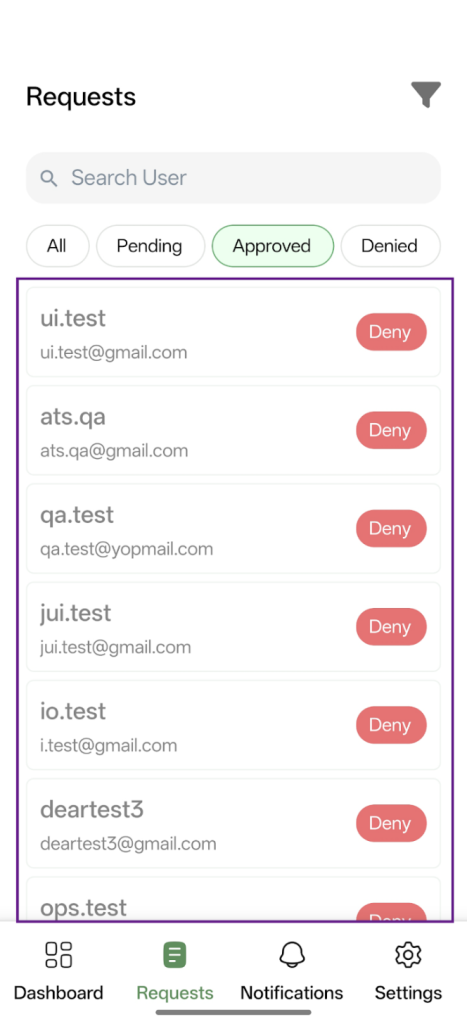
Speed matters. This workflow removes every extra step.
- One-tap approval or denial. No long menus.
- Real-time processing so actions reflect instantly on the WordPress site.
- Auto-triggered emails keep users updated without manual effort.
- Pro feature: take action directly from push notifications. No app opening needed.
This cuts response times from minutes to seconds.
Push Notifications in Real Time
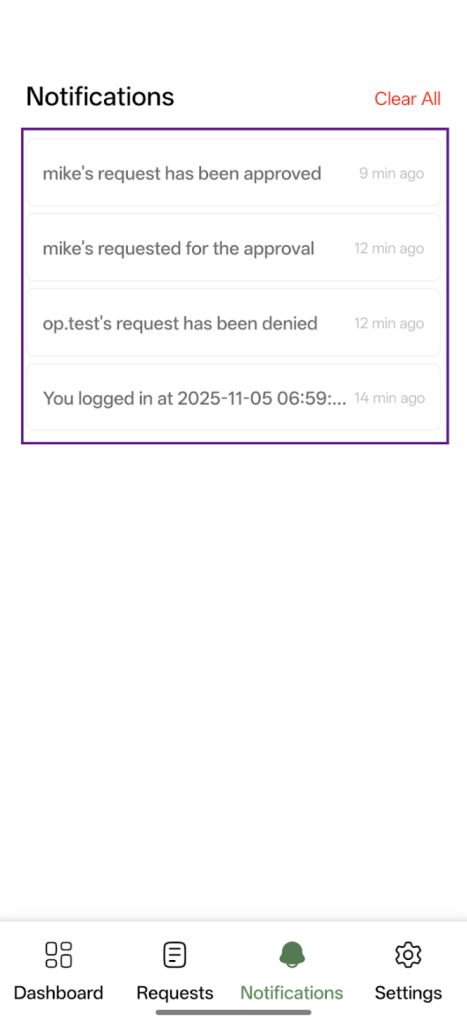
Admins don’t need to “check” anything. The app tells them.
- Alerts fire the moment someone registers.
- Prevents onboarding delays that hurt conversion.
- Keeps teams responsive even when they aren’t near a desktop.
This creates a true always-on approval workflow.
Dashboard With Full Visibility
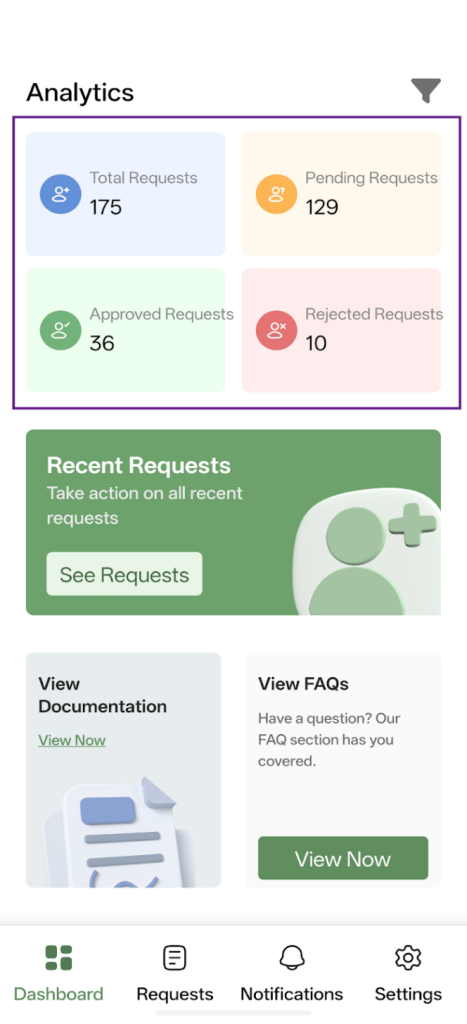
Everything you need shows up in one clean screen.
- Counts for Pending, Approved, and Denied.
- Activity summary at a glance.
- Mirrors the WordPress plugin interface for a zero-learning-curve experience.
Admins know the exact status of user registrations in seconds.
Request Management With Full Control
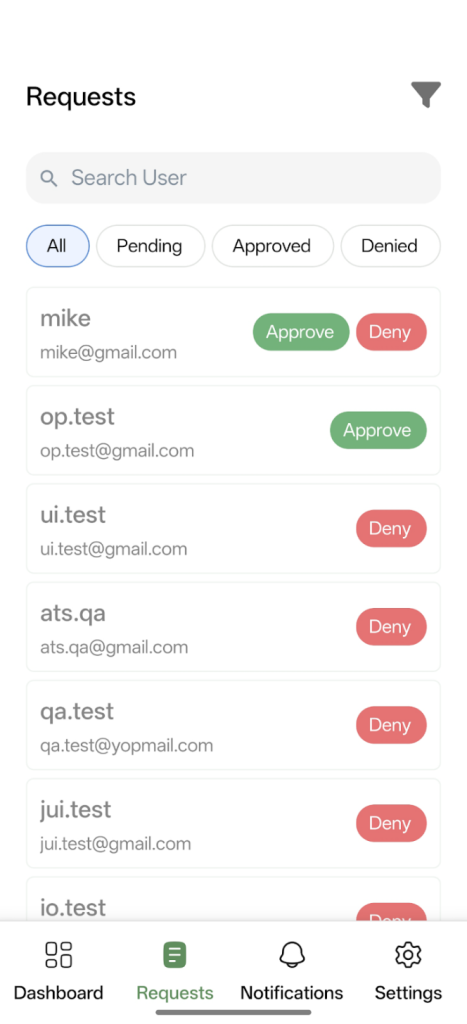
The entire moderation flow is inside the app.
- Approve, deny, or keep pending.
- View complete user details before taking action.
- Search, sort, and filter by any status.
- Multi-admin support so multiple team members can manage the same website.
Ideal for communities, memberships, and large teams.
Time-Based Filters
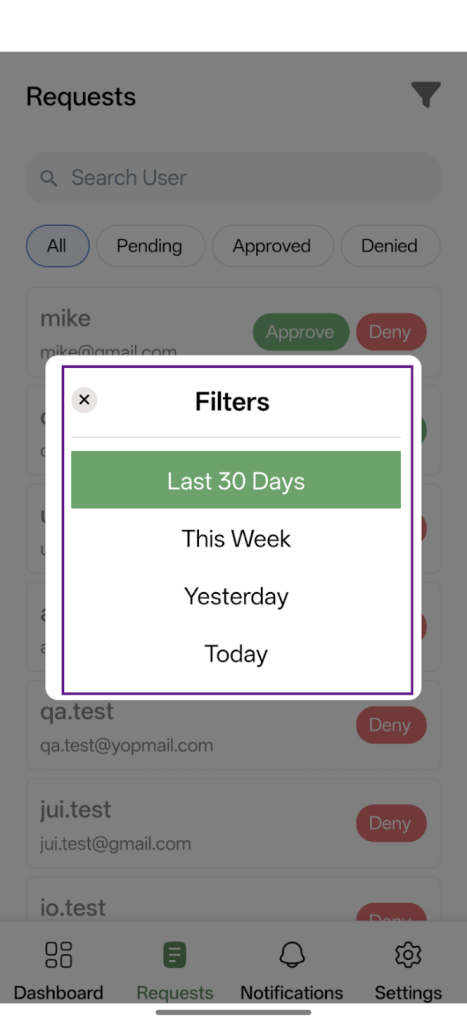
Helps admins focus on what matters now.
- Today.
- Yesterday.
- This Week.
- Last 30 Days.
Supports trend-spotting and keeps old requests from being forgotten.
Built-In Documentation & FAQs
No switching between browser tabs.
- Quick answers without leaving the app.
- Reduces support tickets for site owners.
- Helps new team members onboard faster.
How New User Approve Mobile App Works
The setup is simple. You connect once and manage everything from your phone.
Install the Plugin
You need the New User Approve plugin active on your WordPress site. That plugin handles the approval logic. The app handles the mobile workflow.
Install the Mobile App
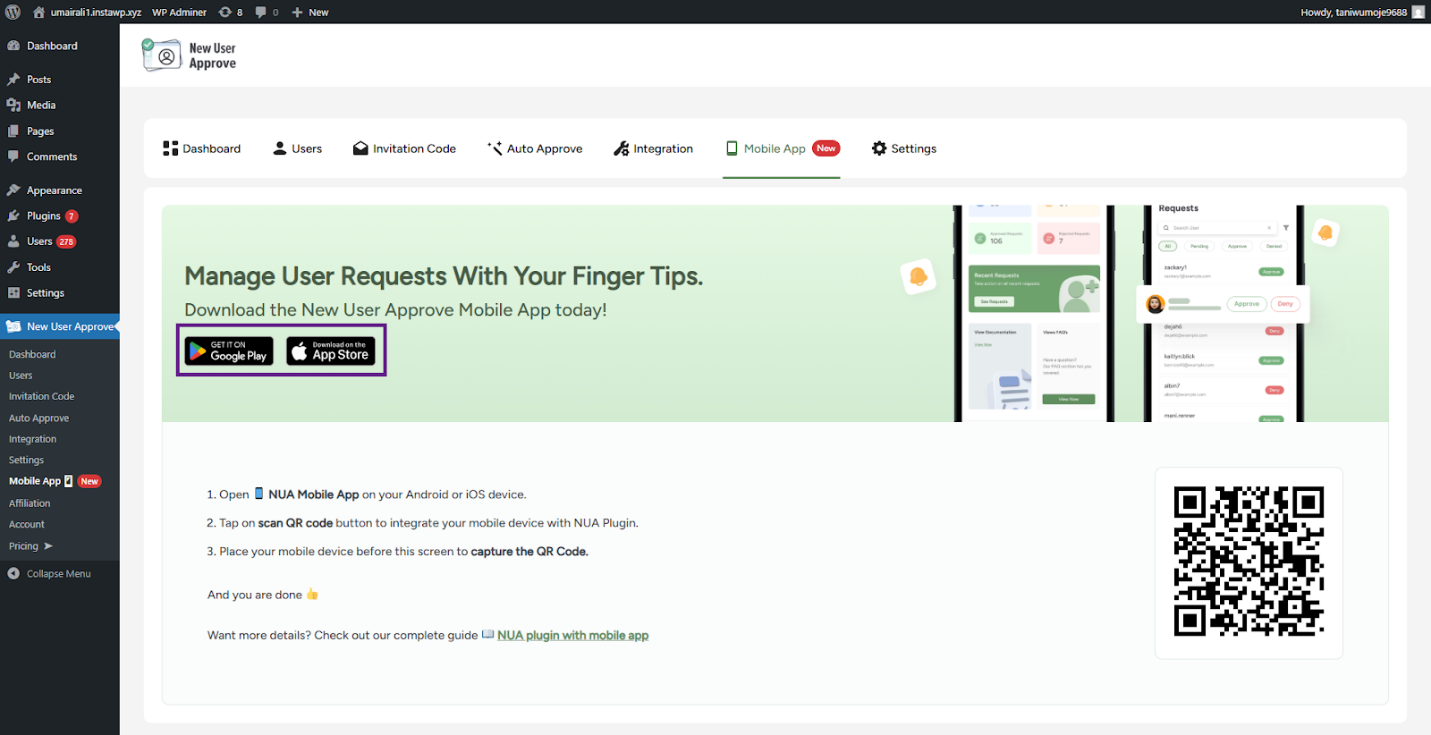
Download the app on your device.
Once installed, the app is ready to connect.
Connect Using the QR Code
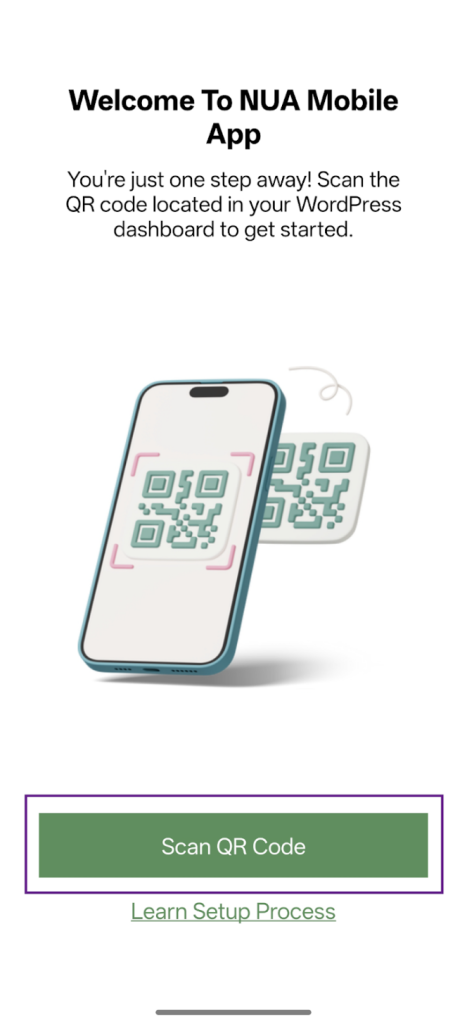
The connection process takes a few seconds.
- Open New User Approve in wp-admin and go to Dashboard.
- Tap the QR icon at the top.
- Scan the QR code using the mobile app.
- The app syncs instantly with your site.
No keys or manual setup. One scan and you are connected.
Start Managing Requests
Everything is now live inside the app.
- Switch between Dashboard, Requests, Notifications, and Settings.
- Approve or deny user requests with one tap.
- View complete details before taking action.
- New alerts appear instantly, so you never miss a signup request.
You now control your entire user approval workflow directly from your phone.
How New User Approve App Strengthens WPExperts Ecosystem
This user approval mobile app fits naturally into the broader WPExperts product stack. It takes an established WordPress plugin and gives it a modern, mobile layer that teams need in 2026.
- It extends WPExperts’ focus on reliable WordPress infrastructure. The mobile app adds speed and flexibility without changing the core approval logic.
- It brings real-time management to a plugin already trusted by communities, membership sites, agencies, and enterprise teams.
- It boosts productivity. Agencies can approve users on the go. SMEs don’t need to wait for desktop access. Large teams can coordinate faster across multiple devices.
- It follows WPExperts’ core approach. Solve real admin problems with tools that reduce friction and keep workflows simple.
This turns New User Approve from a plugin into a complete user approval system that works everywhere your team works.
Who Should Use the New User Approve App?
The New User Approve mobile app is designed for anyone who manages user requests on a WordPress site and wants faster, simpler control. Here’s who benefits most:
- Site Owners – See all pending registrations at a glance and approve them without logging into the desktop.
- Community Managers – Keep new members moving through the signup process quickly to maintain engagement.
- Membership Site Admins – Avoid delays in onboarding paid or restricted members.
- LMS Admins – Manage student access in real time, ensuring courses are accessible immediately after approval.
- Agencies – Handle multiple client sites on the go, streamlining approvals across projects.
- Non-technical Business Owners – Manage user access without needing to understand WordPress dashboards deeply.
- Anyone tired of desktop workflows – Skip the login, navigate, and approve cycle. Mobile-first approval keeps things ready and fast.
Competitive Advantage of This Mobile App
The New User Approve mobile app stands out because it gives complete control from your phone.
- Full Mobile Control – No other WordPress approval tool matches its real-time, mobile-first workflow.
- Faster Approvals – Skip email links and desktop logins. Approve or deny in seconds.
- Enhanced Security – Manual approval ensures only verified users gain access. Auto-approval systems can’t match this.
- WPExperts Reliability – Built and maintained by WPExperts, ensuring updates, support, and long-term stability.
Experience the Desktop-Free User Approval Process With New User Approve Mobile App
Take control of your WordPress user management today. Get New User Approve – a flagship product by WPExperts, and experience fast, secure, and flexible user approvals from anywhere.
This is your chance to simplify workflows and protect your WordPress site without being tied to a desktop.


