



































 Abdullah Ashraf
WordPress 7.2 is the last crucial version release of 2026. WordPress 7.2 introduces a new default theme and is scheduled for release on December 08, 2026. The team will review the features and decide whether to include them.
In addition, WordPress 7.2’s release coincides with the State of the Word event.
This blog post details new features, enhancements, and updates in WordPress 7.2.
WordPress Version 7.2 Release Squad
- Release Lead: Matt Mullenweg
- Release Coordination: David Baumwald
- Tech Leads: George Mamadashvili, Peter Wilson
- Default Theme Design Lead: Henrique Iamarino
- Default Theme Dev Leads: Maggie Cabrera, Carolina Nymark
- Triage Leads: Jb Audras, Eshaan Dabasiya
- Test Leads: Md Noruzzaman, Jina Parekh, Erick Wambua
This release team will communicate and make all release decisions. It will also gather community input.
Release Schedule for WordPress 7.2
| Date | Event |
| August 2026 | Alpha begins |
| 20 October 2026 | Beta 1 |
| 27 October 2026 | Beta 2 |
| 03 November 2026 | Beta 3 |
| 10 November 2026 | Beta 4 |
| 17 November 2026 | Release Candidate 1 (RC1) |
| 24 November 2026 | Release Candidate 2 (RC2) |
| 01 December 2026 | Release Candidate 3 (RC3) |
| 07 December 2026 | Dry run for release of WordPress 7.2 release |
| 08 December 2026 | WordPress 7.2 release date |
Expected Features and Improvements
WordPress 7.2 gives users and developers a range of new features, updates, and enhancements, including:
Responsive Design Controls
WordPress 7.1 has added responsive design improvements. WordPress 7.2 further improves viewport-specific styling for additional design tools and blocks.
As a result, developers can control how layouts and visual settings adapt across screen sizes with more granularity, including responsive Gallery settings for columns, image cropping, and aspect ratios.
Enhanced Global Styles and Design Tools

WordPress 7.2, the last but powerful release, has streamlined site-wide styling through a new custom filter. The filter helps discover blocks with modified styles and showcases inherited Global Styles values in the block inspector controls directly.
Expanded design tools and support for styling form elements also improve flexibility while maintaining a consistent visual identity across a site.
Text Shadow Support
WordPress 7.2 delights users through impressive text shadow controls, letting creators add depth and impact to their content in multiple ways. Creators and developers can customize text shadows through block settings and define them as presets in theme.json to keep typography consistent across a site.
Easier Navigation Management
Site Editor improvements streamline navigation links and make them more intuitive. Developers can add, organize, and edit navigation items directly in the editor sidebar. This way, they can smartly handle and improve site menus without interrupting your workflow.
Better Collaboration with Notes
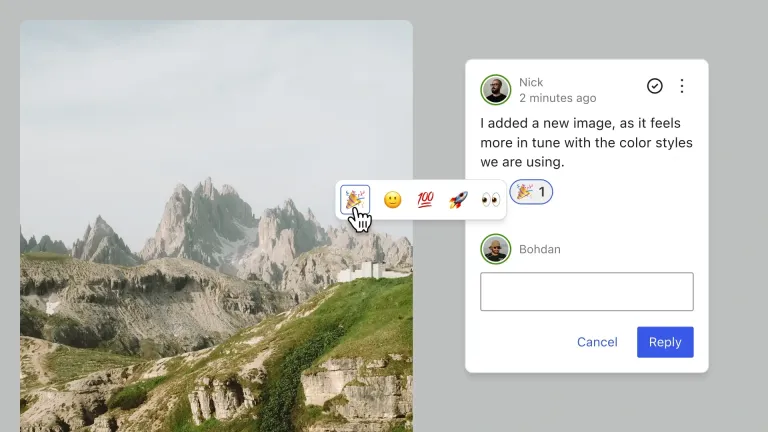
WordPress 7.2, the last yet crucial release, adds emoji reactions to Notes. It also adds a new toolbar icon to make Notes easier to access and manage. Notes have moved to the editor canvas, and conversations now appear directly in the margin.
Users can now keep Notes and the block settings sidebar open at the same time, making it easier to go through feedback while editing. A new minimized Notes mode reduces visual clutter, while positioning and display improvements create a smoother, more consistent collaboration experience.
Faster, More Efficient Media Uploads
WordPress 7.2 enhances client-side media processing in the Media Library. This lets users resize, compress, and convert images in the browser before uploading. This improves upload performance, reduces server resource usage, and better supports modern image formats, specifically in hosting environments with limited image-processing capabilities.
New “On This Day” Dashboard Widget
WordPress 7.2 incorporates a new On This Day dashboard widget that helps users explore content published on the same date in previous years. The widget also makes it easier to revisit past content, celebrate milestones, and find opportunities to refresh or reshare older posts by highlighting posts from the site’s history.
Block Editor Usability Improvements
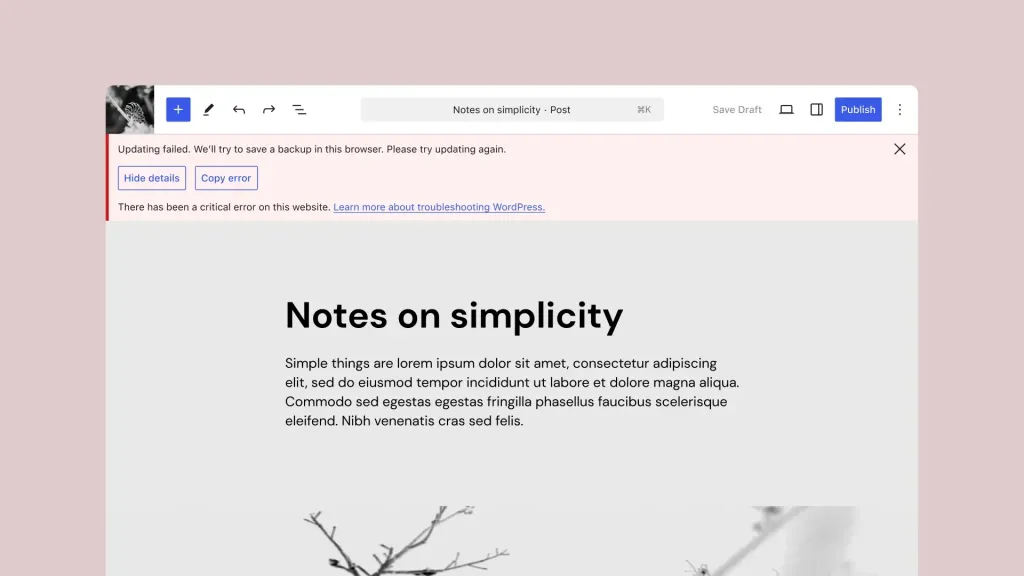
WordPress 7.2 adds several smaller improvements that can minimize friction in daily editing. These improvements include clearer error messages, more helpful feedback when things go wrong, and refinements to common editor interactions. This can make editing more predictable and easier to learn.
A More Consistent WordPress Admin
WordPress 7.2 aims to improve the admin experience by replacing Dashicons in the admin bar and sidebar with icons from the WordPress icon library. These advanced icons create stronger visual consistency between the latest editing interfaces and the traditional WordPress dashboard.
The updated icons bring greater visual consistency between the traditional WordPress dashboard and newer editing interfaces.
An Updated Block Settings Experience

WordPress 7.2 launches a new DataForm-powered inspector that brings an advanced approach to handling block settings in the editor. The DataForm component system powers this inspector, which focuses on more consistent controls and a more extensible foundation for future block-editing improvements.
Faster WordPress Administration
WordPress 7.2 improves admin performance by revolutionizing how it loads scripts and stylesheets. As a result, WordPress now loads assets individually for better browser caching instead of assembling them into massive files.
Additionally, an advanced prefetching mechanism predicts which admin screen users will visit next and loads its resources accordingly to speed up navigation among the dashboard, post lists, and editor.
What’s New in WordPress 7.2 for Developers?
Developers can benefit from several new features in the upcoming WordPress 7.2. These new features include:
New Secrets API
WordPress 7.2 includes a Secrets API that lets developers securely store sensitive credentials, such as API keys and authentication tokens. The API supports encryption at rest, credential rotation, and customizable storage providers. This helps integrations and plugins handle confidential information safely.
Random Content Redirects
WordPress 7.2 adds support for random content redirects, helping visitors find a randomly selected post through a dedicated URL. This improves content exploration and enables readers to rediscover older posts.
More Powerful APIs for Developers
WordPress 7.2 lets users extend the Abilities API with new capabilities to access and query WordPress data. This initiative provides a more consistent, useful foundation for integrations, automation, and AI-powered tools.
Moreover, the Interactivity API improvements offer new ways to render trusted HTML and manage reactive navigation. This gives developers more flexibility when creating interactive, dynamic blocks.
Improvements to the HTML API, block support, and responsive design tools provide powerful markup processing and more control over how custom blocks are styled and showcased across devices.
WordPress 7.2 Beta 2
For technical details related to issues resolved since Beta 1, go through the following links:
- Closed 7.2 WordPress Core Trac tickets since October 20, 2026
- 7.2 Gutenberg commits since October 20, 2026
Continued Improvements to WordPress 7.2
WordPress 7.2 Beta 2 follows the first beta with additional enhancements, bug fixes, and refinements across the administration experience and developer APIs.
Development on the Abilities API continues, including content querying, capability requirements, and improvements to schema handling and permissions. New server-side registration capabilities for DataViews and DataForm empower developers to scale WordPress interfaces in various ways.
Additional work comprises improvements to REST API flexibility, admin asset loading, and the transition to advanced SVG icons across WordPress administration.
WordPress 7.2 Beta 1 Update
This beta release supports testing and development. Developers and other users should set it up on test sites to try the new features. These new features are:
How to Test WordPress 7.2 Beta 1?
To test WordPress 7.2 Beta 1, you can use different methods. For example, you can install and enable the WordPress Beta Tester plugin on your WordPress website. You can then select the “Bleeding edge” channel and “Beta/RC Only” stream.
You can also download the Beta 1 version (zip) and install it on the WordPress site. Additionally, you can use the WP-CLI command: wp core update –version=7.2-beta1.
A WordPress 7.2 Beta 1 Playground instance is also available, letting you examine the software in your browser.
Wrapping Up
As you know, WordPress 7.2 release date is December 08, 2026. It will help developers and users significantly improve the efficiency of their sites and stores. The WordPress 7.2 release coincides with the State of the Word event.


