


























 Muhammad Jaffer
Running a nonprofit just got easier with a WooCommerce donation plugin. When someone donates to your cause, this is the deciding moment for you. Because it decides if they’ll give again. And most organizations miss this moment. They send a boring receipt and wonder why people don’t come back.
The Donation for WooCommerce plugin fixes this. It helps you connect with supporters through personal thank-you emails and smart features. Let’s look at how to turn one-time givers into people who stick around for your mission.
Why Donor Engagement After the First Gift Matters
People with their first donations usually test you. They evaluate if you care about their gift and show real results. Studies say 70% of first-time donors never give again, but that changes when you follow up the right way.
Build Trust Through Quick Recognition
The second someone donates, they should feel appreciated. Thank-you emails that show up within minutes prove you’re professional and grateful. The Donation for WooCommerce plugin sends custom receipts with the donor’s name, gift amount, and campaign info without you lifting a finger.
Create Real Connections With Personal Messages
Generic emails feel cold and lazy. When you mention the exact campaign someone helped and explain how their gift matters, people respond better. The plugin’s tribute feature lets donors leave messages and dedicate gifts to loved ones, adding a personal touch that standard payment systems don’t offer.
Get More Donations Through Easy Sharing
Happy donors tell their friends. When you make it simple for people to share campaigns on Facebook, WhatsApp, or email, you reach folks you’d never find alone. Social sharing in the plugin includes QR codes for events and printable posters for community spaces.
Watch Your Numbers to Get Better
You can’t fix what you don’t track. The plugin shows which campaigns get shared most, which thank-you emails work best, and where donors give up. This info helps you improve over time and put effort into stuff that actually works.
Stop Wasting Hours on Busy Work
Sending personal thank-you notes to every donor sounds nice, but it’s not realistic when you’re running multiple campaigns. Automation does the repetitive stuff while you focus on building relationships with big supporters and planning what’s next.
Best Practices for Donation Thank-You Emails & Donor Engagement
| Best Practice | What It Means | Why It Works |
| Send Thank-You Emails Within 24 Hours | Set up emails that go out right after someone donates. Minutes are better than hours. | People feel great right when they donate. Wait three days, and that good feeling is gone. They’ve moved on. |
| Use the Donor’s Name and Gift Amount | Write emails with their real name and the exact amount they gave, not “Dear Supporter” nonsense. | Nobody wants to feel like a number. “Thanks, Sarah, for your $25,” shows you actually noticed them. |
| Explain Exactly How Their Money Helps | Tell them what their donation does—like “Your $50 buys school supplies for two kids” instead of vague stuff. | Donors want to see real impact. Specific examples stick in their mind better than fuzzy promises. |
| Include a Way to Share the Campaign | Put social buttons and links right in the thank-you email so sharing is easy. | When someone just donated, they’re pumped about your cause. Give them an easy share button, and many will use it. |
| Ask for Feedback, Not More Money | After they give, ask what they think about the process or what matters to them—don’t hit them up for cash again. | People hate feeling used. Asking their thoughts shows you care about more than money. Plus, you learn useful stuff. |
| Show What Happened With Their Gift | Send an update in a month or two with real progress—numbers and photos, not corporate talk. | Donors wonder where their money went. When you show them instead of going quiet, trust grows. |
| Let People Give Tributes | Let them dedicate donations to honor or remember someone, then display these tributes on your page. | Tribute gifts mean more than regular donations. People share tributes with family, bringing you new donors for free. |
| Watch What Works and Change Things | Check which emails get opened, what gets clicked, who gives again—then adjust based on real data. | Every group is different. What worked for others might fail for you. Watch your numbers and fix what’s broken. |
How to Set Up Effective Thank-You Emails in Minutes
Getting started takes less time than writing one manual email. Here’s how:
Download, Install, and Activate the Plugin
Purchase the Donation for WooCommerce plugin from the Woo marketplace. Go to your WordPress dashboard and click Plugins, then Add New, then Upload Plugin, then Install, and finally Activate. You’ll see a WC Donations menu pop up in your sidebar.
Set Up Your First Campaign
Click WC Donations and then Add New. Give it a clear name like “Winter Coat Drive” instead of something vague. Set your money goal and deadline if you want. This donation setup guide walks you through each part with tips so you won’t get confused.
Turn On Social Sharing
Find the Social Share tab in your campaign editor and enable it.
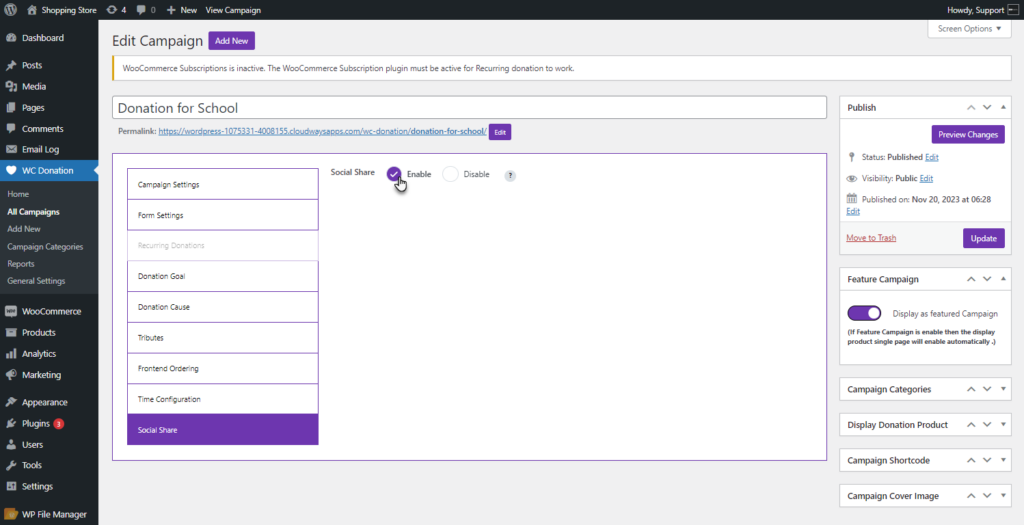
Now users can help you by sharing on their preferred platforms:
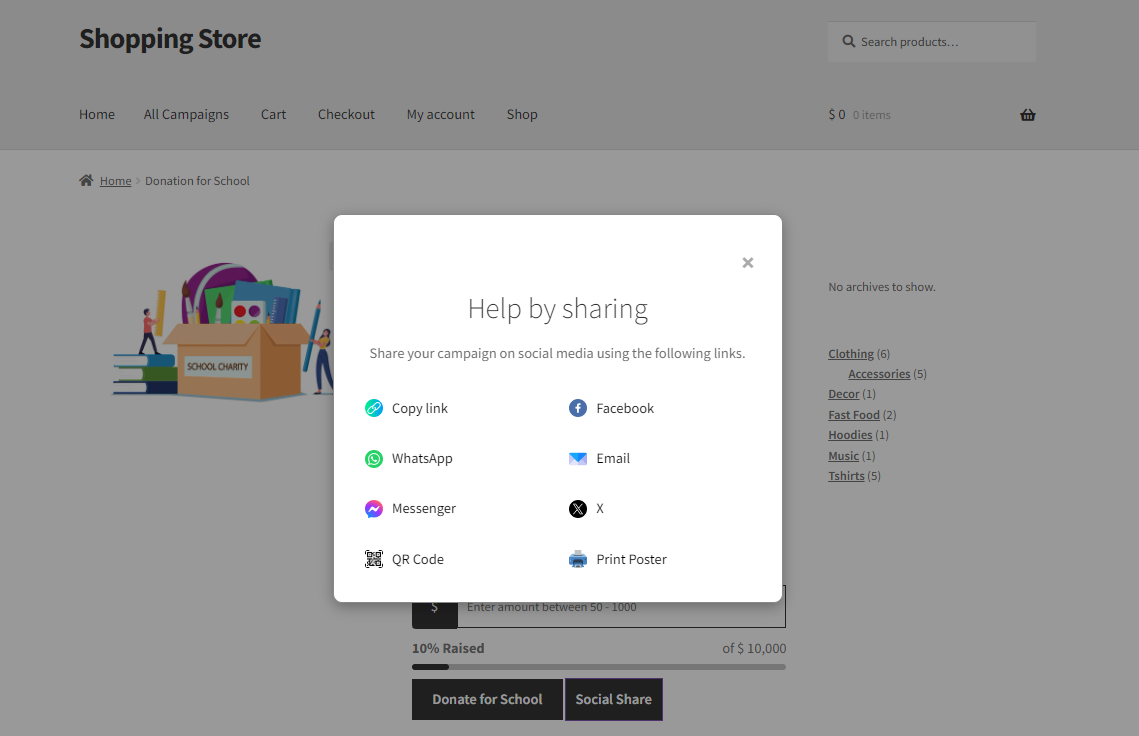
- Facebook for social networks
- WhatsApp for direct messages
- Email for personal outreach
- Messenger for Facebook chats
- X for public posts
- Copy Link for pasting anywhere
- QR Code for printed stuff
Add Tribute Messages
Go to WC Donations, then Settings, then General. Turn on Tributes. Enable the Messages option that shows up.
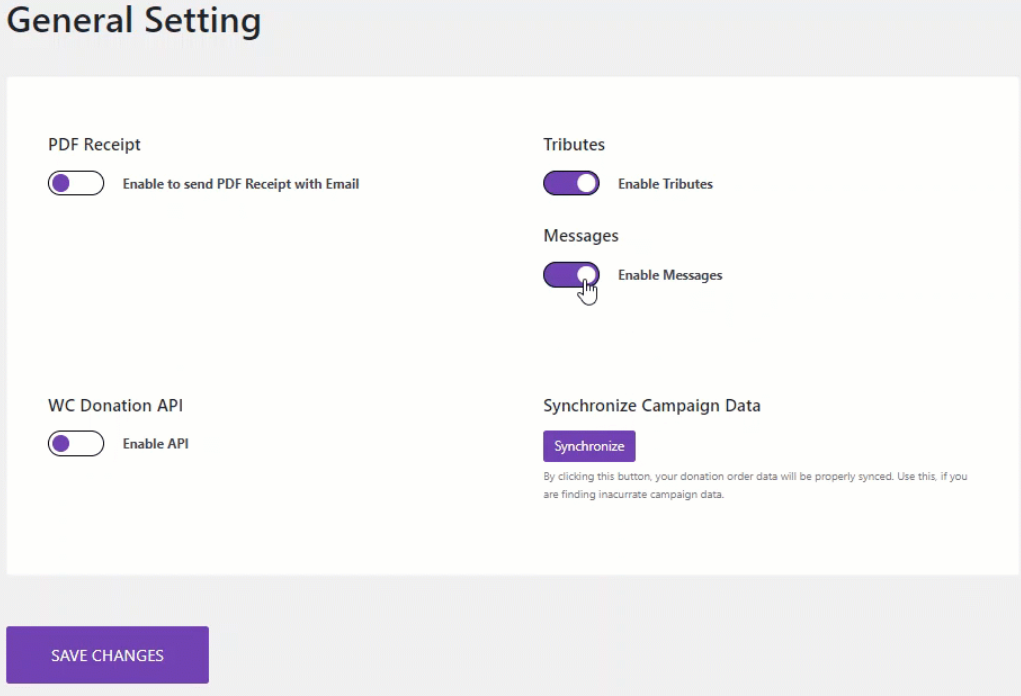
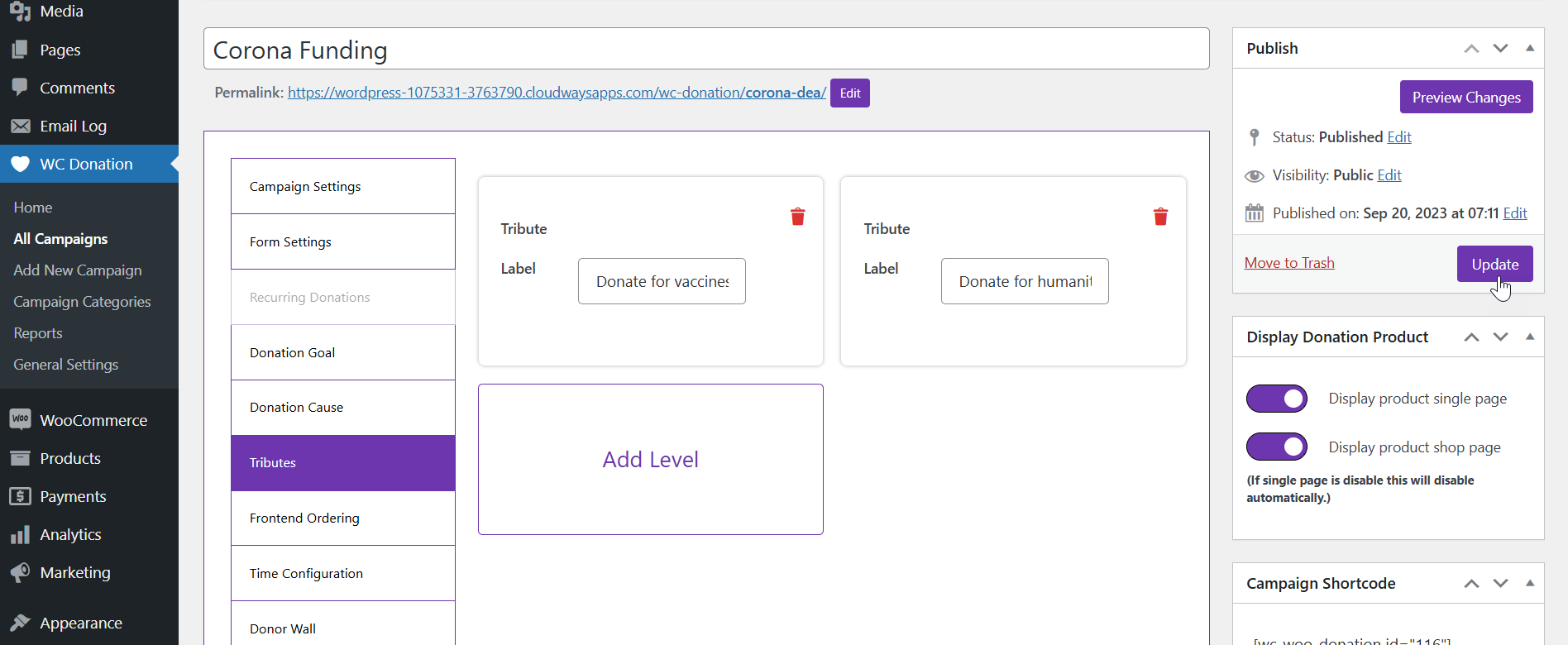
Go back to your campaign and click the Tributes tab. Add options like “Donate for Vaccine” or “In Memory Of” so people can dedicate their gift to someone special.
Fix Your Thank-You Email
The plugin includes a default template that you can customize.
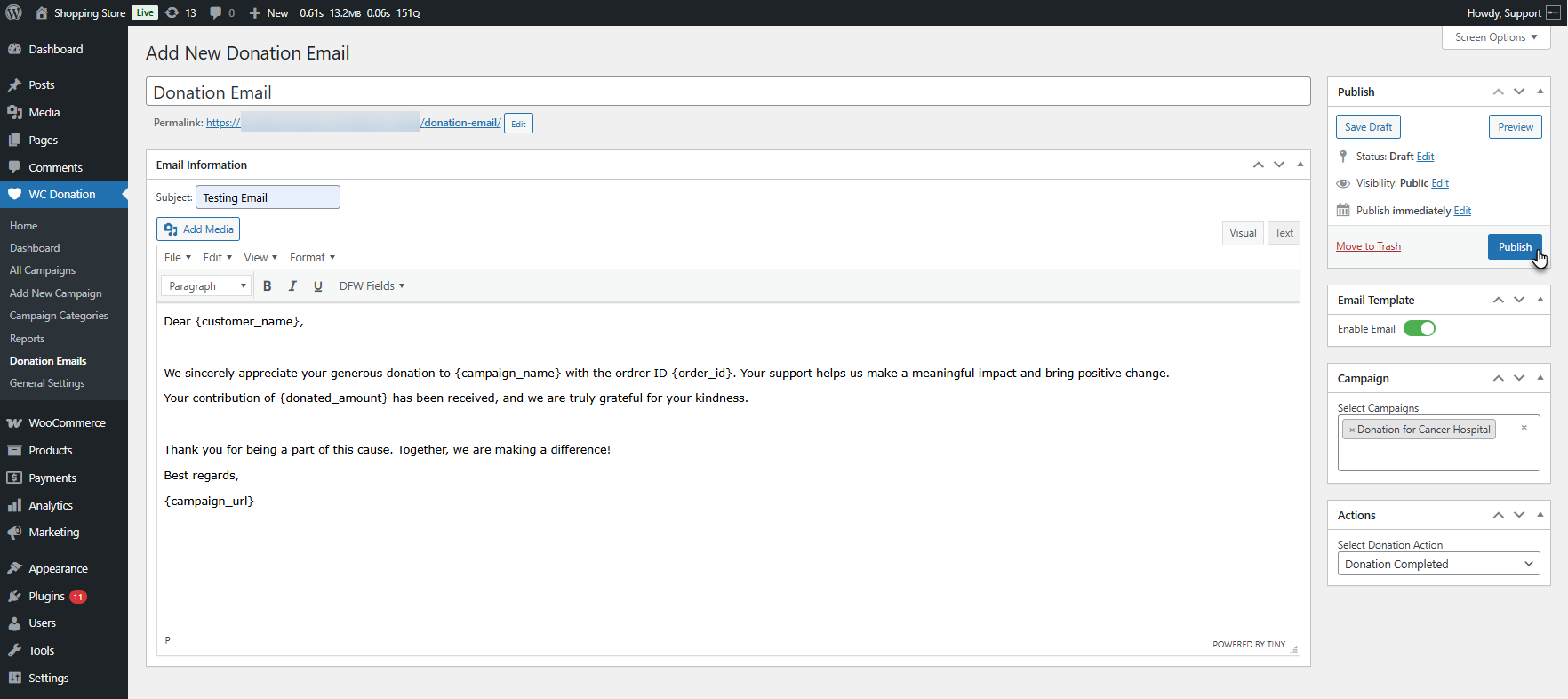
Use the donor’s name up top. Mention which campaign they helped. Say what their donation will do; just be specific. Add something like “Share with friends” or “Get updates on your gift.” Keep it warm, not stiff.
Final Thoughts on Building Donor Relationships
Thank-you emails aren’t just being polite. They’re tools that decide if someone gives once or becomes a regular supporter. Groups that keep donors around versus groups that struggle often differ in these small connection moments after the gift.
The Donation for WooCommerce plugin by WPExperts handles the tech stuff so you can focus on the people side of fundraising. Tributes, social sharing, and auto emails work together to create something donors remember and want to do again. Get it today and turn one-time givers into your biggest supporters.


