
















































If you run a WooCommerce store, you already know that managing B2B sales isn’t as simple as handling regular retail customers. You’re not just selling one or two items. You’re dealing with businesses that buy in bulk, expect custom pricing, and demand more. That’s why you should have the best WooCommerce B2B plugin in your directory for your real-world business needs.
We’ve seen store owners struggling with wholesale pricing, user roles, and bulk order management. The default WooCommerce setup just doesn’t cut it for serious B2B operations. That’s where Wholesale for WooCommerce, the best WooCommerce B2B plugin, comes in.

A complete solution designed to simplify B2B eCommerce with the Bulk Order Table feature. It gives you everything you need to sell wholesale online.
Why Getting the Best WooCommerce B2B Plugin Can Solve Your Problem
Most B2B WooCommerce stores fail because they focus only on listing products and waiting for sales. That doesn’t function like that. Wholesale customers require personalized B2B features that make buying quick, easy, and 100% according to their needs.
WooCommerce B2B store owners might encounter these issues if they don’t get the best WooCommerce B2B plugin:
- Confusing bulk pricing setups.
- Manual approval processes for new wholesalers.
- Slow order placement due to a lack of bulk order functionality.
A true WooCommerce B2B plugin should simplify all of this — and that’s exactly what Wholesale for WooCommerce does. It bridges the gap between WooCommerce’s default setup and the advanced functionality businesses need to scale.
Understanding the Bulk Order Table Feature — A Game Changer for B2B Stores
One of the most necessary features of this add-on is its integration with Bulk Order Form for WooCommerce.
This feature lets your B2B/wholesale customers view products in a clean, table-style layout with featured image, ID, categories, prices, an Add to Cart button, and more.
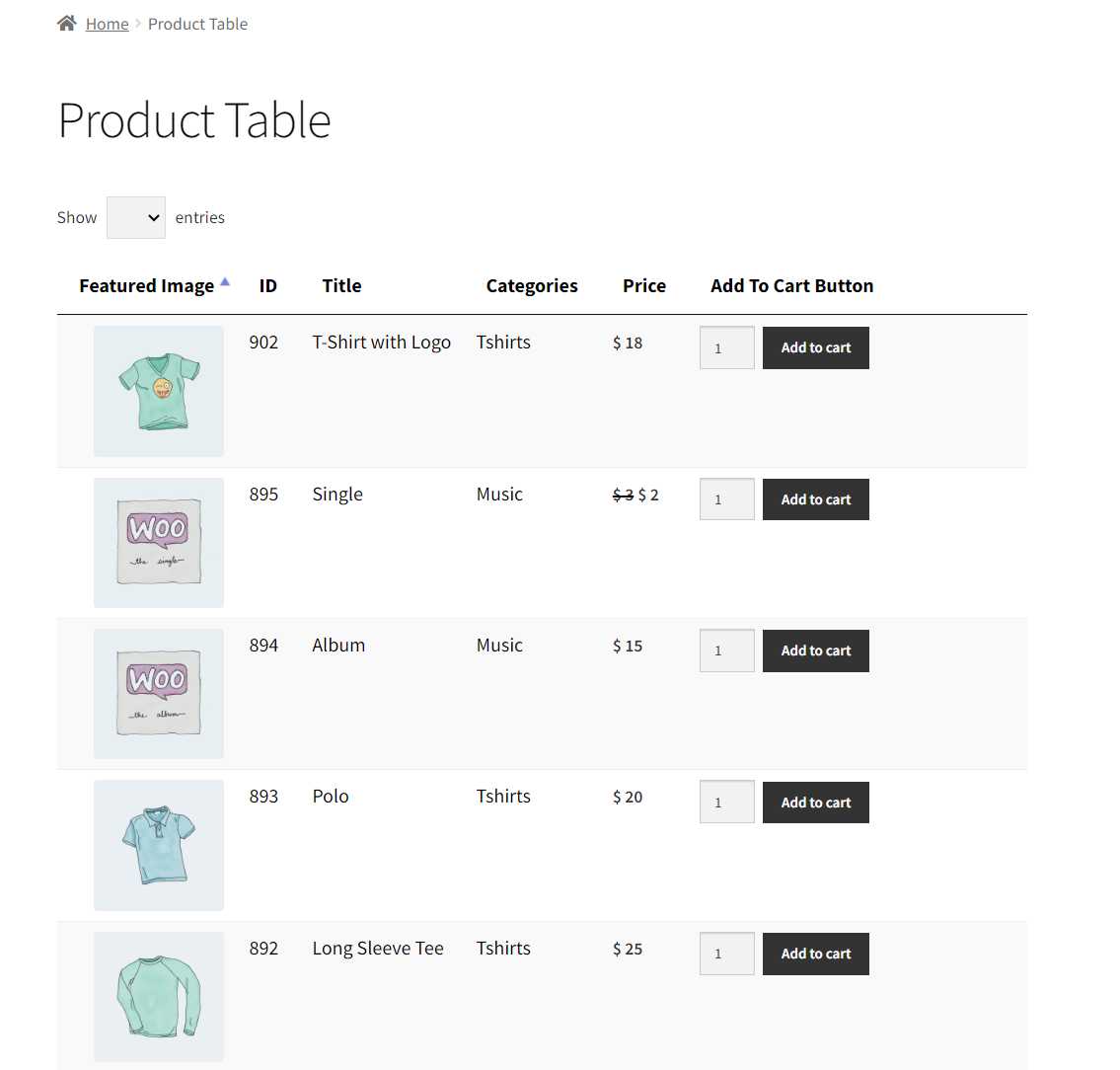
There, they can add multiple products to their cart in a snap. It saves your B2B clients time they would otherwise spend browsing dozens of individual product pages.
How It Works
The Bulk Order Form for WooCommerce plugin works with Wholesale for WooCommerce to let you:
- Create one-page bulk order forms with responsive product tables.
- Enable features like search, sorting, pagination, and category filters.
- Automatically display retail pricing to normal users, while approved B2B customers will see wholesale pricing.

In fact, a restaurant supply business ordering ingredients in bulk could log in, see the product table, and order everything they need in just a few seconds. No browsing, no confusion-just fast, efficient ordering.
Why the Bulk Order Table Feature Matters in B2B eCommerce
Time is money in the B2B world, and with each second that your customer spends searching for products, they get one more reason to abandon their carts. The Bulk Order Table feature solves this problem by making the entire purchase process so much easier.
Here’s why it’s such a game-changer:
Speed and Efficiency
Wholesalers often know what they want; instead of clicking through to multiple product pages, they can simply enter quantities and hit “Add to Cart.”
Improved User Experience
It provides a direct, spreadsheet-style interface that is easy to navigate, mobile-friendly, and speedy.
Reduced Errors
Since everything is displayed on a single screen for price, stock, and variations, customers make fewer ordering mistakes. It translates into fewer customer support requests.
Higher Conversion Rates
When customers can place bulk orders speedily, your checkout conversion rate improves on its own.
A retailer that wants to order 200 T-shirts for their shop can log in, open the bulk order table, adjust the quantities for each size, and check out-all in a matter of minutes. That’s the difference between a standard WooCommerce setup and a truly optimized WooCommerce B2B plugin experience.
What Additional Features Make Wholesale for WooCommerce the Top WooCommerce B2B Plugin
When we talk about B2B and wholesale users of WooCommerce, Wholesale for WooCommerce comes first. It’s an entire wholesale management system built into WooCommerce.
It enables you to:
- Offer tiered and flexible wholesale pricing.
- Manage wholesale user roles and groups.
- Display different pricing to wholesale and retail users.
- Create a private wholesale store for approved customers only.
This plugin gives store owners the ability to manage B2B operations from a single dashboard — saving time and reducing errors.
Key Features That Make It Stand Out
1. Wholesale User Groups
Categorize your wholesale customers into different groups — like distributors, resellers, or bulk buyers — and offer each group custom pricing and discounts.
2. Advanced Wholesale Dashboard
Monitor wholesale sales, stock levels, and tax rules all in one place. Its advanced wholesale dashboard feature gives you complete visibility over your B2B store’s performance.
3. Tiered Pricing for Bulk Orders
Encourage larger orders with automatic discounts when customers buy more. You can set pricing levels based on quantity purchased—a proven strategy to increase average order value.
4. Custom Wholesale Registration Form
Let new wholesale customers register easily, and approve them manually or automatically. You can collect relevant business information directly during signup.
5. Role-Based Pricing and Restrictions
Show wholesale prices only to approved users, and hide retail pricing when necessary. You can even restrict payment methods or shipping options by user role.
These features, together with the B2B Bulk Order Table, make Wholesale for WooCommerce the Best WooCommerce B2B Plugin.
Final Thoughts
If you’re really committed to growing your B2B wholesale business, avoid using makeshift WooCommerce setups or a collection of plugins. Get a system that works well together. And Wholesale for WooCommerce gives you everything — from flexible pricing and user management to the powerful Bulk Order Table Feature. This add-on redefines how B2B buyers interact with your store.
So if you’re looking for the Best WooCommerce B2B Plugin, this is the one that checks every box — functionality, performance, and reliability.





