



















































WordPress 6.9, released on December 2nd, 2025. Though initially only one release looked doable in 2025, project leadership reexamined this strategy when contributor capacity improved in recent months. They decided that an additional release was deemed feasible.
The release concentrates on improving the Site Editor with a streamlined editing mode and more intuitive template management. As a result, collaborative content creation is possible with the help of block-level commenting, which enhances developer capabilities with updates to the Interactivity API and the introduction of the Abilities API, improving performance with faster page transitions and more efficient resource handling.
WordPress 6.9 Development Releases
– Release Codename: WordPress 6.9 “Gene”
- WordPress 6.9 “Gene” is named in honor of jazz pianist Gene Harris
- Self-taught from the age of six
- Known for blending jazz, soul, blues, and gospel
- His expressive, genre-crossing style reflects the creative spirit of WordPress 6.9
– Release Squad
- Release Lead: Matt Mullenweg
- Release Coordination: Akshaya Rane, Amy Kamala
- Tech Leads: David Baumwald, Ella van Durpe, Héctor Prieto
- Design Lead: Francisco Vera
- Triage Leads: Aki Hamano, Ryan Welcher
- Test Leads: Jonathan Bossenger, Krupa Nanda
- 900+ contributors
- 279 first-time contributors
- 340 enhancements and fixes
– Release Schedule
| 25 Mar 2025 | Alpha Begins. Trunk is open for business. |
| 21 Oct 2025 | Beta 1. From this point on, core contributors will focus on testing and fixing bugs discovered during beta testing. Begin writing Dev Notes and the About page. |
| 28 Oct 2025 | Beta 2. Test the beta release, fix bugs discovered during beta testing, and continue writing Dev Notes and the About page. |
| 4 Nov 2025 | Beta 3. Test the beta release, fix bugs discovered during beta testing, and continue writing Dev Notes and the About page. |
| 11 Nov 2025 | Release Candidate 1. Publish the Field Guide with Dev Notes, commit the About page, begin drafting the release post, hard string freeze, and branch for the release. |
| 18 Nov 2025 | Release Candidate 2. Update the About page images and continue drafting the release post. |
| 25 Nov 2025 | Release Candidate 3. Update the About page images and continue drafting the release post. |
| 1 Dec 2025 | Dry run for release of WordPress 6.9 and 24-hour code freeze. |
| 2 Dec 2025 | WordPress 6.9 final release. |
Source: WordPress 6.9 Development Cycle
WordPress 6.9 Beta 1
Users can download WordPress 6.9 Beta 1 for testing purposes.
How to Test WordPress 6.9 Beta 1?
If you want to test WordPress 6.9 Beta 1, you can take advantage of different methods. For instance, you can install and enable the WordPress Beta Tester plugin on your WordPress website. You can choose the “Bleeding edge” channel and “Beta/RC Only” stream.
Besides, you can download the Beat 1 version (zip) and install it on the WordPress site. Similarly, you can use the WP-CLI command: wp core update –version=6.9-beta1. Lastly, the WordPress 6.9 Beta 1 WordPress Playground instance is available, which you can utilize to examine the software in your browser.
WordPress 6.9 Beta 2
WordPress 6.9 Beta 2 comprises more than 33 Editor updates and fixes, including 28 tickets for WordPress core. Users can download WordPress 6.9 Beta 2 for testing purposes.
How to Test WordPress 6.9 Beta 2?
You can use various methods to test WordPress 6.9 Beta 2. For example, you can install and activate the WordPress Beta Tester plugin on your WordPress website. You can select the “Bleeding edge” channel and “Beta/RC Only” stream.
Additionally, you can download the Beta 2 version (zip) and install it on the WordPress website. You can also use the WP-CLI command: wp core update –version=6.9-beta2 to test WordPress 6.9 Beta 2.
The WordPress 6.9 Beta 2 WordPress playground instance is now available, letting you test the software in your browser.
WordPress 6.9 Beta 3
WordPress 6.9 Beta 3 includes 80+ updates and fixes since Beta 2.
How to Test WordPress 6.9 Beta 3?
You can use various methods to test WordPress 6.9 Beta 3. For instance, you can install and activate the WordPress Beta Tester plugin on your WordPress website. You can select the “Bleeding edge” channel and “Beta/RC Only” stream.
Additionally, you can download the Beta 3 version (zip) and install it on the WordPress website. Similarly, you can use the WP-CLI command: wp core update –version=6.9-beta3 to test WordPress 6.9 Beta 3.
The WordPress 6.9 Beta 3 WordPress playground instance is now available, letting you test the software in your browser.
WordPress 6.9 Beta 4
Beta 4 addresses bugs found in the new template activation and notes features, and includes the revert of the template activation feature and modified notes notifications.
You can go through the technical details for all issues covered since Beta 3 using these links:
- Gutenberg commits for 6.9 since November 4, 2025
- Core commits since 6.9 on November 4, 2025.
- Closed Trac tickets since November 4, 2025.
How to Test WordPress 6.9 Beta 4?
You can use various methods to test WordPress 6.9 Beta 3. For instance, you can install and activate the WordPress Beta Tester plugin on your WordPress website. You can choose the “Bleeding edge” channel and “Beta/RC Only” stream.
Moreover, you can download the Beta 4 version (zip) and install it on the WordPress website. Likewise, you can use the WP-CLI command: wp core update –version=6.9-beta4 to test WordPress 6.9 Beta 4.
The WordPress 6.9 Beta 4 WordPress playground instance is now available, allowing you to test the software in your browser.
WordPress 6.9 Release Candidate (RC) 1
WordPress 6.9 release candidate (RC) 1 contains WordPress 6.9 highlighted features in the Beta 1 announcement. Additionally, you can go through the links below for technical information related to issues covered since Beta 4:
You can browse the technical details for all issues addressed since Beta 4 using these links:
- Gutenberg commits for 6.9 since November 7, 2025.
- Core commits for 6.9 since November 7, 2025.
- Closed Trac tickets since November 7, 2025.
WordPress 6.9 Release Candidate (RC) 2
WordPress 6.9 release candidate (RC) 2 includes WordPress 6.9 highlighted features in the Beta 1 announcement. Moreover, you can check the links below to get more information concerning the issues covered since RC1:
- GitHub commits for 6.9 since November 11
- Closed Trac tickets since November 11
WordPress 6.9 Release Candidate (RC) 3
WordPress 6.9 release candidate (RC) 2 includes WordPress 6.9 highlighted features in the Beta 1 announcement. Also, for technical information related to issues addressed since RC2, you can browse the following links:
- Gutenberg commits for 6.9 since November 18
- Closed WordPress Core Trac tickets since November 18
Will There Be A New Default Theme?
Unsurprisingly, there will not be a new default theme in 6.9. This decision has been influenced by the release pace of both this release and WordPress 6.8, its predecessor, which was released in April 2025. Apart from this, the maturity of block themes has increased over recent years. Therefore, users will not experience a new default theme when using WordPress 6.9.
WordPress 6.9 Features and Improvements
Like WordPress 6.8, the upcoming version of WordPress will likely inspire users with various features and improvements. Highlights of 10 Key Features of WordPress 6.9
- Notes (Block-Level Comments)
- Command Palette Everywhere
- Fit Text to Container
- Improved Site Editor
- Hide Blocks
- Better Drag-and-Drop
- Performance Improvements
- Accessibility Enhancements
- New Abilities API Improvements
Enhanced Site Editor
As you might be aware, the site editor comprises the interface you can use to personalize pages, styles, and templates throughout the website. The primary purpose of this initiative is to streamline the site editing process and enhance the user experience.
Streamlined Site Editing
As a user, you can smartly edit content tailored to your specific needs. You can make amendments to text and images without viewing the advanced design tools. If you need to perform advanced website editing, you can use these tools as needed.
Simplified Template Management
Like site editing, template management will likely get better for users in the latest release. They can take advantage of more than one template for a single page. Besides, users can save custom templates before they switch themes and make the most of the new standard REST API endpoints.
Hiding Blocks
Users can easily prevent visitors from viewing the hidden parts of their sites. Moreover, they don’t need to remove them. This is helpful when testing new designs or hiding partial or incomplete content. This means that users can still perform multiple tasks without hampering their live sites.
Improving Content Creation
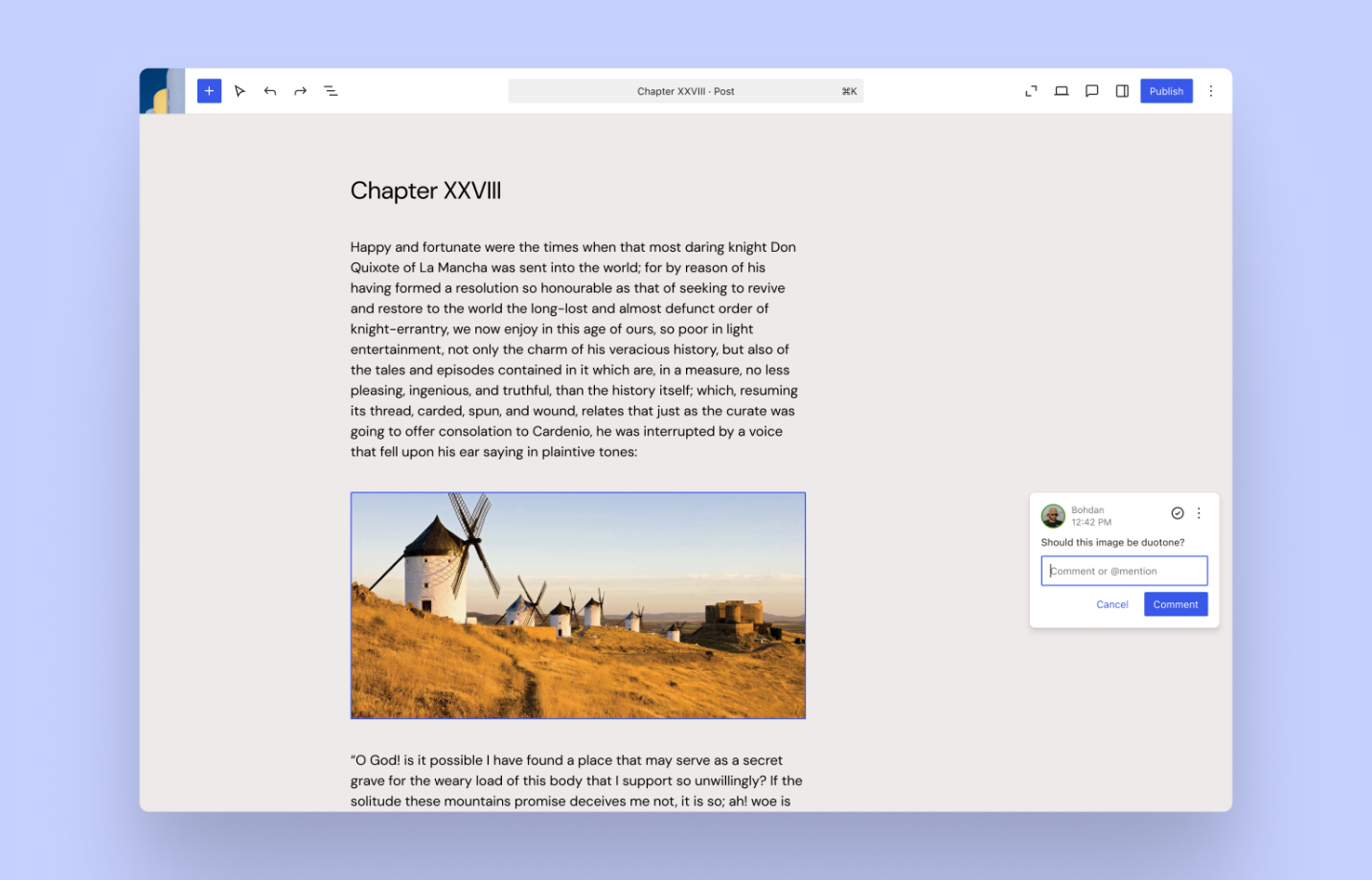
In this new release, content creation has been made simpler and more impactful. Users will utilize various tools to move crucial blocks from one side to another. Moreover, keyboard shortcuts will also make the lives of users a lot easier.
Notes (block-level collaboration)
A new, exciting feature, Block Level Commenting Notes (block-level collaboration), will likely inspire users. This will help users working in teams to collaborate with other users, sharing their ideas and approaches in real time. They can add comments on particular blocks and manage them without wasting their time.
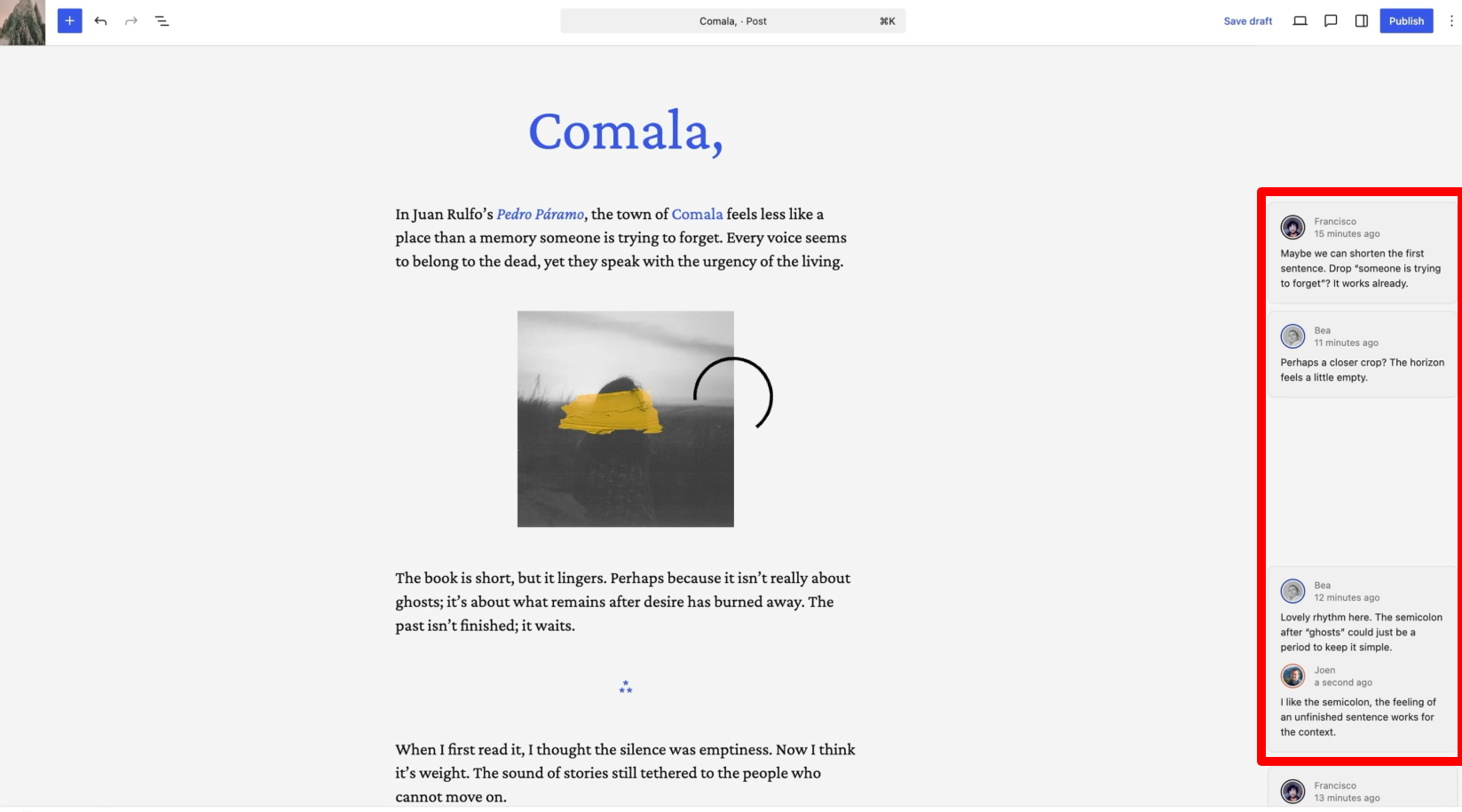
- Notes appear directly on blocks
- Improve team collaboration and feedback workflows
- Work during copywriting, design, and layout changes
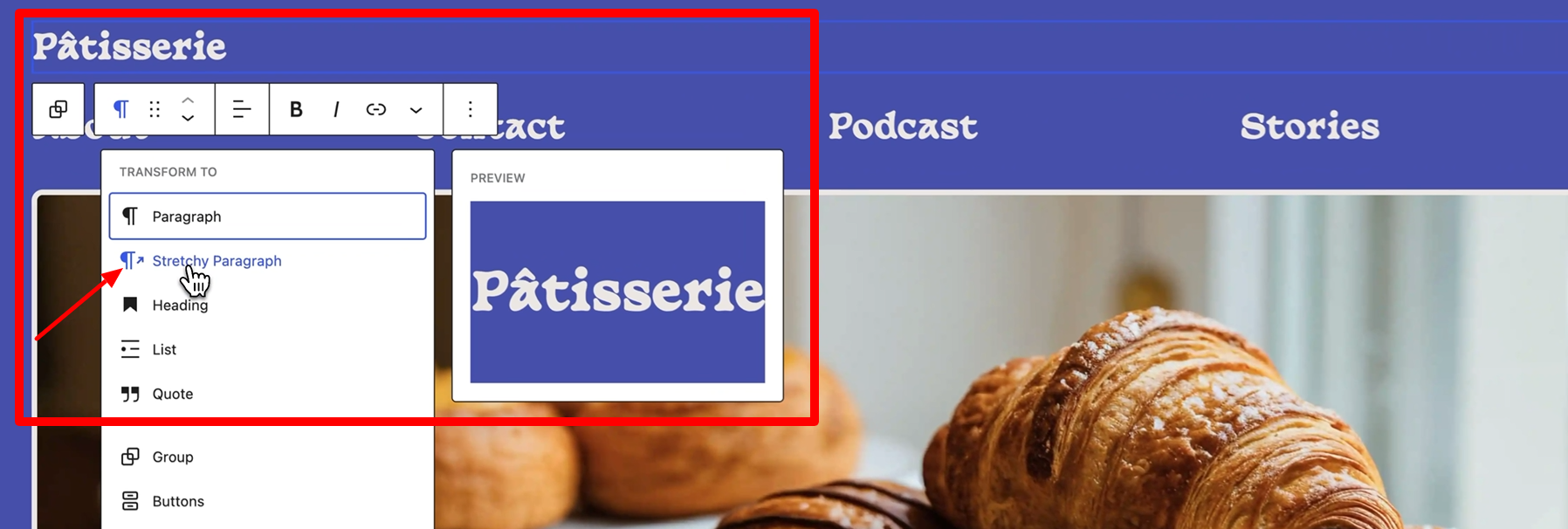
WordPress 6.9 introduces a new typography option called Fit Text to Container. This feature automatically adjusts the font size so the text perfectly fits the space available. It works with the Paragraph and Heading blocks and is ideal for creating standout elements like banners, hero sections, and callout messages without manually tweaking font sizes.
Aspect Ratio in Gallery Block
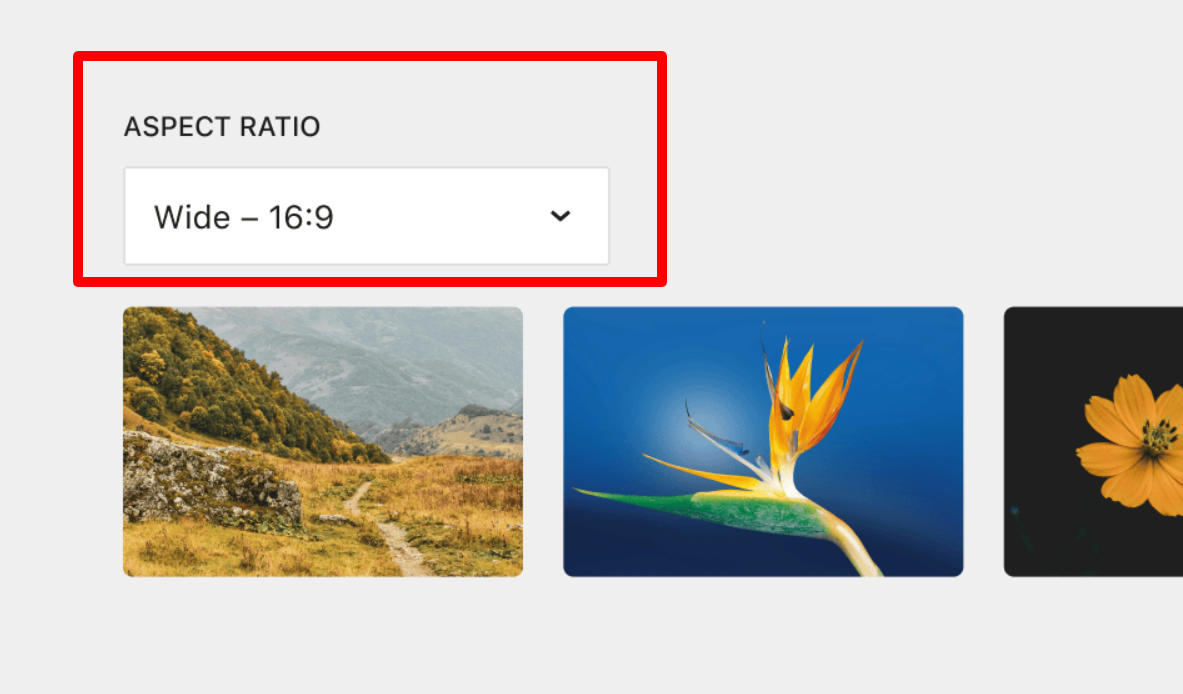
WordPress 6.9 lets you set a fixed aspect ratio for images inside the Gallery block. This helps your galleries look clean, consistent, and aligned without needing manual adjustments. It’s a simple improvement that gives users more control over how images appear across their site.
New Blocks and Visual Drag-and-Drop Enhancements
Alongside other improvements, WordPress 6.9 introduces new practical blocks designed to help creators build richer content layouts. Additionally, the drag-and-drop experience has been made more visual and intuitive, allowing users to rearrange content more easily while seeing clearer placement indicators and block boundaries.
Enhanced Details Block
The Details block has been improved in WordPress 6.9, making it easier to display expandable content sections with better styling and behaviour. These upgrades help users present structured information more cleanly.
A new Accordion block is now available, allowing you to add collapsible sections anywhere on your site. It’s perfect for FAQs, menus, and long content you want to keep tidy. This gives users more flexibility when organizing information.
Time to Read Block

The new Time to Read block shows an estimated reading time for your posts. This small addition improves the reading experience by helping visitors know how much time the content may take.
Command Palette
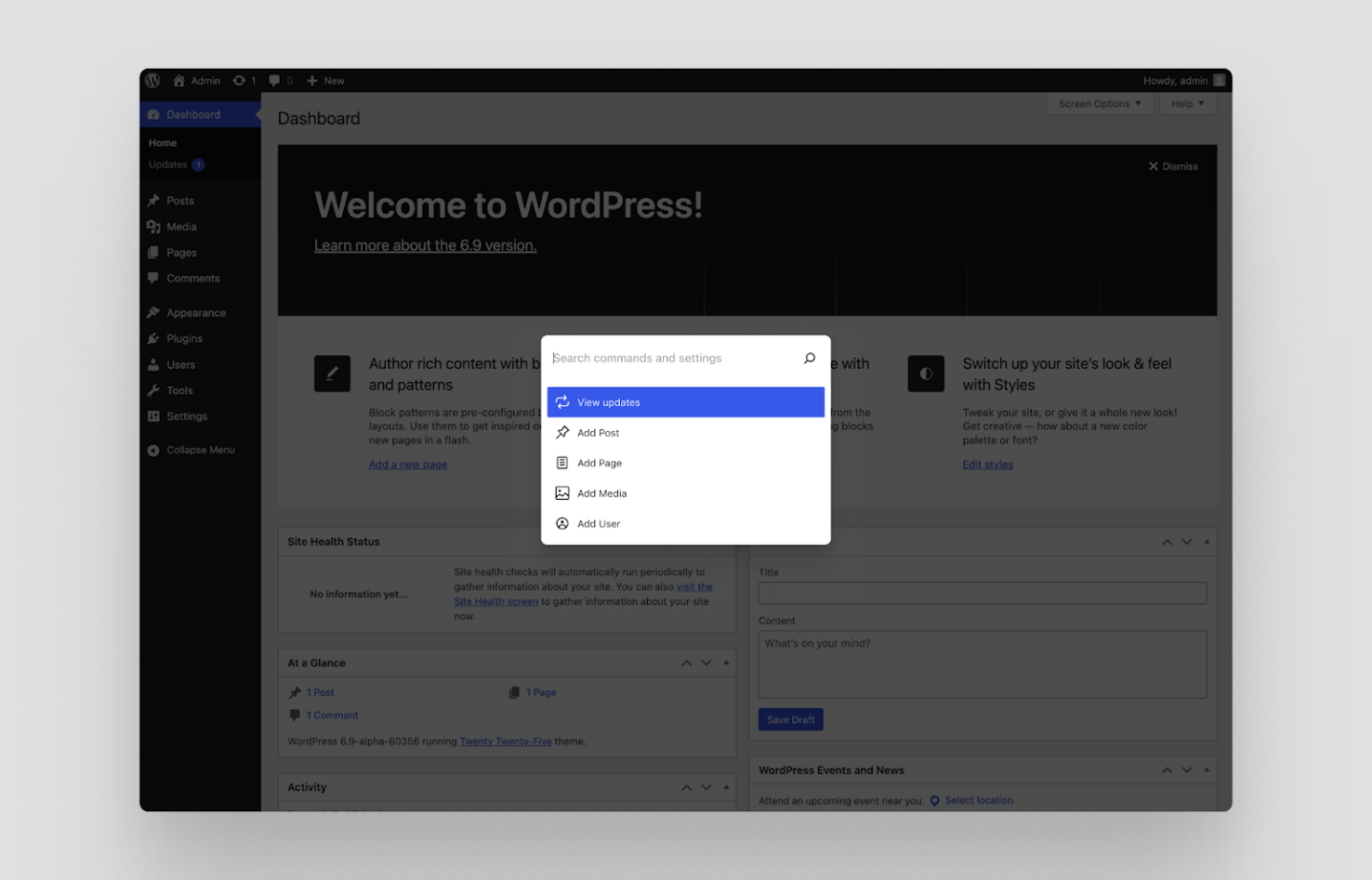
WordPress 6.9 will include the Command Palette feature, which is incorporated into all aspects of WordPress. This enables users to quickly go through all parts of their websites and perform various actions as needed.
Accessibility Improvements
WordPress 6.9 includes more than 70+ accessibility fixes to enhance usability for everyone. These improvements refine how WordPress interacts with assistive technologies and ensure a smoother editing experience. Key updates include:
- Improved screen reader announcements for better clarity
- Removal of unnecessary CSS-generated content from assistive tools
- Fixes for cursor placement issues when typing
- Ensuring users don’t lose focus when clicking on autocomplete suggestions
These updates collectively make WordPress more accessible and easier to navigate.
WordPress 6.9 Developer Updates
WordPress 6.9 will help developers make their sites more engaging and results-driven. They can utilize various tools, including AI Integration, Data and Forms, Connecting Blocks, Interactive Features, and HTML tools.
New Abilities API
The new Abilities API provides a standardized, machine-readable permissions system that works across PHP, REST API, JavaScript, and even AI agents. Developers can now register, validate, and execute actions consistently, making automated and AI-driven workflows easier to build.
Interactivity API Improvements
The Interactivity API gets several enhancements, including smoother full-page navigation and instant search results. These improvements help developers create more dynamic, interactive experiences with less effort.
Bind Controls to External Sources
Developers can now extend block bindings by connecting controls to external data sources. This gives third-party tools and services more flexibility when integrating with WordPress, making it easier to build richer, more dynamic experiences.
HTML API Enhancements
The HTML API also continues to evolve in WordPress 6.9, improving code handling and making the editing and rendering process more reliable.
Math Block (MathML Support)
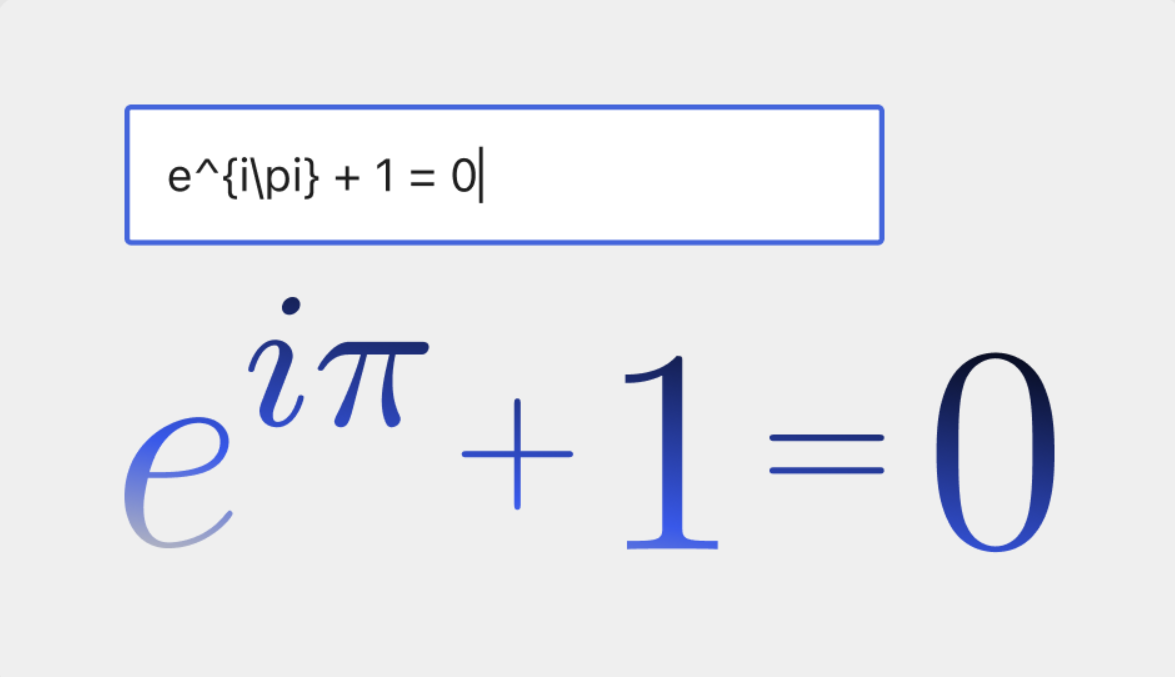
WordPress 6.9 introduces a new Math block with MathML support, allowing developers and content creators to display formulas and equations directly in the editor—ideal for educational and technical sites.
Performance Enhancements
In terms of performance enhancements, users will experience many improvements in WordPress 6.9. These enhancements comprise faster data loading, smart page caching, speedy page navigation, and efficient stylesheets.
With faster data loading, pages will load quickly, even if they contain a lot of information. Smart page caching enables developers to control how pages are saved, thereby enhancing site performance.
In faster page navigation, the visited pages will be loaded quickly, improving page load time significantly. Efficient stylesheets make code more effective, ensuring sites load faster than ever.
What WordPress 6.9 Update Means for Enterprise WordPress
WordPress 6.9 brings real value to teams and large organisations. Features like Notes make content collaboration smoother and more natural, while the new Abilities API shows how WordPress is preparing for an AI-powered future. With faster performance and stronger developer tools, this release makes WordPress even more reliable for high-traffic and enterprise-level websites.
As a leading WordPress services provider, WPExperts sees the WordPress 6.9 release as a clear sign of the platform’s thoughtful growth. The improvements are thoughtful, practical, and built to support complex workflows without losing the flexibility WordPress is known for.
This release marks the start of a new, more collaborative era for WordPress. Now it’s up to organisations to adapt their content processes and make the most of these powerful new tools.
Major Initiatives Planned Alongside WordPress 6.9
Aside from the above features and performance enhancements, there have been other initiatives planned alongside WordPress 6.9. At this stage, they are tentative, but hopefully, users will experience the following initiatives as experimental features in Gutenberg.
- New WordPress Admin Experience
WordPress will delight the user through a new or advanced appearance. The admin dashboard will be more user-friendly in terms of customization and flexibility.
- MCP Adapter
As an open protocol, MCP (Model Context Protocol) helps standardize how applications offer context to LLMs. This protocol applies the open standard to expose Abilities to AI assistants. Furthermore, it also helps connect to other MCP servers.
Content developers can effortlessly manage their WordPress sites, and developers can simplify cumbersome workflows throughout systems.
- PHP AI Client
Developers can utilize the new tool, PHP AI Client, allowing them to include new AI features into WordPress sites. Consequently, they can connect to their desired AI service in no time. PHP AI client works seamlessly with various AI services and is updated accordingly.
Don’t Miss the Next WordPress 6.9 Release Date
Experience a faster, more innovative, and more collaborative WordPress 6.9. As we witnessed, it’s loaded with powerful new features that enhance editing, performance, and workflow for creators and developers.
If you like this blog post, share it with others. Your support enables us to share updates, news, and information related to WordPress.





