


















































Elementor has become one of the most popular WordPress page builders, loved for its drag-and-drop interface and endless design possibilities. While it offers a built-in form widget, many users quickly realize its limitations when it comes to creating more advanced or interactive forms.
That’s where form addons come into play. These tools help extend Elementor’s basic form functionality by adding smarter fields, improved styling, and powerful features.
In this post, we dive into Cool FormKit, a feature-packed addon designed to supercharge your Elementor forms. Whether you are using the free or pro version of Elementor, this review will help you decide if Cool FormKit is worth adding to your toolkit.
Why I Choose Cool FormKit for My Elementor Forms
After using Elementor’s built-in form widget for a while, I quickly ran into its limits. It is fine for basic contact forms, but once I needed features like conditional fields, a country code dropdown for the phone field, sliders, calculators, and more, it just couldn’t do it. That’s when I came across Cool FormKit, and honestly, it changed the way I build forms.
I’ve been using Cool FormKit for a few weeks now, and what impressed me is how many powerful features it adds, without making the process harder. It gives you advanced field types like conditional logics, image radios, rating stars, country & state pickers, masked inputs, and even calculation fields, all directly inside Elementor’s interface. Here’s a quick look at the key features of Cool FormKit.
Quick Overview of Cool FormKit Features
Cool FormKit makes it easy to manage all its advanced form features from one clean dashboard. You can turn each feature on or off with a single switch, depending on what you need.
Here’s a quick look at the dashboard:
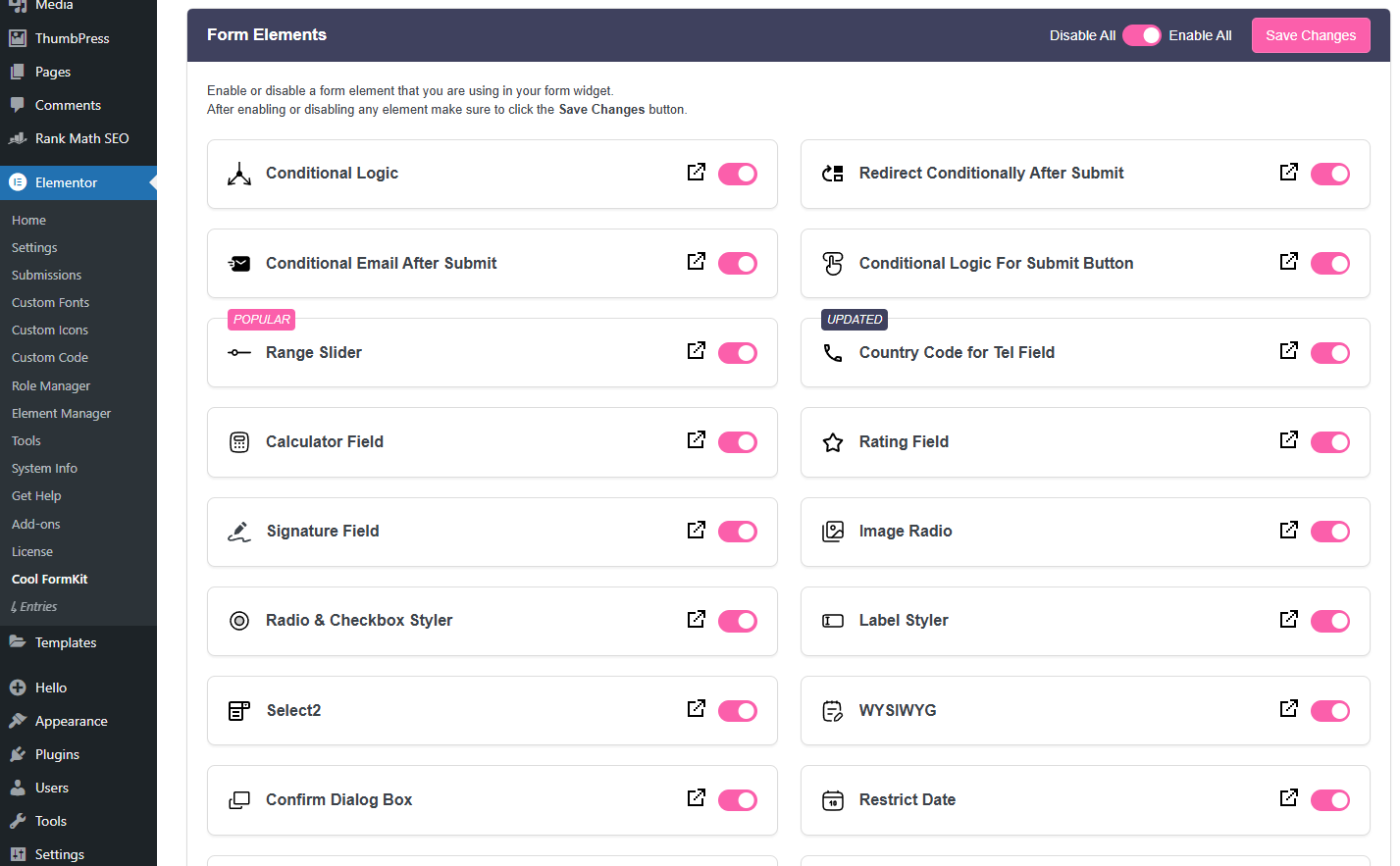
You can also enable or disable all features at once using the toggle at the top. This screenshot shows just part of the dashboard; there are more settings and options available, but this gives you a good idea of how simple and organized everything is.
Now, let’s look at each feature and how it can improve your forms:
– Conditional Logic for Elementor Form
One of my favorite features I used in Cool FormKit was Conditional Logic. It helped me show or hide fields based on user input, making the form cleaner and easier to fill out. This isn’t possible with Elementor’s default form, so it made a big difference.
Here’s what I liked about it:
- Show or hide fields based on user answers.
- Create dynamic forms without writing code.
- Keep forms short, clean, and easy to fill out.
- Works right inside the Elementor editor.
– Country Code Dropdown for Phone Field
One of the most valuable features I added with Cool FormKit was the Country Code Dropdown for phone fields. It made collecting mobile numbers much easier and more accurate, especially for international users. Elementor’s default form doesn’t offer this, so this feature helped.
Here’s what I liked about it:
- Adds a dropdown with country names and flags.
- Auto-fills the correct dial code (+91, +1, etc.).
- Improves accuracy for phone number inputs.
- Looks clean and fits perfectly inside Elementor forms.
– Range Slider for Elementor Form
The Range Slider in Cool FormKit is a great way to let users select a value by sliding instead of typing. You can use it for things like age selection, budget range, or quantity input. It’s simple to set up and gives your form a more modern feel.
You can use it to:
- Let users select values with a smooth slider.
- Set custom min, max, default, and step values.
- Collect inputs like age, price, or rating ranges.
- Make forms more interactive and user-friendly.
– Rating Field for Elementor Form
The Rating Field in Cool FormKit is perfect for collecting quick feedback visually. Instead of asking users to type reviews or scores, you can let them select stars or emojis with a single click. It’s easy to add and works well for surveys, product reviews, or service feedback.
– Signature Field for Elementor Form
The Signature Field in Cool FormKit lets users draw their signature directly in the form. It’s useful for approval forms, agreements, or service requests where a digital signature is needed. Setup is simple, and it works smoothly on both desktop and mobile.
– Toggle Field for Elementor Form
The Toggle Field in Cool FormKit lets users switch between two options using a clean on/off switch. It’s excellent for yes/no questions, preferences, or simple settings. It looks modern and is more user-friendly than a basic checkbox. You can also add your custom on/off text.
– Image Radio for Elementor Form
The Image Radio field in Cool FormKit allows users to select an option by clicking on an image instead of plain text. It’s perfect for forms where visuals matter, like choosing product types, booking options, or design styles.
You can use it to:
- Display choices with images instead of labels.
- Make forms more engaging and easier to understand.
- Use for product selection, travel types, or layouts.
- Improve user experience with visual input options.
– Currency Field for Elementor Form
The Currency Field makes it easy to collect money values in the correct format by automatically adding currency symbols like ₹, $, €, and more as users type. It also formats prices in real-time, ensuring a clean and professional input experience. This feature is especially useful for forms that involve payment amounts, cost estimates, or financial data, helping improve accuracy and streamline user input.
– Select2 Field for Elementor Form
The Select2 Field enhances your Elementor form dropdowns by adding search functionality and multi-select options. It’s beneficial for forms with long lists of options or when you want users to select multiple items quickly and easily.
– Label Styler for Elementor Form
The Label Styler allows you to instantly change the appearance of form field labels by selecting from predefined styles, Style1, Style2, Style3, or more. No need for custom CSS or manual adjustments.
– Checkbox & Radio Styles for Elementor Form
Cool FormKit lets you style checkboxes and radio buttons to look more modern and user-friendly. Choose from different layouts, shapes, and colors.
You can use it to:
- Customize checkbox and radio designs.
- Change its appearance and visibility.
- Match field styles to your form design.
- Improve form appearance and clarity.
– WYSIWYG Field for Elementor Form
The WYSIWYG Field adds a rich text editor directly inside your Elementor form, allowing users to type and format content with options like bold text, links, bullet points, and more. It’s perfect for collecting detailed input such as guest post submissions, user bios, feedback, or report content.
– Month/Week Field for Elementor Form
The Month/Week Field allows users to select either a specific month or a week, rather than an exact date. This is ideal for forms related to planning, scheduling, or reporting where daily precision isn’t required.
– Restrict Date Field for Elementor Form
The Restrict Date Field gives you control over which dates users can select in a date field. You can easily block past or future dates, weekends, specific holidays, or define a custom date range. This is especially useful for event registrations, bookings, or deadline-driven forms where only specific dates should be allowed.
– Calculator for Elementor
The Calculator Field is the one I’ve used the most in Cool FormKit. It allowed me to build custom calculators, directly inside my forms, all without writing any code. It’s one of the most powerful and practical features in the addon.
You can use it to:
- Create EMI, SIP, BMI, or cost calculators.
- Do instant calculations based on user input.
- Set dynamic pricing or total amounts.
- Make forms more interactive and useful.
– Conditional Redirect for Elementor Form
The Conditional Redirect feature lets you send users to different pages after they submit a form, based on their inputs or selections. This allows you to personalize the post-submission journey, whether it’s directing users to custom thank-you pages, targeted offers, or follow-up resources.
– Conditional Emails on Form Submission
The Conditional Emails feature allows you to send different email messages based on user input in the form. You can send custom confirmation emails to users, notify specific team members, or route leads to different departments, all based on what the user fills in.
– Country & State Field for Elementor Form
The Country & State Field lets you add two connected dropdowns to your form—one for country and one for state. When a user selects a country, the state dropdown automatically updates with relevant regions, ensuring accurate and relevant input.
– Input Mask for Elementor Form
Guide users to enter data in the correct format.
- Phone Number – 123-456-7890
- Date – DD/MM/YYYY
- Credit Card – 1234 5678 9012 3456
- Brazilian Format – 000.000-00 (CPF)
- IP Address – 168.001.001
– WhatsApp Redirect on Form Submission
The WhatsApp Redirect feature automatically sends users to WhatsApp after they submit your form, making it easy to start real-time conversations. You can include pre-filled messages based on form inputs, helping users connect with your business instantly.
– Cloudflare Turnstile for Elementor Form
Cloudflare Turnstile is a privacy-focused CAPTCHA alternative that protects your forms from spam without disrupting the user experience. It’s lightweight, fast, and user-friendly.
– hCAPTCHA for Elementor Form
hCAPTCHA is a secure and privacy-friendly CAPTCHA service that helps block spam and automated bots from submitting your forms. It’s a solid alternative to Google reCAPTCHA, especially for sites focused on user privacy.
– Google reCAPTCHA for Elementor Form
Google reCAPTCHA helps secure your form by blocking bots and fake submissions. You can choose between the classic v2 Checkbox or the Invisible version, depending on your form’s design.
Pricing & Value
One of the things I like about Cool FormKit is how fair and straightforward the pricing is. You don’t have to pay separately for each feature; everything comes in one bundle, without any hidden costs.
If you are just managing a single site, the $35/year plan is a great starting point. It gives you full access to all features at a very affordable price.
Here are all the current prices of Cool FormKit:
Annual Plans
- $35/year – 1 site license
- $71/year – 5 site licenses
- $134/year – 25 site licenses
Lifetime Plans (One-Time Payment)
- $84 – 1 site license
- $169 – 5 site licenses
- $339 – 25 site licenses
Conclusion
After using Cool FormKit, I can confidently say it’s totally worth the money. You get 25+ advanced form features, innovative tools, and everything works smoothly right inside Elementor. No extra plugins, no code, just a better form-building experience. If you regularly build forms, whether for clients or your own projects, Cool FormKit is a smart investment.
Try It Yourself




