



















































You are walking across a road and see something beautiful in a store but forgot your wallet at home. What would you do in this situation? You can either note it mentally or ask the store to hold it for you. Hence, an e-commerce wishlist stands for something that lets people save products they love but aren’t ready to buy yet, providing your customers with the ultimate convenience.
The e-commerce wishlist is a way shoppers remember their favorite products. And it’s invaluable information for businesses regarding customer preferences. Beyond that, it focuses on improving the customer experience and increasing conversions and loyalty. Thus, wishlists are becoming essential features in an e-commerce environment where customer retention merits just as much focus as acquisition.
What Is Wishlist?
A wishlist is an online collection where customers save products for future purchases. Think of it as a personal shopping basket—where there is no pressure to check out the items immediately. It can be anything; from that dream purchase and gift ideas to the shopping list is kept in one place.
If someone asks you what a wishlist is? You can say a wishlist is an enabler for your customers to dream, plan, and buy. Research shows that features such as wishlists can help decrease instances of cart abandonment, encourage repeat visits, and help e-commerce retailers better understand customer preferences.
Why Ecommerce Wishlist Is Important
As customers browse through your e-commerce store, they may hit numerous roadblocks that can eventually result in abandoned carts. Consequently, the average abandonment cart rate went up to an average of 70.2%.
This happens mainly because customers can’t decide on time. An e-commerce wishlist is the ultimate solution to this problem. It allows them to save the things they like without pressure to buy them right away.
Here’s why every e-commerce store needs to implement a wishlist feature:
Enhance the Shopping Experience
Ecommerce wishlist saves all the favorite items of customers to make shopping hassle-free. Hence, it eases the stress of decision and becomes the reason for future visits.
Generates Repeat Sales
E-commerce wishlists promote repeat visits. Customers who like the items tend to visit again to buy them from your store. Converting more & more customers in the long run.
Gives Personalization Insights
Tracking the products saved by their customers allows businesses to understand their customers’ preferences. Such data supports personalized marketing campaigns, such as tailored recommendations or exclusive offers, which can enhance engagement and sales.
The Role of Ecommerce Wishlists in Understanding Customer Behavior
Ecommerce wishlists are an indulgence for customers but a treasure trove for businesses. Every product saved to a wishlist offers insights into a customer’s preferences, purchase intent, and shopping behavior. Such insights can also address the following critical questions on ecommerce wishlists:
- What are the most frequently added products to wishlists?
- Are customers waiting for discounts or stock updates?
- Which items are popular during certain seasons or events?
Analyzing wishlist data can help businesses make informed decisions about inventory management. For instance, if a product keeps appearing in multiple wishlists but does not convert into sales, it may indicate that the price is a barrier. This information allows businesses to adjust pricing, offer discounts, or improve product descriptions to drive conversions.
Furthermore, the information derived from wish lists is employed for personalization applications. Retailers can then use this data to target emails or notifications to customers as reminders of their items. They can alert them of price adjustments or suggest complementary items.
Personalization helps build a fellowship with clients and further brings engagement and loyalty.
How Ecommerce Wishlists Enhance the Customer Experience
Actually, a wishlist in the ecommerce platform represents more than mere saving of desired products; this tool improves and enhances every perspective of the customer shopping experience. For most clients, shopping has never been a once-off; indeed, it could be a tour. Wish lists help bridge gaps between browsing and buying by planning purchases at convenient times for these consumers.
Customers get tired of deciding when purchasing online. This is because, from thousands of products, selecting one can become a very daunting task. Wishlists ease this by providing a platform to organize and compare items. Customers can take their time, revisit his or her list, and make a better decision.
Social sharing is another thing ecommerce wishlists bring to enhance engagement among customers. Most sites that support WooCommerce wishlists let their users share the wishlist with friends and family. This makes gifting relatively easy and a little fun as well. On birthdays or holidays, a wish list can even facilitate collaborative, organic brand promotions.
Wishlist Ecommerce Best Practices
Proper implementation is very important to get the most out of wishlists on your e-commerce store. An un-designed wishlist feature will definitely disappoint your customers and may end up in lost opportunities. Here are some wishlist ecommerce best practices to optimize your wishlist feature and make it impact much more:
1. Easy to use
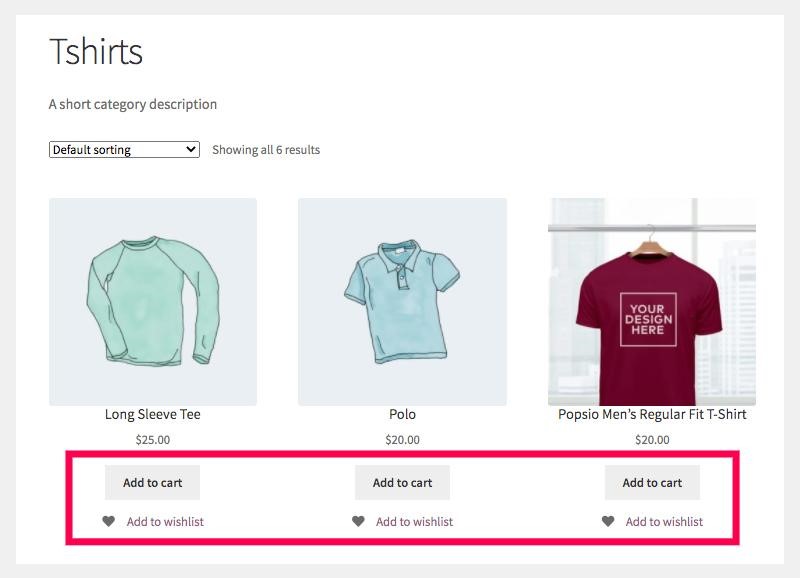
An eCommerce wishlist should be designed in such a way that it becomes an intuitive application by virtue of its ease of use by customers. The “Add to Wishlist” button for any product must be visible. We recommend you place it right below the “Add to Cart” button.
Adding, editing, or removing items should be streamlined with minimal effort. For instance, include a clear confirmation popup when an item is added successfully to the wishlist.
2. Enable Guest Access
Not every visitor will want to open an account immediately. Guest wishlists lower the entry barrier and offer a hassle-free experience for first-time or casual shoppers. Temporary storage of guest wishlists is encouraged for repeat visits and eventual registration.
3. Provide Multiple Wishlists
Customers usually have various shopping requirements, such as gift planning for holidays or personal purchases. Having the option of multiple wishlists will give them a better way of organizing their preferences. For example, they might have one list for themselves, another for gift ideas, and a third for future purchases.
4. Include Price Drops and Stock Alerts
Inform the customer when products in their wishlist have gone on sale or become available. In case of sales or availability of items they have placed on their wishlist, email them automatically or remind them through their mobile app. Not only do these keep the customer engaged, but they also provoke a sense of urgency to purchase quickly.
5. Add Social Sharing Capability
Let customers share their wishlists with friends and family. Whether for a birthday registry or holiday shopping guide, social sharing can increase your store’s visibility and drive traffic. Channels for shared wishlists include Facebook, Instagram, and WhatsApp.
6. Follow and Analyze Wishlist Data
Ecommerce wishlists are a popular goldmine of information for the owners of stores. Analyze what people put in their wishlists but end up not buying. Are they too pricey? Are customers holding out for discounts? Now, use these insights to adjust your prices, smart inventory, and targeted marketing campaigns.
Introducing Smart Wishlist for WooCommerce
Now, you know what a wishlist is, right? And the best practices for eCommerce wishlist? So, it’s time to look at Smart Wishlist for WooCommerce, one of the most imperial WordPress plugins for WooCommerce store owners. It not only serves as a wishlist; it is a complete package that aims to increase customer satisfaction, generate sales, and offer very useful insights.
Smart Wishlist stands out with its robust features and seamless integration. It allows customers to create multiple wishlists, track prices, and share their lists, making shopping more personalized and convenient.
What Makes Smart Wishlist Unique?
- Enable Wishlist – Activate the wishlist with one click. ✅
- Allow Multiple Wishlists – Create and manage several wishlists. 📂
- Allow Variations – Save specific product variations. 👕
- Allow Guest Users – Enable wishlist for guest users. 💻
- Wishlist Social Media Sharing – Share wishlists on social platforms. 📢
- Popup Notification – Show alerts when adding items. 🔔
- Enable Wishlist Button on Shop Page – Add button directly on shop page. 🛍️
- Button Type Customization – Modify button appearance and style. 🎨
- Wishlist Icon Customization on Product Image – Adjust wishlist icon design. 🖼️
- Tooltip on Hover – Show tooltips on the wishlist button. 📝
- Wishlist Button Styling – Customize button colors and fonts. 🧩
- Wishlist Page Customization – Modify wishlist page layout. 🛠️
- Wishlist Privacy Settings – Set wishlist visibility options. 🔐
- Gift Registries – Create and share wedding lists. 🎁
- Holiday Shopping – Organize wishlists for holiday shopping. 🎄
- Product Comparison – Compare multiple product choices. 📱
- Influencer Collaboration – Share curated lists with followers. 🤳
- Personal Shopping Lists – Save items for later purchase. 🛒
Installation of Smart Wishlist for WooCommerce
The installation of Smart Wishlist is not complicated at all:
- Purchase the Smart Wishlist extension.

- Download the.zip file from your WooCommerce account/Email.
- Go to WordPress Admin Dashboard > Plugins > Upload Plugin > Choose File.
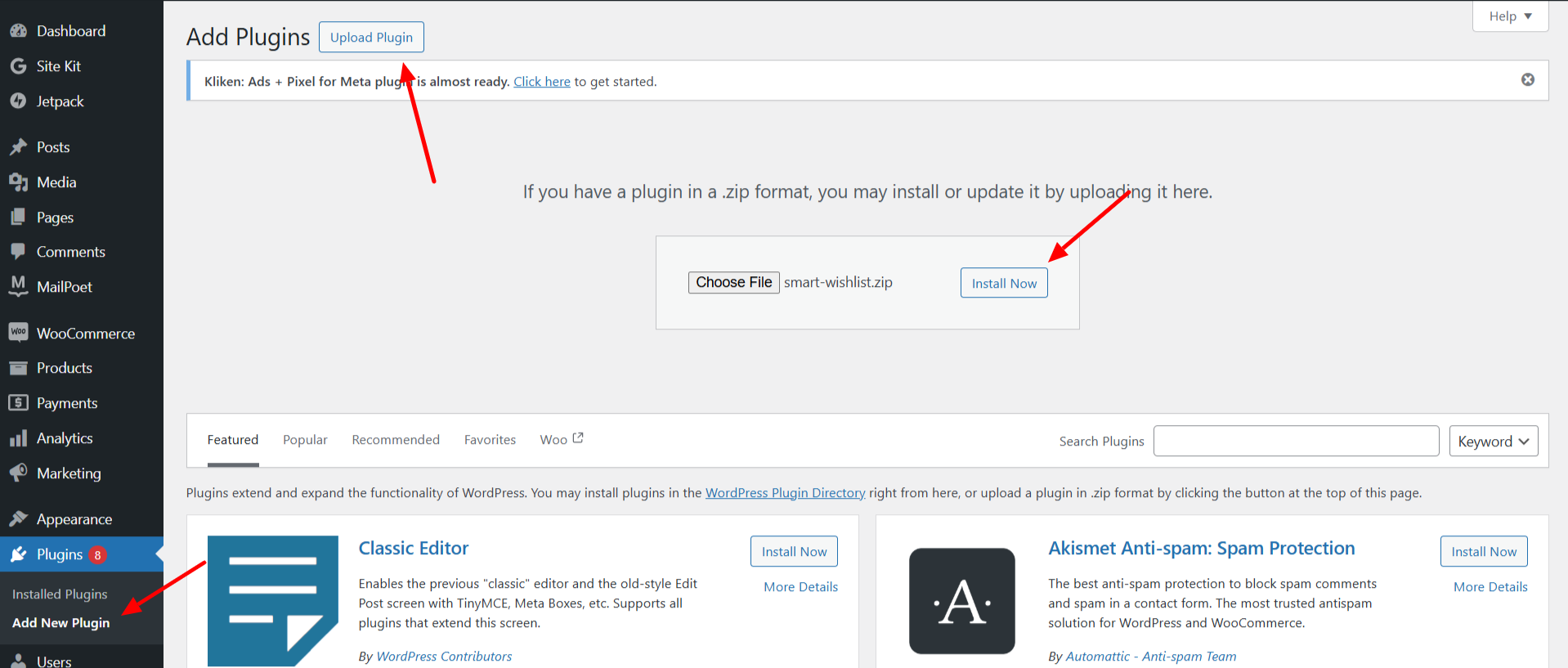
- Install and activate.

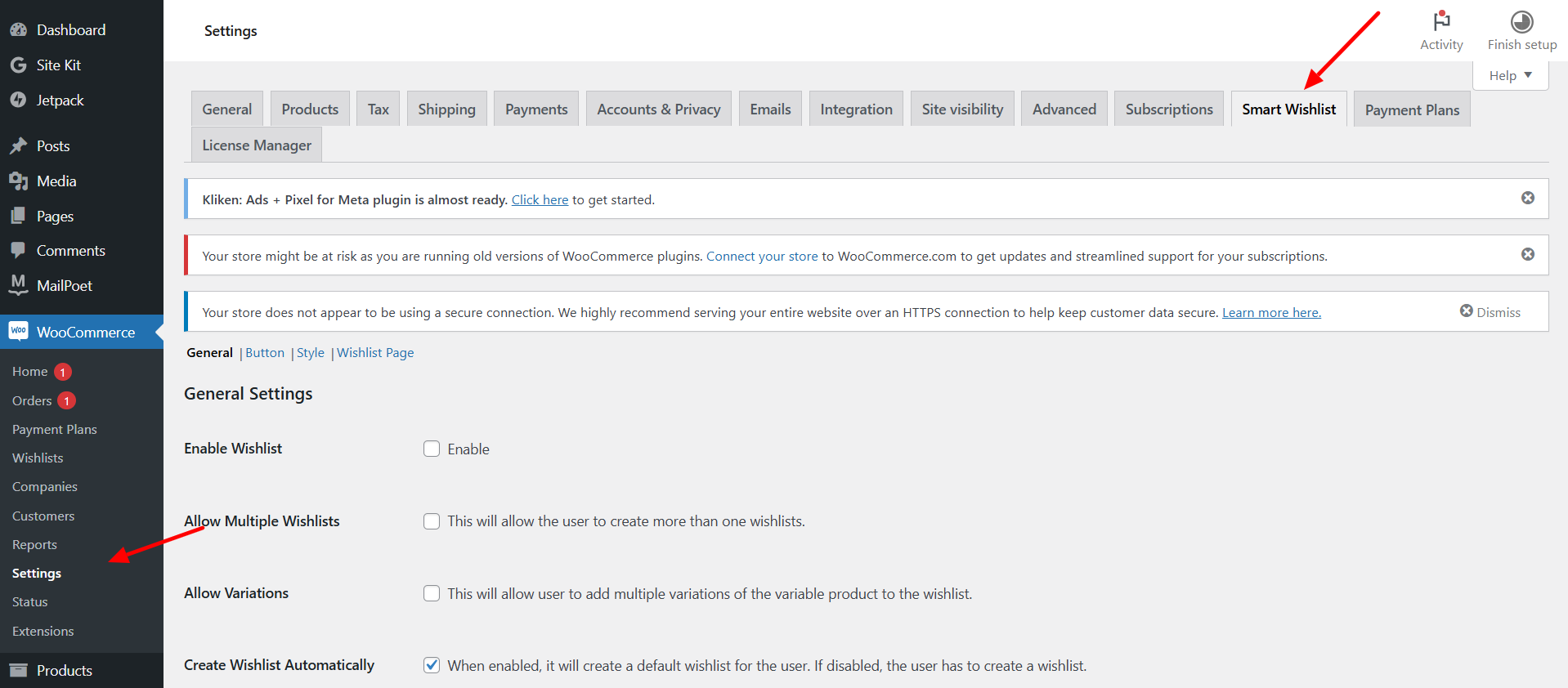
- Now, you can configure the wishlist plugin as you want. Set this according to your store’s needs through the easy-to-use interface shown in the image below.
Conclusion
An eCommerce wishlist is more than just a feature. It happens to be a strategic tool for both customers and businesses. To the customers, it makes shopping easy, convenient, personalized, and flexible; to the businesses, it provides customer preference insights, increased engagement, and more conversions.
Elevate your shop’s functionality using Smart Wishlist to provide them with a specialized shopping experience in return. Have those browsers stay as buyers—the smartest next step would be to get that started immediately using the Smart Wishlist.




