




















































WooCommerce store owners should take every possible measure to counter customers’ pain points. There is no denying that customers expect online stores to speak on their behalf and provide the best shopping experience.
Usually, successful online stores showcase prices in local currency to facilitate and motivate customers to complete their purchases. Moreover, offering users’ selected currency throughout the entire shopping experience helps increase trust, minimize confusion, and protect customers from sudden price changes at the last minute.

This blog post will discuss how online e-commerce store owners can showcase local currency and enhance customers’ shopping journeys with the top-notch Currency Switcher plugin.
Customers Prefer to Make Purchases in their Own Currency
Undoubtedly, customers prefer to buy their desired products in their preferred currency. If this is not the case, store owners may experience low conversion rates. If customers view the currency they want to use at checkout, it can help improve the overall shopping experience.
In this situation, the Currency Switcher for WooCommerce plugin plays a crucial role, helping customers choose their desired currency at checkout when purchasing products or services.
Consistency Helps Develop and Increase Trust During the Shopping Journey

As you may be aware, currency consistency encourages new and existing customers to complete their purchases. That’s because they assume the online store they have chosen to buy from is trustworthy.
Otherwise, the lack of trust may prevent customers from completing their purchases due to confusion or uncertainty.
Avoid Last-Minute Price Change Hassle

As a WooCommerce store owner, you should not undermine the importance of the currency switcher when you want to facilitate your customers. Unfortunately, unexpected currency changes at checkout compel users to abandon their carts.
Therefore, you must configure the Currency Switcher plugin on your online store to provide customers with a consistent user experience. In short, you don’t confuse your new or potential customers with a sudden price change at the last minute when you use this impressive plugin.
How Currency Switcher for WooCommerce Helps Customers Select Their Preferred Local Currency?
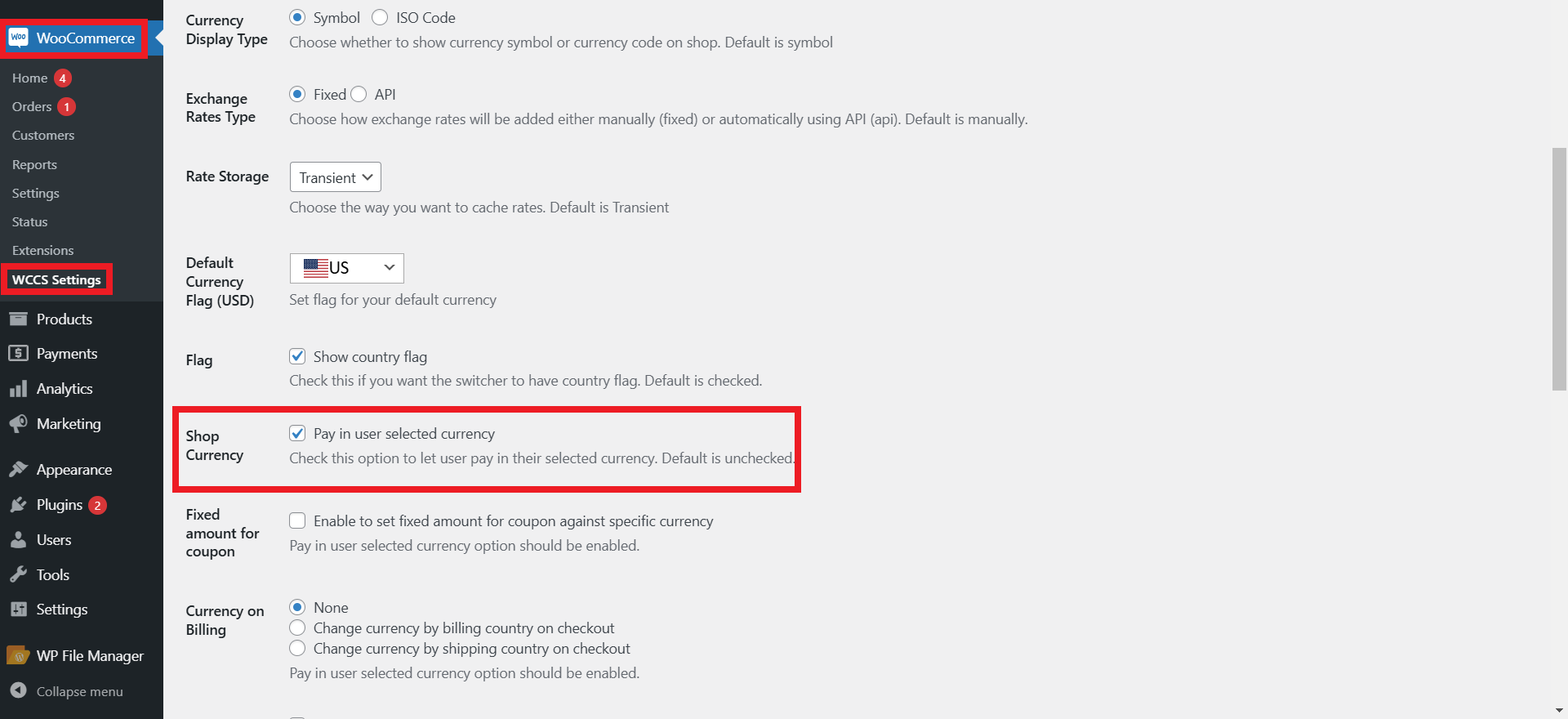
As discussed, the Currency Switcher for WooCommerce plugin lets store owners display the local currency customers prefer for purchases. In addition, it offers an exclusive feature, Shop Currency, that allows customers to make purchases in their preferred currency.
To facilitate your customers by offering them this feature, you must check this option. If left unchecked, transactions will be completed in the default currency even if the customer selects another currency.
Therefore, they must install and configure the Currency Switcher for WooCommerce plugin on their online e-commerce stores to allow customers to select their desired currency. To do this, follow the steps below:
- Log in to your WordPress admin panel and go to WordPress Admin Dashboard > Plugins.
- Press the Add New button, then click the Choose File button in the box shown below.
- Choose the zip file you downloaded earlier and upload it. Press the Activate option.
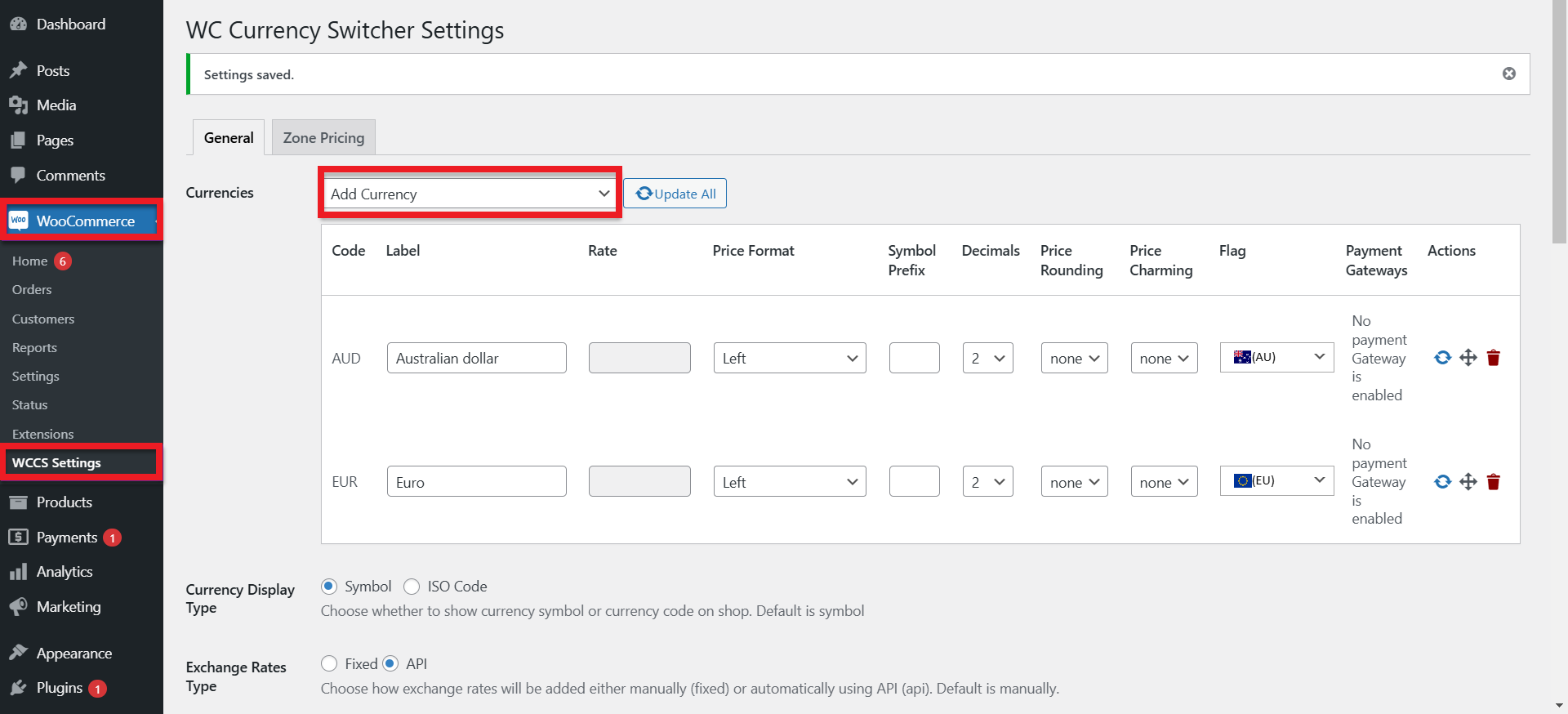
- Navigate to the WooCommerce tab and then go to the WCCS Settings tab.
- Using the Currencies Section, you can choose multiple currencies you need from the dropdown button. After selecting the currency, it will appear in the list.
- Now, you should activate the “Shop Currency” feature by checking it.
The front-end indicates the default currency is USD, but the selected currency is GBP. This means that the final transaction will be completed in GBP.

This is how you can let your customers choose their preferred currency when buying products or services from your online e-commerce store.
Wrapping Up
Online e-commerce store owners must display local currency throughout the checkout process to enhance conversions, drive sales, reduce confusion, and build trust. For this reason, they can turn to Currency Switcher for WooCommerce, which helps them provide customers with a comprehensive multi-currency shopping experience.
If your customer base includes international customers, allowing them to select their preferred local currency throughout checkout is key to long-term success.




