


















































You know the drill and would be familiar with the routine if building WordPress websites is your daily task. Need a custom block? You pay a coder, shuffle code yourself, or accept something that’s “good enough” from a plugin repository. WordPress Telex aims to flip that math on its head.
Announced at WordCamp US 2025, Telex is WordPress’s experimental artificial intelligence that converts plain English into functioning Gutenberg blocks. No code. Simply write what you need, as if you were using ChatGPT, and the WordPress Telex AI will build it for you.
Too good to be true? Well, perhaps not. Let us break down what Telex actually is, how it works, and whether it lives up to the hype.
What is WordPress Telex?
WordPress Telex is a development tool that uses artificial intelligence to translate natural language input into functional Gutenberg blocks. It’s like having a developer on call who has an extensive understanding of what WordPress is and how WordPress works.
WordPress co-founder Matt Mullenweg refers to it as “V0 or Lovable, but just for WordPress.” As it happens, V0 and Lovable are two famous “vibe coding” tools where you talk, and an AI generates the code. Telex is doing the same, but it is designed specifically for WordPress environments.
The software is currently experimental and can be accessed at telex.automattic.ai. It’s just one part of WordPress’s overall move into AI, following its earlier announcement of hiring a full-fledged AI team in 2025.
How Does WordPress Telex AI Really Work?
It doesn’t involve some elaborate step-by-step procedure. It’s very easy and is up and running right away.
Step 1: Log in with your WordPress.com Account
To start using WordPress Telex AI, you need to log in first; just follow these steps.
- Visit https://telex.automattic.ai/ from your Google Chrome or any web browser.

- When you type your prompt, for example: “I need a product page,” it will ask you to log in first to start building.

Once logged in, you’ll be able to start using WordPress Tellex AI software for free.
Step 2: Write Your Prompt
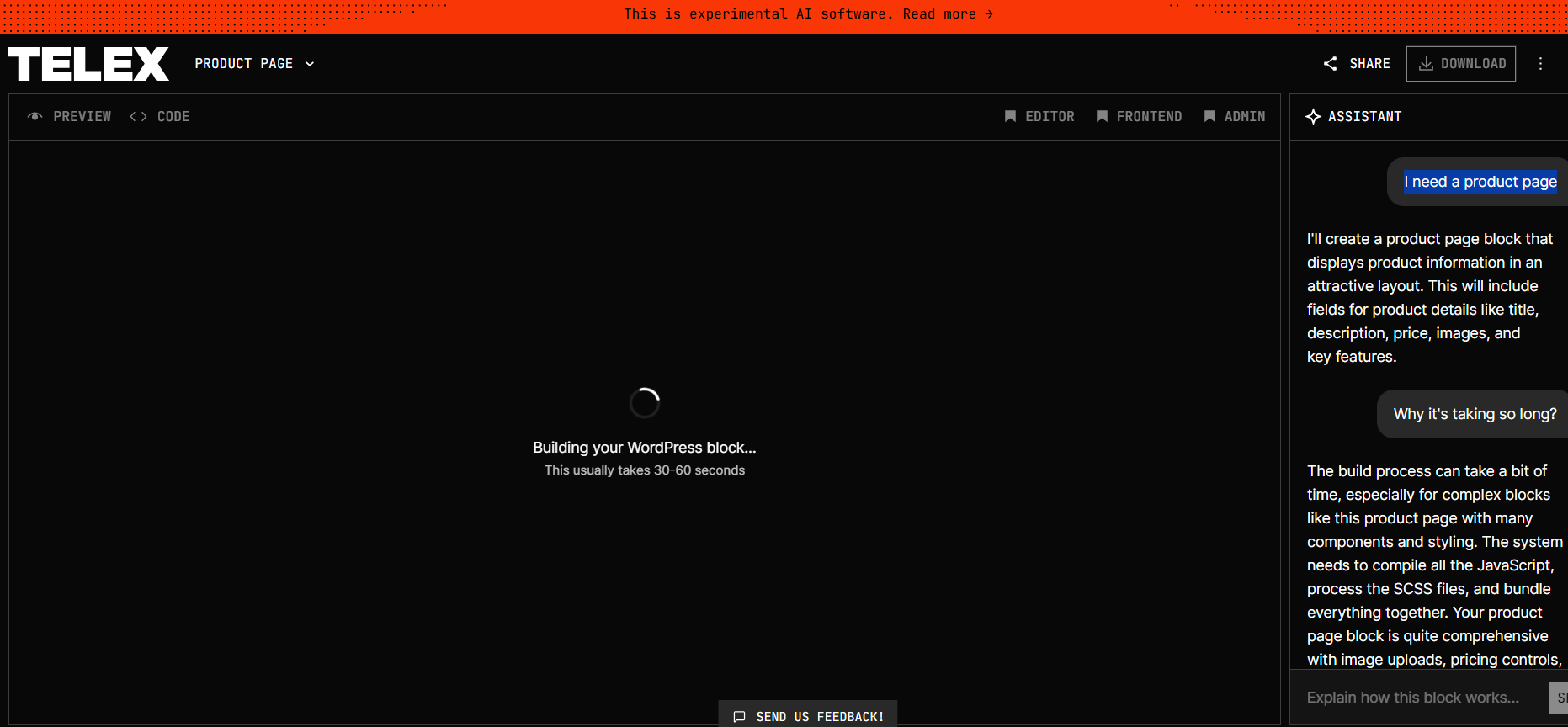
You tell it in the simplest language what you need. For instance: “I need a product page.”
Step 3: AI Does Its Thing
Telex translates your request and builds all the necessary code, including Readme.txt, HTML organization, CSS formatting, JavaScript interactions, and PHP hooks. It is aware of WordPress norms, so the output is theme-compatible and adheres to Gutenberg best practices.
Disclaimer: If your prompt requires extensive block creation, it will take longer.
Step 4: Download Your Block
You receive a .zip file containing all the necessary files. There is a preview option, allowing you to view the content before downloading it.
Step 5: Install and Test
Upload the .zip file to your WordPress site at Plugins → Add New, or test on WordPress Playground (a browser-based testing environment for WordPress). Enable the plugin, and enter it into any page or post. Your new block is then available within the block inserter.
Step 6: Refine If Needed
First version not quite there? Go back to WordPress Telex AI and tell it to make adjustments with additions like “make styling work for my theme” or “This functionality isn’t quite working.”
The interface is simple. No nonsense setup, no API keys to deal with. A web browser and a concept.
Key Features Which Set WordPress Telex AI Apart
1. Natural Language Input
This is the gold mine. You don’t have to know PHP, React, or CSS. If you can clearly communicate to Telex AI exactly what you want, this WordPress AI can assist you accordingly.
2. Fully Complete Portable Packages
Unlike some products that give you code blocks to copy-paste into your project, Telex gives you a fully complete plugin package, ready to go. Everything comes wrapped up properly.
3. WordPress-Native Understanding
Telex AI is not a generic WordPress code generator. It understands WordPress structure. How blocks are registered, how the editor differs from the frontend, and how themes are organized. The code that it generates works well with WordPress.
4. Sandbox Testing Environment
You can experiment with blocks in WordPress Playground without even touching your live site to avoid any mistakes. This is more important than you realize. Messing around on a live site can lead to trouble and problems.
5. Iterative Refinement
The Telex AI will not be able to get it right initially. You can refine by discussion, making adjustments to the specifics until you have precisely what you require.
Real Benefits of WordPress Telex AI for Real People
1. For Non-Developers
Designers, marketers, and writers can now create custom functionality without relying on developers or learning to code themselves. Want to have a custom call-to-action block? Build one yourself in minutes.
2. For Developers
Even if you think you’re one of the best WordPress developers, Telex AI accelerates prototyping by a considerable factor. Use it to generate overlapping code, quickly test ideas, or buffer minor sections, allowing you to focus on more challenging parts and features.
3. For Everybody
Telex plays seamlessly into WordPress’s DNA to make publishing accessible to everyone. It’s another step toward normalizing web development, allowing more people to build the sites they want.
The Limitations of WordPress Telex AI (And They’re Real)
Let’s be real. WordPress Telex AI is in beta, and it shows.
– It Battles Complexity
Membership sites, commerce functionality, server-side logic, and database queries—Telex has not arrived yet for all these. Several of the early testers had projects that crashed or required extensive manual fixes.
– Code Quality Is Not Reliable
Generated blocks are occasionally theme-incompatible or will crash in some browsers. You may have to debug, fix edge cases, or fill security vulnerabilities. Don’t expect to get output ready for production.
– Prompt Quality Matters
Fuzzy prompts generate fuzzy responses. You must clarify what you desire. There is an acquired skill for writing good prompts.
– Not a Developer Replacement
Telex is currently suitable for prototyping and basic blocks only. Telex won’t replace real developers in essential projects. Use it as a helper or your sidekick, not a substitute.
Who Should Use WordPress Telex?
Best for:
- Rapid prototypes and testing
- Basic custom blocks (image galleries, counters, CTAs)
- Learning from WordPress blocks
- Client presentation and mockups
- Personal projects where good enough is fine
Avoid it for:
- Mission-critical production environments
- Complex business logic
- Anything that touches payments or user data
- Seriös endeavours where reliability is not an option
Final Thoughts: Should You Give It a Try?
If you’re curious about AI-powered development or just want to mess around with blocks that you can mold without writing code, give it a go. Telex is free and simple to test at telex.automattic.ai.
Just have realistic expectations. It’s a prototype. Things will break. The code will have to be adjusted. But that’s fine—you get to see the future before it’s finished.
For now, what is Telex? It’s an experiment. A good one, but an experiment nonetheless. Use it for learning, for prototyping, for hobby projects where mistakes don’t matter.
Don’t turn your business into it yet, but do play with it, by all means. The technology will improve, and learning how to collaborate with AI tools today puts you ahead.
The future of WordPress is conversational. Telex is just the start.




