














































It would be very frustrating to kick off a promising digital marketing campaign without knowing which strategies worked best. Enter the URL campaign builder, which is the right tool for this job. Whether a seasoned racer or newbie, mastering the campaign URL builder will take your marketing game to the next level. You’ll also be able to start tracking campaigns like a pro.
Whether you are new or established in the world of digital marketing, the URL campaign builder will definitely help you figure out things to make well-informed decisions and improve your action plans.
By the time you finish this guide, you will have acquired the guts of knowledge on campaign URL builders. We’ll also discuss the most sought-after campaign URL builder, the Google Campaign URL Builder.
What is a Campaign URL Builder? Is it Important?
The campaign URL builder is a software application that allows marketers to append UTM (Urchin Tracking Module) parameters to their URLs. Such parameters offer their bearer a very detailed view of the traffic sources. They allow tracking of the exact visitors coming to your site and how they behave.
What Are UTM Parameters?
UTM parameters are small but powerful tags that are appended at the end of any URL. Each tag provides specific information regarding the traffic source that makes it easier to track and analyze your marketing efforts. Here is how they function:
- utm_source: It tells you about your traffic source. Such as Instagram, Facebook, LinkedIn, or your newsletter.
- utm_medium: It tells you about the marketing medium. Which can be email, social media, or CPC.
- utm_campaign: It tells you about your running campaign. Like BlackFriday, summer sales, or new product launches.
- utm_term: This keeps track of keywords in paid campaigns, such as “organic coffee” or “best running shoes.”
- utm_content: Differentiates between versions of the same ad, such as CTA1 vs. CTA2, or banner ad vs. sidebar ad.
Tagging your URLs with these UTM parameter builders unlocks unprecedented insights into audience behavior. You will understand what campaigns, platforms, or content pieces drive the most engagement and conversions. Such a level of detail about URL campaign builder allows you to measure success & make informed decisions about campaigns.
Let’s talk about Google UTM builder now!
How Does Google Campaign URL Builder Work?
The Google Campaign URL Builder is a simple application that automatically tags URLs with UTM parameters. It seamlessly integrates with Google Analytics and tracks enormous amounts of information regarding your campaigns’ performance.
Why is Google UTM Builder a Preferred Choice Over Its Rivals?
Google UTM Builder is preferred because you can integrate it seamlessly with Google Analytics. In return, you get real-time insights into your paid campaign performance. Unlike other available tools, Google Campaign Builder ensures consistency and accuracy in tracking.
Example of a UTM-Tagged URL
Assume you’re advertising a summer sale on Instagram. Your UTM parameter builder generated this:
arduino

Copy

https://example.com?utm_source=instagram&utm_medium=social&utm_campaign=summer_sale&utm_content=ad_version_1
You can now monitor traffic in Google Analytics and understand what is significant about this data, such as source (Instagram), medium (social), and ad version (ad_version_1).
How Does UTM Generator Work: How to Build Campaign URLs
Step 1: Open the Google Campaign URL Builder
Go to the Google Campaign URL Builder. It will help tag URLs in an easier and error-free way.

Step 2: Put your Landing Page URL
Put the URL of the page you want users to land and track on. For example, product pages, blogs, and special sale pages.

Step 3: Add UTM Parameters
Enter the following:
- Source: This is the source of the traffic (Facebook, Twitter, email newsletter).

- Medium: This is the medium through which the traffic comes (CPC, social, or email).
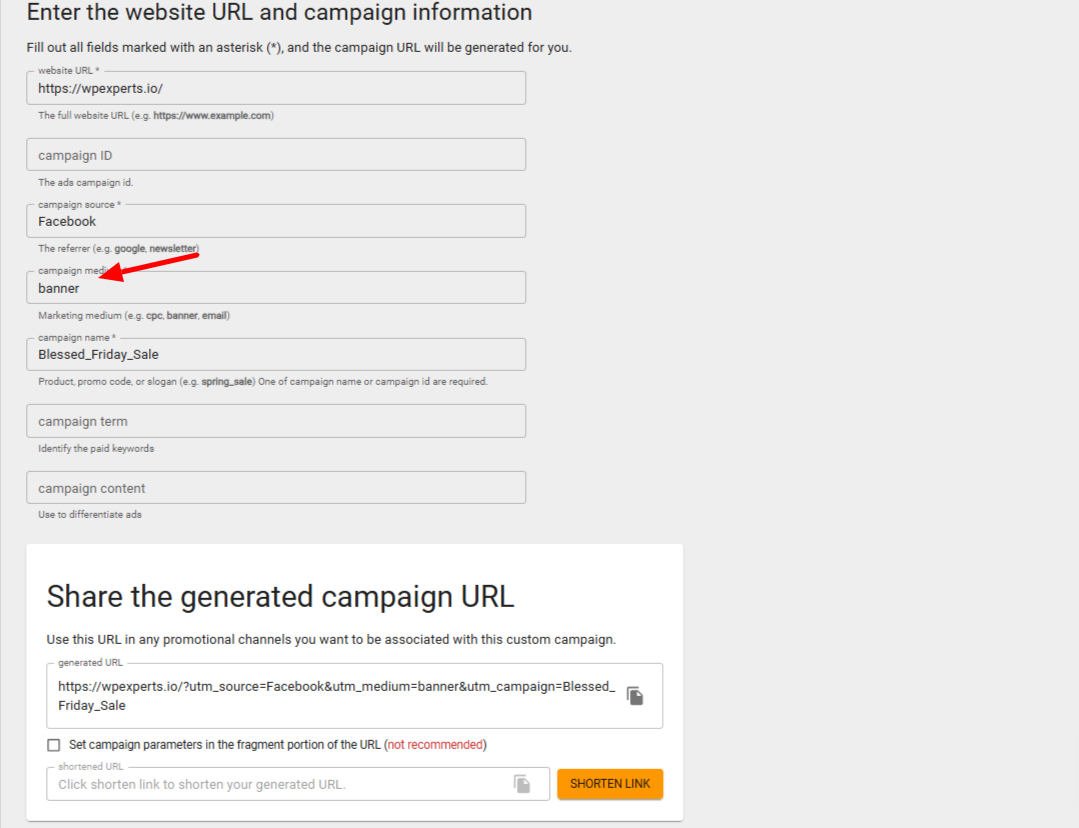
- Campaign: This is the campaign name (Summer_Sale, Product_Launch).

- Term (Optional): This is used to track keywords in paid ads.
- Content (Optional): Differentiate between ad variations.
Step 4: Generate and Test the URL
The Google campaign URL builder tool will generate a custom URL with the appended UTM parameters. Copy the URL and test it in your browser to ensure it directs to the correct landing page.

Step 5: Deploy and Monitor
Use the tagged URL in your campaign from the URL campaign builder. Whether in a social post, email, or ad, now, the URL will begin collecting valuable data. Monitor performance in Google Analytics under Acquisition > Campaigns to evaluate results.
Reasons Behind the Importance of URL Campaign Builder Tracking
URL campaign builder tracking creates the very backbone of modern digital marketing analytics. Without it, you are actually flying blind and guessing about your audience and their preferences. Here are very good reasons why campaign builder tracking is an absolute must-do:
- Know Sources of Traffic: Which social media, paid ads, or email campaigns send the most traffic and conversions to your site? This gives you quality clarity on where you need to get serious about your efforts.
- Measure ROI: Consider the efficiency of each campaign in turning the respective costs into revenue, hence measuring ROI. Knowing what works allows for the right budget and resources to be applied to higher-impact things.
- Optimize Strategies: Finding out what is working and tweaking the messaging or targeting. You can scale the winning ad; for example, one ad was performing better than the other. So you keep the one performing better.
Key Benefits of GA4 UTM Builder
1. Precise Campaign Tracking
URLs generated by Google’s UTM builder tool determine exactly which campaigns, advertisements, or channels drive the maximum traffic & conversions. Whether it is through social media or email campaigns, such insights assist in sharpening your efforts toward high-performing approaches while identifying areas for improvement. This level of detail certainly helps maximize ROI and refine marketing strategies.
2. Seamless Integration with Google Analytics
Google UTM generator integrates with Google Analytics. Tagged URLs end up directly in your analytics dashboard and offer clear and elaborated information on user behavior. The UTM parameter builder tells you everything from bounce rates and time spent per session to actual conversions. This integration enhances the marketer’s intelligence well beyond mere traffic information.
3. Cross-Channel Efficacy
What makes this function all the more essential is its ability to track campaigns. The UTM generator covers all these channels: social, e-mail, and PPC. As a result, it is easy for you to gain a more rounded picture of your marketing activities. These insights can also give you an understanding of the comparative performance of various channels, which determines your refinement of strategies and resource allocation.
4. Data-Driven Decisions
Performance on tagged URLs’ trends will reveal resource allocation requirements, as well as inform inconsistencies in an online marketing campaign. This way, marketers will know the strategies to improve their performance and pour resources into what actually works.
Advanced Tips for Using Campaign URL Builders
1. Consistent Naming Conventions
Use consistency in naming UTM parameters. For instance, use lowercase letters and avoid spaces or special characters to keep your analytics organized. Proper naming conventions ensure that your reports remain clean, easy to understand, and actionable.
2. Automate URL Creation
For massive campaigns, it’s cumbersome and time-consuming to do the manual URL tagging. One can make use of UTM.io or a custom script to create these URLs, saving time and minimizing errors. It’s really helpful for marketers running hundreds of campaigns at a time.
3. Make Use of A/B Testing
You can use the utm_content parameter to test variations of ads, email content, or landing pages. For instance, you could compare calls-to-action (CTA1 vs. CTA2) or creative designs. All these are super valuable in understanding what your audience is responding to and thus boosting engagement.
4. Regular Monitoring
Campaign tracking isn’t a once-done thing. A regular review of your analytics data, often aggregated from multiple ad platforms using tools like Funnel.io or its alternatives, would identify emerging trends and spot problems before they really become big ones. In this way, you can change your campaigns in real-time, so you’re always at peak performance.
Practical Uses of URL Campaign Builders with Examples
1. E-commerce Success
The company used a campaign URL builder to track the performance of their email campaigns. After analyzing the data, they realized that midweek emails performed 20% better than weekend emails. Thus, they shifted their schedule and increased sales and customer engagement.
2. B2B SaaS Campaign
A software company used the Google Campaign URL Builder to track LinkedIn ads promoting a free product demo. Their analysis revealed that targeting mid-level managers yielded a 25% lower cost-per-lead compared to targeting senior executives. With this knowledge, they refined their targeting strategy and significantly reduced acquisition costs.
3. Nonprofit Fundraising
A nonprofit organization attached donation links to a holiday campaign. Google Analytics data showed that the highest traffic came from Twitter, but Facebook generated 40% more donations. This information allowed the nonprofit to shift its focus, optimizing future campaigns for higher conversion rates.
Conclusion
For the modern marketer, the Google URL campaign builder is an essential tool for campaign tracking. This relates to tagging your URLs by using UTM parameters and forms a valuable reservoir of insights allowing for any data-driven decision-making and strategic optimization from social media ads to email campaigns, helping you to track your performance and understand your audience and ROI measurement.
Start to tag your URLs today and level up your campaigns. Precision tracking is the future of successful marketing and is never easier to achieve with Google Campaign URL Builder.
For any professional Google Analytics services help, feel free to contact us for customized solutions to take your marketing efforts to the next level.




