















































Every website over the internet faces an error that becomes hard to resolve. Ironically, this error may not provide enough information, making the task of problem identification difficult. Unfortunately, the HTTP 429 Too Many Requests is one such error.
This blog post will discuss the possible troubleshooting methods to fix the HTTP 429 Too Many Requests error. In addition, you will find various reasons for this client error.
What Do You Mean by HTTP 429 Error?
When a user sends too many requests within a short period, they may experience the HTTP 429 error sooner or later. As you might know, the 429 status code relates to rate-limiting schemes.
In simple words, the HTTP 429 Too Many Requests error happens when users have made more requests to servers than allowed within a specific time. This rate limiting comes in handy when preventing overloads and preserving server health.
Different Variations of HTTP 429 Error
Users can experience the 429 error on their screens in multiple ways. Regardless of whether the error includes the phrase “too many requests.” These various variations are:
- HTTP response code 429
- Response code 429
- HTTP error 429
- HTTP code 429
- HTTP error code 429
- HTTP status code 429
- There was a problem with the server 429
- Problem with the server 429. That’s an error.
- 429 server error
Potential Causes Behind the HTTP Error 429 Too Many Requests Error
Identifying the potential causes of HTTP 429 errors comes in handy for troubleshooting. Here are a few scenarios where users can experience the 429 error:
Automated Traffic
Unfortunately, automated scripts, crawlers, and bots can make numerous requests to a website at a time. The annoying part is that they look legitimate initially, but they eventually exhaust rate limits because of multiple automated requests.
Therefore, website owners must understand such automated traffic as crawlers, bots, and scripts. Once they know automated traffic correctly, resolving the 429 error becomes relatively easy.
Server Setting Misconfigurations
Improper rate-limiting settings can prevent users from accessing their desired sites. There is a strong likelihood that these settings are set too low and do not accommodate high traffic loads. In this situation, users may face the 429 HTTP status code error.
Resource-Heavy Requests
A few requests usually take a lot of server resources, such as complex database queries. These queries negatively affect the server’s productivity, and if the server receives such requests on multiple occasions, it can lead to 429 errors due to the rate-limiting problem.
High Traffic Volume
Websites might receive more requests during peak traffic, like product launches, sales, etc. If the website’s rate limit does not manage such spikes, users may experience the HTTP 429 error Too Many Requests issue.
Shared Hosting Resources
Do you know resources are divided among various sites in shared hosting environments? Yes, it is true. As a result, your website might face the HTTP 429 Too Many Requests error due to reduced available resources if another website experiences high traffic or conducts intensive operations.
How to Fix HTTP 429 Error Too Many Requests?
When fixing the HTTP 429 error, you can benefit from several simple yet results-driven methods. That said, the 429 Too Many Requests error can hamper the performance of a service or an app that largely depends on the API or the server.
However, you can take advantage of various possible solutions to bypass this client error appropriately. These methods include:
- Wait and Try Again.
- Clear a Browser Cache.
- Switch to a Default WordPress Theme.
- Flush the DNS Cache.
- Increase Rate Limits or Server Resources.
- Deactivate WordPress Plugins.
- Contact Your Web Hosting Provider.
Wait and Try Again
The easiest solution is often to wait before sending more requests. This can be particularly effective if the rate limit is time-based (e.g., 100 requests per hour).
Sometimes, your web hosting service provider may receive too many requests to load your website. This scenario is more common in shared hosting environments. If the problem persists, consider upgrading your hosting plan or using a VPS.
Clear a Browser Cache
Clearing a browser cache can help avoid the HTTP 429 Too Many Requests error. Therefore, you must clear a browser cache to resolve this frustrating error accurately. To do this, here is what you should do:
- Click the three dots at the top-right corner of your browser to access the settings panel. Then click the Delete browsing data option.

- You should choose options such as Cookies, Browsing history, Cookies, and other site data, files, and Cached images. Click the Delete data option to remove the 304 HTTP status code.
- Likewise, you can remove advanced data by hitting the ‘Advanced’ data tab.
- You can select options like Cookies and other site data, Download history, cached images and files, browsing history, etc.
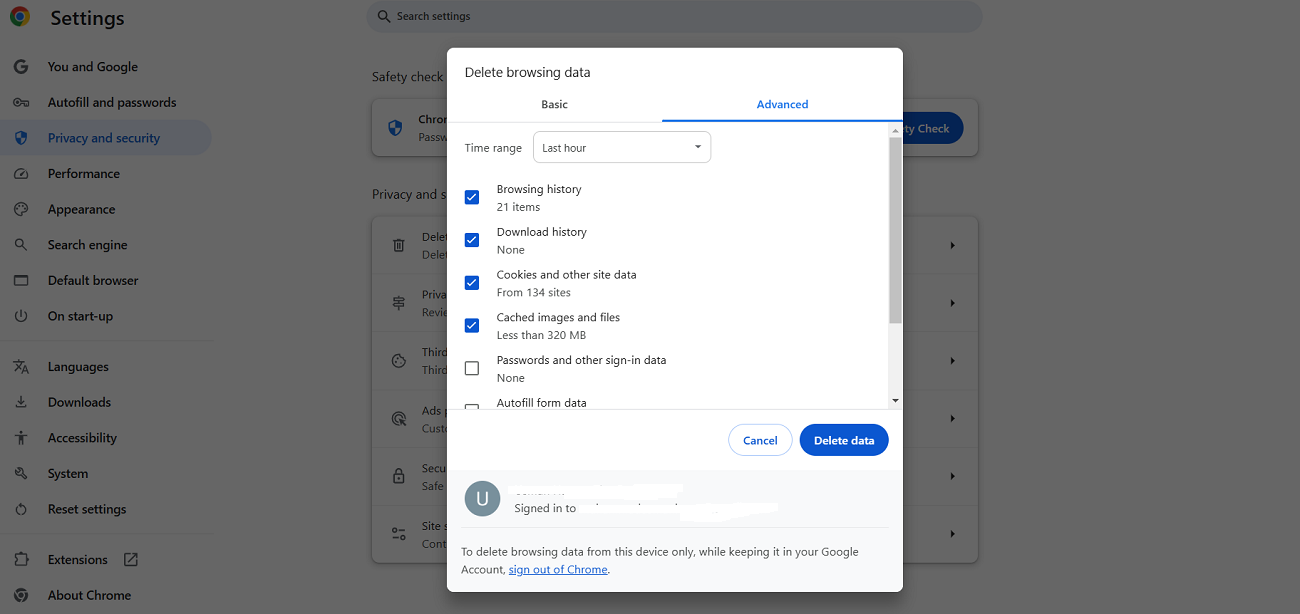
You can likely overcome the HTTP 429 status code error by hitting the Delete Data option. Luckily, clearing the browser cache enables you to resolve the Err_Cache_Miss error in Google Chrome. Besides, it bypasses the WSoD (white screen of death) error.
Switch to a Default WordPress Theme
If clearing the browser cache does not help you eliminate the 429 error, check your current WordPress theme. To determine if that’s the case, manually deactivate your current theme, enabling WordPress to switch to one of the default templates compatible with the CMS.
There is a likelihood that the 429 HTTP error will not stop you from using your site’s backend. If this is the case, you should log into your WordPress dashboard. Once you do this, go to Appearance > Themes. Doing so lets you select the active theme for your site. You must hit the Activate button to switch to the default WordPress theme.

Hopefully, switching to the default WordPress theme will help eliminate the HTTP 429 status code error in the right direction.
Flush the DNS Cache
Flushing the DNS cache is another way of removing the 429 Too Many Requests error. Additionally, it helps users bypass the HTTP 304 Not Modified status code error. To remove the Google Chrome browser’s cache, follow the below steps:
- Write “chrome://net-internals/#dns” in the address bar using a new tab.
- Hit Enter and click the Clear host cache button:
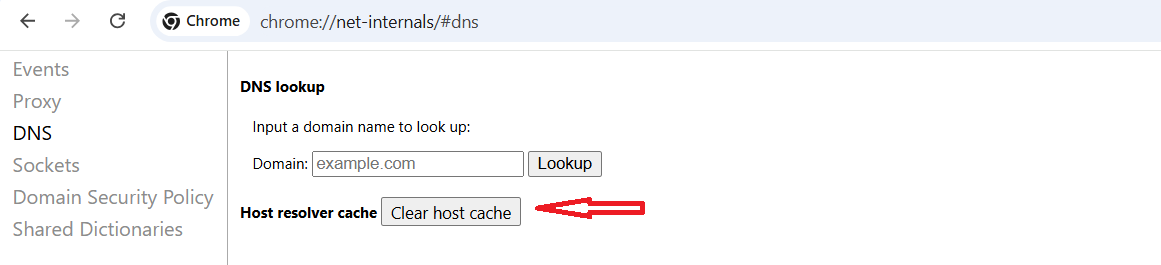
This way, you can flush the DNS cache and force your device to fetch the newest DNS information, helping eradicate the DNS cache-focused issues.
Increase Rate Limits or Server Resources
As a website developer or owner, your prime responsibility is to ensure your site does not face an annoying error like the HTTP 429 Too Many Requests error. So, you must consider increasing rate limits or server resources to manage more requests without issues.
Acquiring a results-driven hosting solution might be the solution you need. Likewise, you should know how to configure server settings to handle peak traffic loads, preventing 429 errors effectively. When improving server resources or rate limits, you can consult your site developer if you own a WordPress site.
Deactivate WordPress Plugins
Disabling WordPress plugins can likely help site developers and owners eliminate the 429 Too Many Requests error. Thus, you should immediately disable your WordPress plugins. Once you deactivate the plugins, confirm whether the issue has gone away. The same solution method enables users to evade the 403 forbidden error.
To deactivate plugins, follow the below steps:
- Through your WordPress admin dashboard, click the Plugins tab > Installed Plugins.
- Choose the plugin you wish to disable. Once you have selected your desired plugins, select the Deactivate option following the Bulk actions tab and hit Apply. That’s it.

Contact Your Web Hosting Provider
There are cases where the cause behind this client error might relate to your server rather than the site. In this situation, you will not resolve the problem, which can result in the 429 error. That’s because fixing your website’s backend issues will not help you resolve problems associated with your server.
Hence, you must contact the web hosting service provider and ask them to check problems that relate to your server. This might help you avoid getting the HTTP 429 Too Many Requests error.
The good thing about hosting service providers is that they can offer valuable insights, significantly eradicating this client error and eventually allowing you to find the desired solution.
Wrapping Up
We hope you liked our blog post describing the error HTTP 429. Experiencing an error on the WordPress site does not improve your reputation. Thus, you must resolve them as early as possible. However, the good thing in this situation is the number code that provides you with a wealth of information to fix this error. If you face the 429 Too Many Requests error, something has hampered your web server with several requests.
Hence, you should detect the source of the problem in this situation. Last but not least, all these above-described possible solutions allow you to resolve the 429 HTTP status code error.