



















































You may be using email / social media to provide support to customers. Or maybe already using a messy WordPress ticketing system that is not working properly for you and are looking for a suitable one.
That’s why you have somehow landed on this blog. Yes, we are assuring you have found the right one.
Let me first tell you a stark fact: finding an intuitive, affordable, plus powerful ticketing system for your WordPress website is a big challenge. For this reason, many of us end up stuck and continue using social media, email, or any random ticketing system.
That’s why we have done the research (the difficult part) for you and will share our top pick.
So, first of all, let’s clarify the WordPress ticketing system concept for you a bit more. Then we will move forward to our recommendation part and give you proper reasoning for it.
So, let’s start the reading.
What Is a Ticketing System?
A ticketing system is a software tool that helps you manage, track, and organize all customer support requests. It acts as a central hub that keeps communication clear and ensures no query gets missed.
When a customer sends a question, issue, or query by email, a contact form, or another channel, the system automatically turns it into a “ticket.” Each ticket holds the full message, shows who is handling it, and tracks its progress until it is resolved.
This means you never have to jump between different inboxes or worry about losing a message. Everything stays in one place, which helps your team work more efficiently and deliver faster responses.
Ultimately, a ticketing system makes your support easier, responses faster, and ensures no message gets missed.
Yes, it actually brings order to the mess of customer communication.
The Core Qualities of a Proper Ticketing System
A ticketing system is the core of a support team, but not all of them are created equal. So to help you choose the right one, we will discuss seven core qualities that define a truly great ticketing system.
So, let’s look at the seven!
1. Easy to Use
A good ticketing system should be intuitive for everyone involved. It should be easy for customers to submit tickets and just as easy for agents to manage them.
You shouldn’t need a long learning curve or a 10-30 day course just to get started. Instead, the dashboard should be clean, and the workflow should be so simple that new team members can get started with minimal training.
2. Automation
The best ticketing systems handle repetitive tasks so your team doesn’t have to. Powerful automation features can automatically route tickets to the right agent, send follow-up messages, or add tags based on keywords. You can also create automated workflows that trigger specific actions, which complete tasks without manual intervention. This frees up your support agents to focus on solving complex issues, not on manual work.
3. AI Capabilities
Modern systems include AI to help agents work smarter and faster. This includes capabilities like Ticket Summaries, which can condense a long conversation into a few key points, and Sentiment Analysis, which helps agents understand a customer’s emotional tone.
AI can also assist with generating replies and provide other smart suggestions. This allows your team to deliver exceptional support with more efficiency.
4. Collaboration Tools
Support is a team sport. A great ticketing system should provide tools for easy collaboration, such as internal notes and the ability to assign tickets to different teams.
This prevents duplicated replies and ensures smooth handoffs, so your team can work together to solve issues without confusion.
5. Seamless Integrations
A ticketing system should never be an isolated tool. It needs to work with the other software your business already uses. Look for a system that connects with your CRM, communication apps, and e-commerce platforms. This ensures all your data is in one place, which helps your team provide smarter, more personalized support.
6. Detailed Reporting and Analytics
If you can’t measure your performance, you can’t improve it. A great ticketing system provides in-depth reports and analytics. This allows you to track key metrics like first response time, resolution rates, and customer satisfaction, giving you the insights you need to make better decisions.
7. Scalability and Fair Pricing
A ticketing system should grow with your business, not punish it. A great system has clear and transparent pricing that allows your team to expand without a “growth tax.” Look for a model with no hidden fees and no per-agent pricing to avoid unexpected costs down the line.
Trusted Solution for WordPress Ticketing System
So, we have thoroughly discussed what a ticketing system is and the core qualities of a great one. Now comes the decision: which system should you choose if you run a WordPress business to provide stellar customer support?
In this instance, if you want our recommendation, we will say one solution rises above the rest: Fluent Support.
It’s the complete package for any business, whether you’re a solo entrepreneur or a fast-growing team. This solution simply checks every box, from its powerful AI and seamless integrations to its fair, transparent pricing.
For more of these types of reasons, we’re really confident in naming Fluent Support as our number one recommendation.
In the next section, we will get to know why we are so confident about this dominant WordPress ticketing system and recommend this one to you.
So, let’s find out!
Why Choose Fluent Support as Your WordPress Ticketing System?
Let’s get to know why Fluent Support might be the right fit as your WordPress ticketing system. You’ll get a clear idea of how it matches your support needs and why it could be the solution you’ve been looking for.
Ease of Use
Setting up a new tool doesn’t have to be a headache. Fluent Support is built to be simple from the very start.
You can have the plugin up and running in under five minutes, without any technical hassles. Once it’s installed, the dashboard is a breeze to use. The interface is clean and intuitive, making it a perfect fit for both new users and seasoned support staff.
Plus, if you ever need a hand, their documentation is packed with clear, step-by-step guides that walk you through everything you need to know.
High-end Customer Support
The team behind Fluent Support is WPManageNinja, and as you may know, they are already well known for their stellar customer service. This reputation is key, but here’s an even more powerful sign of their commitment. They use Fluent Support themselves to manage their own support team.
Ultimately, when a company trusts its own tool for its most vital tasks, it’s the ultimate sign of confidence. It shows they not only believe in their product, but they also rely on it every single day.
AI-Powered Capability
AI is a game-changer for customer support, and Fluent Support makes it easy to use. The plugin integrates directly with OpenAI. This gives your team powerful tools that help them be smarter and less stressed.
Ultimately, its AI capability helps streamline the support process. This allows your team to handle customer inquiries faster and more effectively.
We will explore these powerful AI features in detail in the dedicated features section later in this post.
Integrations
A great ticketing system doesn’t work alone. It connects with your other tools to make your job easier. That’s why Fluent Support integrates with over 20 popular WordPress plugins.
This powerful ticketing system connects seamlessly with your CRM, e-commerce, online courses, and form builders. For example, you can instantly see a customer’s purchase history from WooCommerce or their profile details from FluentCRM. This helps your team provide smarter, more personalized support.
Fluent Support also connects with popular messaging apps like Slack, Telegram, and Discord. These connections keep your team updated in real-time, even when they’re not on the main dashboard. This saves time and reduces manual work, so you can deliver great support with less effort.

No Growth Tax
Many helpdesk tools have what is called a “growth tax.” It’s a pricing model that charges you more as your team or business grows. This forces you to pay higher fees for more agents or tickets.
Unlike other services, Fluent Support does away with the “growth tax.” With this tool, you pay once for the license, and you can then use it with as many people on your team as you need. There are no hidden fees or surprise monthly bills to worry about.
This straightforward pricing means you can grow your support team without worrying about high costs. It is a smart and transparent choice for any business that wants powerful tools without the extra charges.
Simple and Transparent Pricing
When it comes to pricing, Fluent Support keeps things straightforward and honest. You won’t find any hidden fees or confusing plans. The pricing is built to be simple, no matter if you’re a single user or a business with many websites.
There is even a free version you can use to manage your very basic support needs. For the full experience, here are the simple pricing tiers:
- Single Site License: $129/year for 1 website.
- Agency License: $249/year for up to 5 websites.
- 50 Sites License: $399/year for up to 50 websites.
Let’s Take A Look at Fluent Support’s Main Features
Now that we’ve covered the basics, we will close with what you know about Fluent Support.
In this section, we will walk you through some of the key features available inside this WordPress ticketing system. This will help you see exactly how they can make your support work easier and faster.
– Unlimited Offerings (tickets, agents, users, tags, and products)
Your support system should grow with your team, not hold it back. Fluent Support gives you true flexibility by removing the limits on what matters most.
With this tool, you can handle as many support tickets as you need without any caps or blockers. You can also add an unlimited number of agents and serve as many customers as you want, whether you are helping hundreds or thousands.
If you have multiple products, you can manage them all from a single dashboard. Plus, you can create as many custom tags as needed to organize tickets and track issues more efficiently.
This level of freedom makes Fluent Support a great fit for growing teams that do not want to deal with limits or surprise costs.
– Advanced Ticket Filtering
Support teams deal with many tickets every day, so finding the right one quickly makes a big difference. Fluent Support’s advanced filtering is designed to help you do just that.
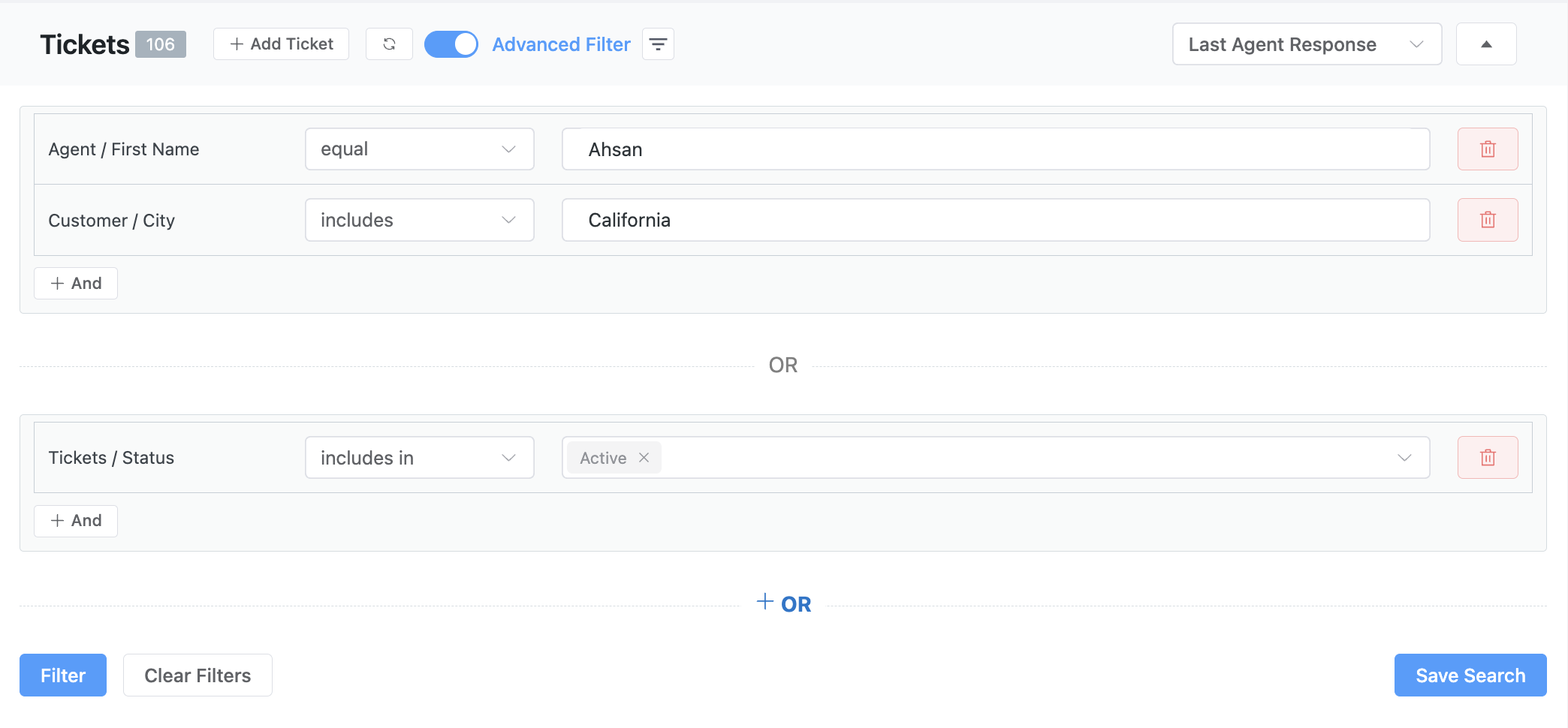
The advanced filtering feature allows you to add conditions using “AND” or “OR” logic. This helps you combine multiple rules to create the exact filter you need. You can use three main properties to set these conditions: Tickets, Customer, and Agent.
For example, you can filter tickets by title, tags, status, or assigned agent. You can also filter by a customer’s name, email, or location.
After setting your filters, you can save them as custom tabs. This gives your team quick access to focused views without repeating the setup.
– Email Piping
Even with advanced tools, email remains a primary channel for customer communication. Not every customer wants to fill out a support form. Fortunately, Fluent Support’s email piping feature solves this.
It automatically turns every incoming email into a ticket inside the dashboard. This means your agents can reply directly from one central place. The customer receives that reply straight in their inbox, just as they expect.

The system also supports CC’d emails. This means when a customer includes someone else in the thread, they can stay in the loop as the conversation continues. Ultimately, email piping helps your team bring every conversation into one place. It reduces back-and-forth, keeps things organized, and makes sure no message slips through.
– Shared Inbox
Support should feel organized, even with multiple agents involved. Fluent Support’s shared inbox gives your entire team access to incoming tickets in one clean, simple view.
Everyone can see what’s happening, who is replying, and what still needs attention. It’s the perfect way for your team to stay on top of everything. From the inbox, you can filter, assign tickets, reply, or add internal notes.
Whether you have one agent or ten, the inbox stays synced and updated in real time. This means there are no crossed wires and no duplicated replies. Ultimately, a shared inbox keeps your team connected and your support process smooth.
– Internal Notes
Great support requires seamless teamwork. Fluent Support’s internal notes are for keeping your team in sync.
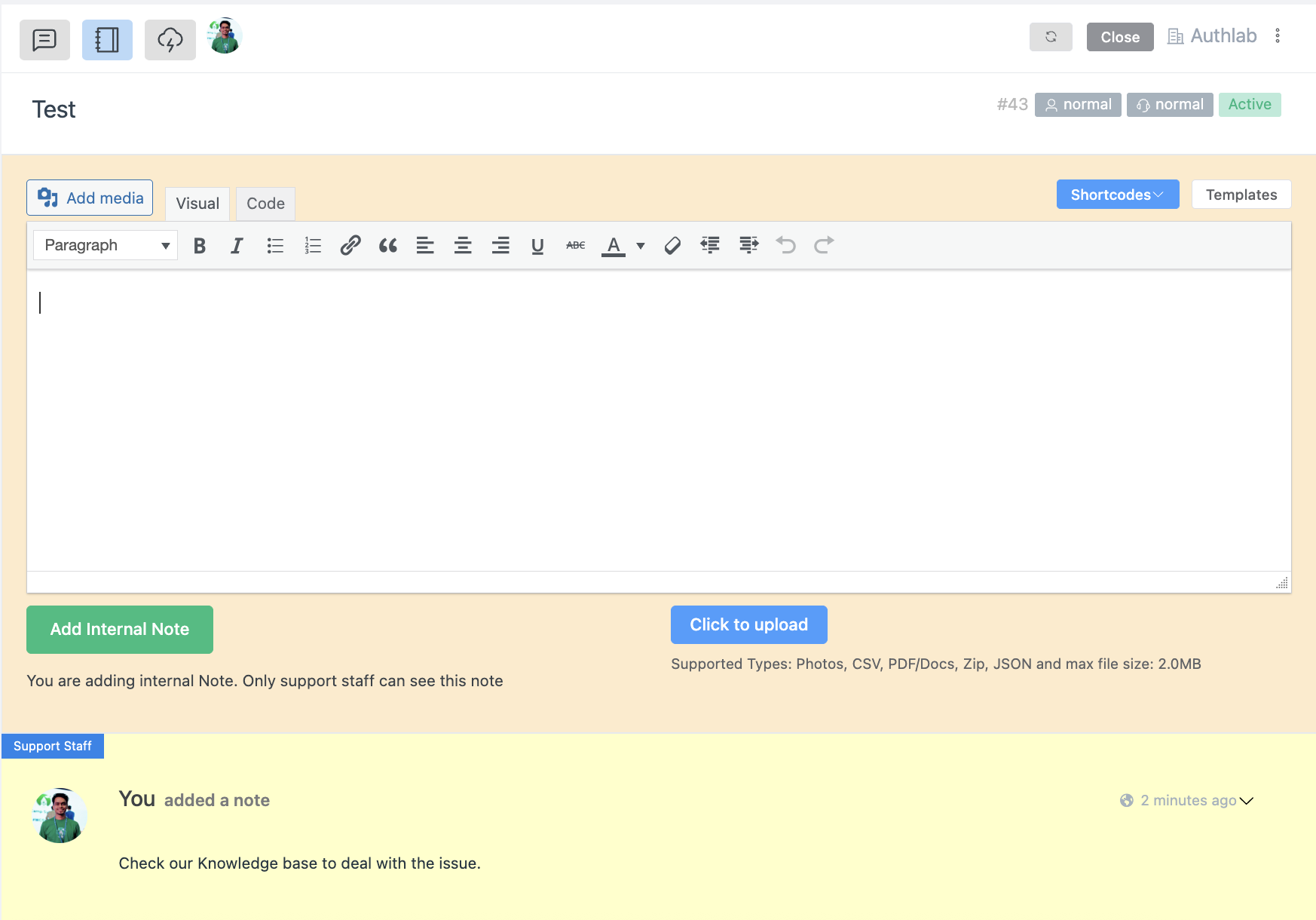
These notes allow agents to leave private comments inside tickets. They are only visible to your support team and never to the customer. You can use them to quickly summarize a conversation, flag a tricky issue, or leave instructions for the next agent.
This feature helps your team stay aligned, especially when a ticket is handed off or reopened later. It is a perfect way to collaborate smoothly and keep every ticket on track.
– Saved Replies
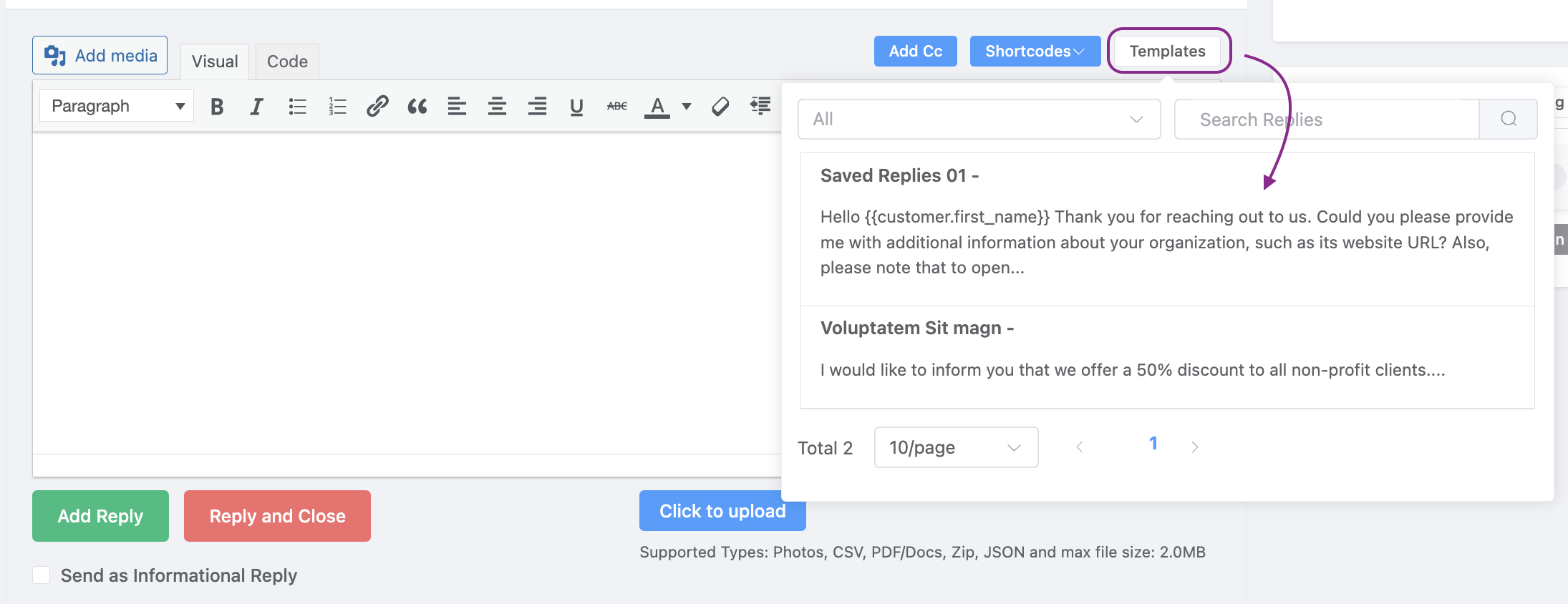
Support teams often deal with the same questions repeatedly. Fluent Support’s saved replies feature solves this problem by allowing you to create reusable message templates. This means you can save time and keep your responses consistent with just one click.
To create a new template:
- Navigate to Global Settings and select Saved Replies.
- Click + Create New.
- Organize your templates by product.
- Use shortcodes to personalize messages with Customer First Name, Customer Last Name, Customer Email, Customer Status, and more.
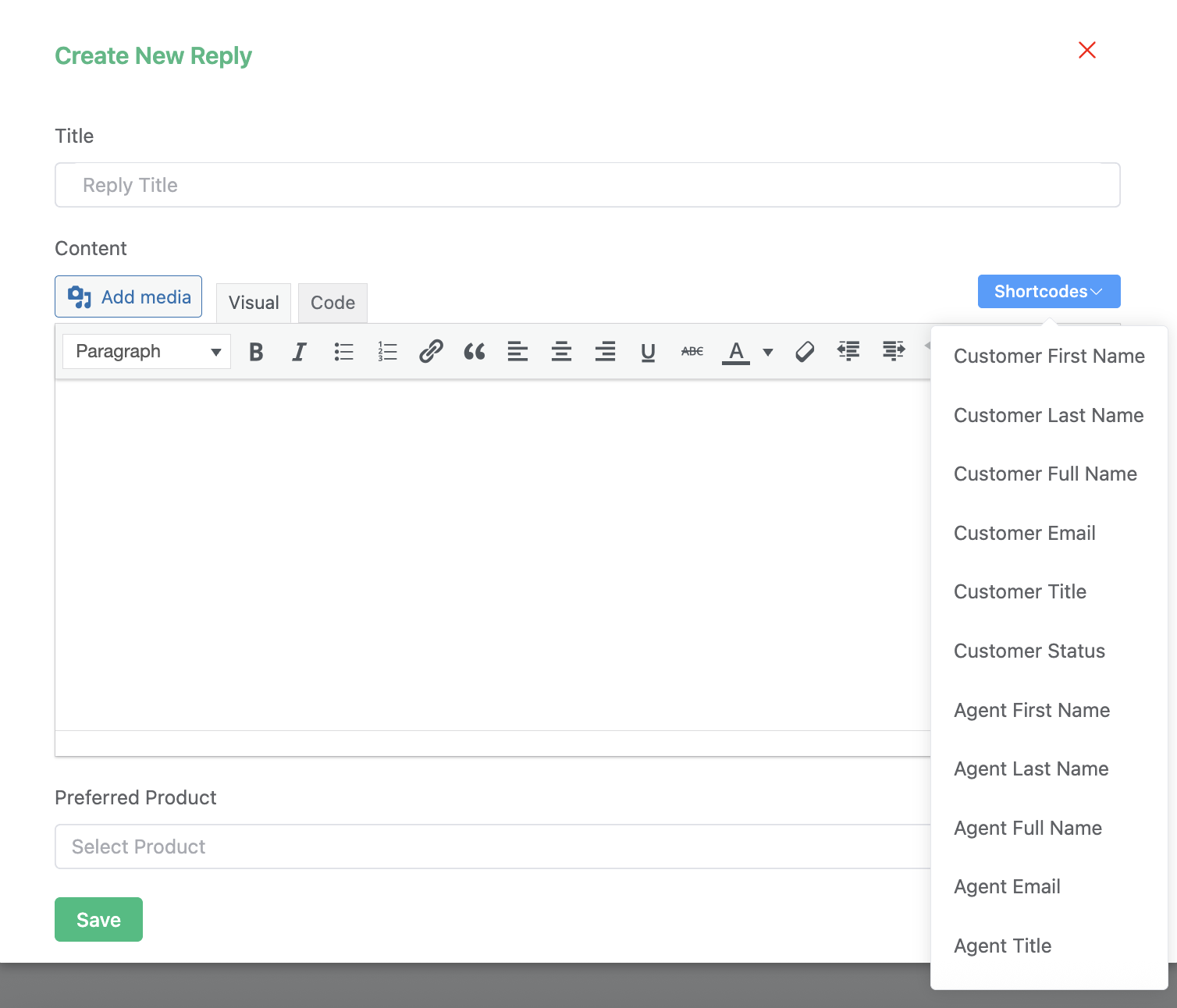
Once saved, these templates are always ready when you need them. You can access them directly from the ticket interface with a click of the Templates button.
– Close Ticket Silently and Automatically
Not every support ticket needs a grand finale. Sometimes, it is best to wrap things up quietly and efficiently. Fluent Support offers two powerful features to help you do just that.
— Close Ticket Silently
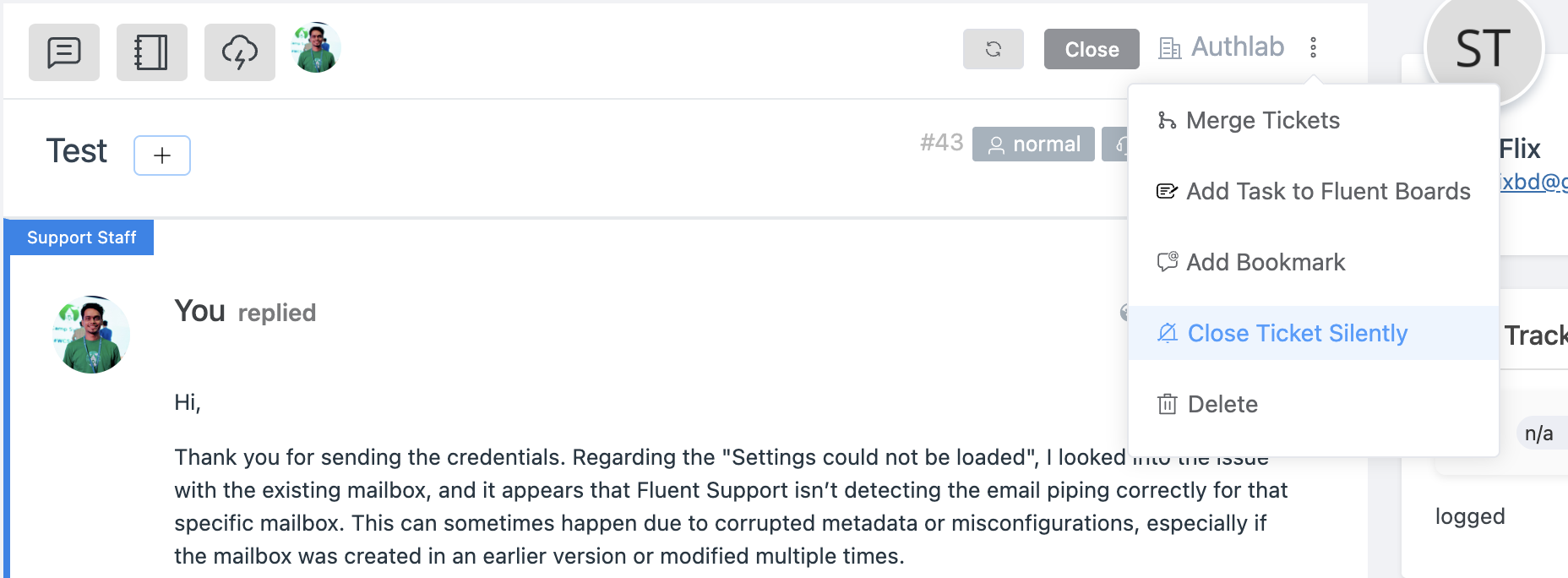
When you need to close a ticket without sending an email notification to the customer, you can use the “Close Ticket Silently” option. This is perfect for internal resolutions or situations where no further customer action is needed.
The process is straightforward:
- Navigate to the specific ticket.
- Select “Close Ticket Silently” from the three-dot icon next to the mailbox.
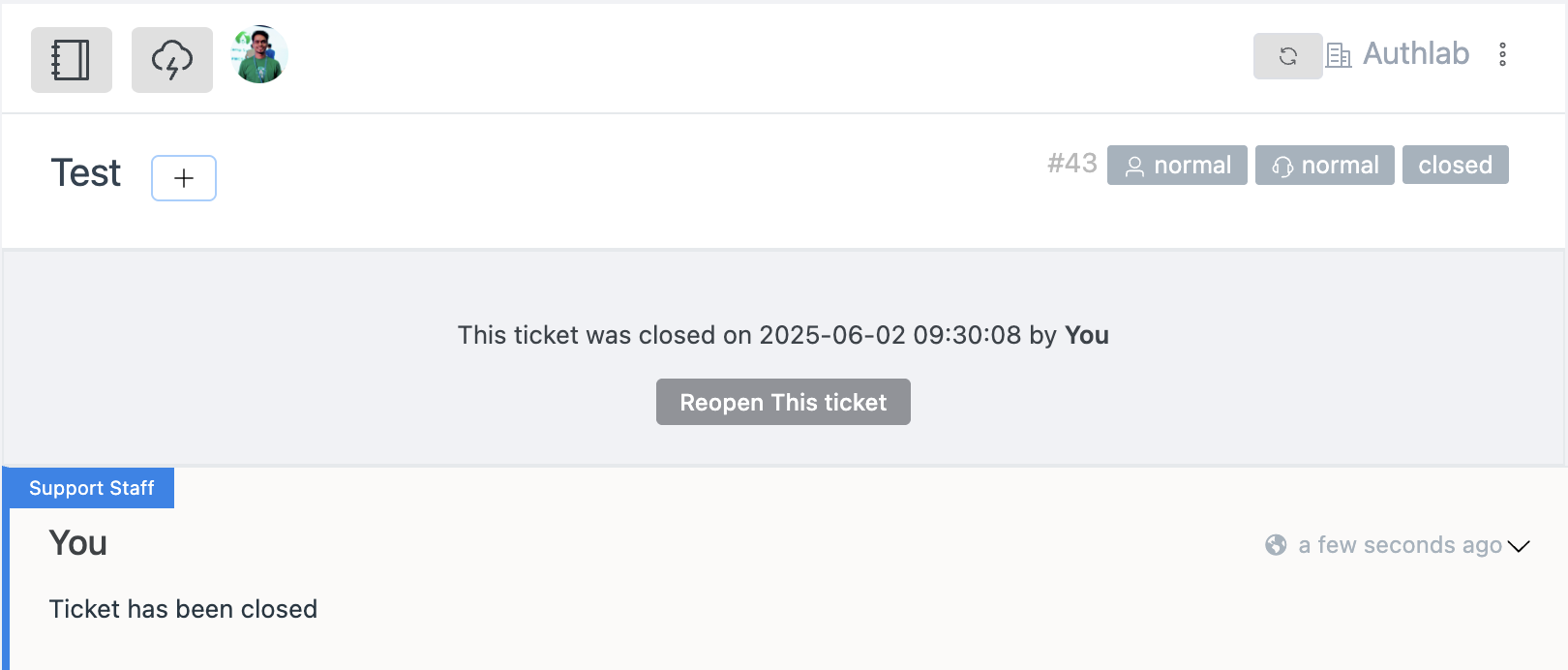
A confirmation message will appear for your team, ensuring the ticket is closed without a customer alert. You can also have the option to reopen the ticket.
— Automatic Ticket Closing
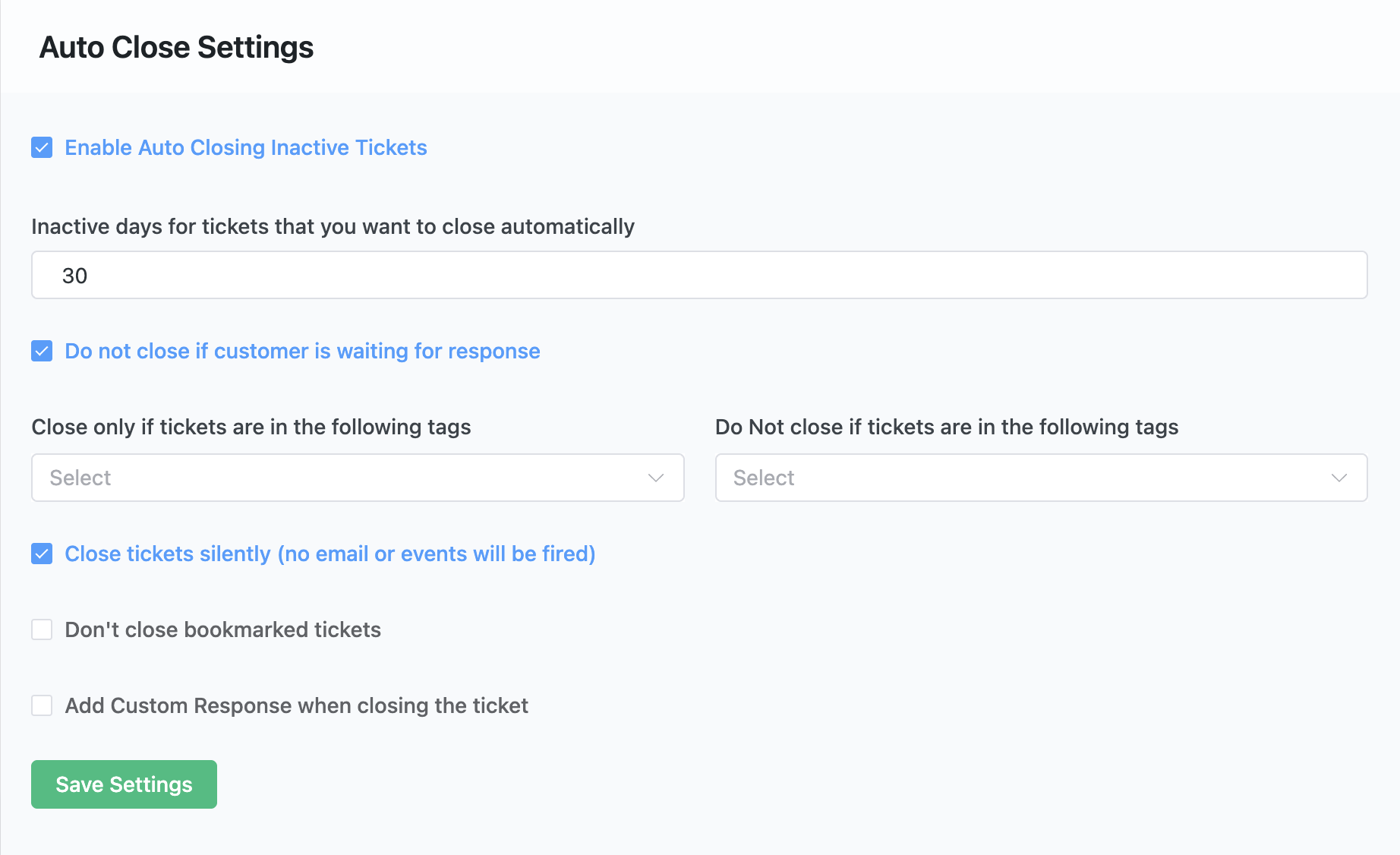
You can also set up rules to automatically close inactive tickets after a certain period. You can customize the conditions, such as inactivity duration, specific tags, or even choose to exclude bookmarked tickets.
Here’s how to configure it:
- Go to Fluent Support settings.
- Select “Auto Close Settings” from the sidebar.
- Enable “Auto Closing Inactive Tickets.”
- Set your desired criteria, such as inactivity days, tags, and whether to exclude bookmarked tickets.
- Choose to close tickets silently if preferred.
By reducing clutter and automating tasks, these features free up your team to focus on active and important tickets.
– Ticket Bookmark
Some tickets need a little extra attention. Maybe they are complex, or you are waiting on more information. With Fluent Support’s ticket bookmark feature, you can easily flag these tickets for quick access later.
The process is smooth. Just go to your desired ticket, click the three-dot icon in the top right corner, and select “Add Bookmark”. You can also assign it to yourself or to other agents on your team.
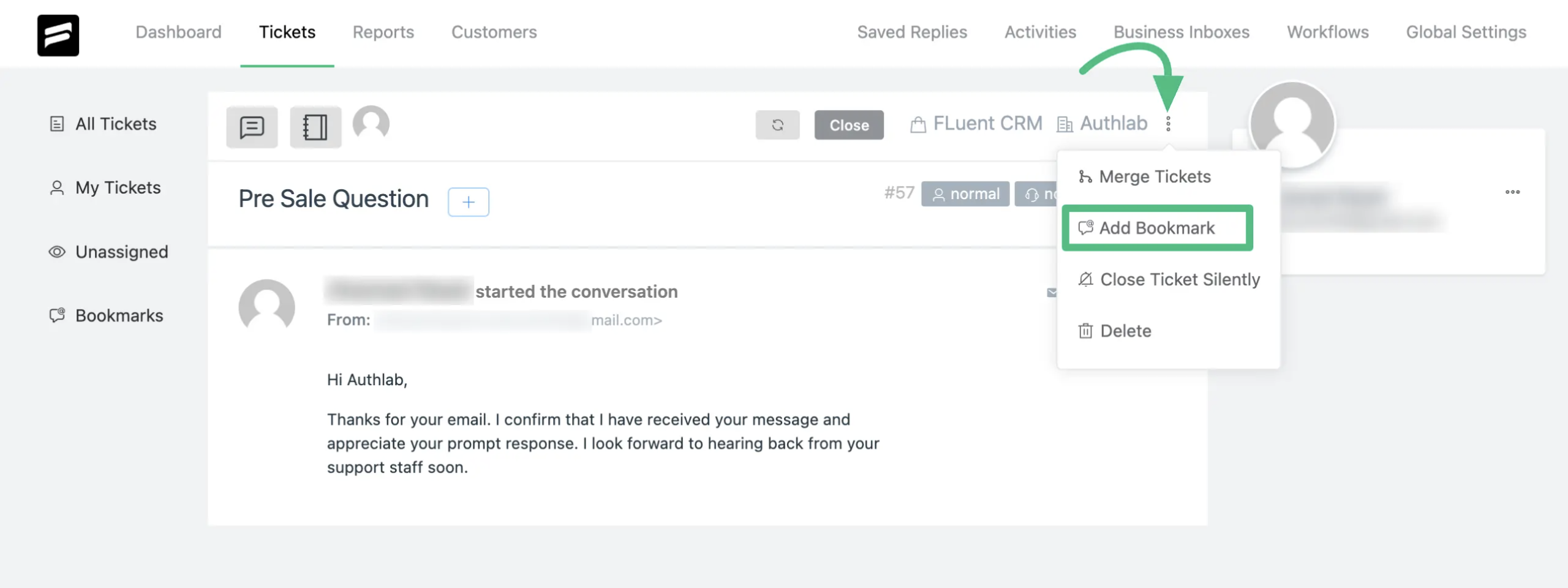
Bookmarked tickets appear in their own section on the dashboard. This keeps your important conversations front and center.
Also, you can see which support staff is assigned to the ticket on the right side of the screen. You can add more agents by simply clicking the plus icon.
Advanced Features of Fluent Support
Hey, we hope you got the basic functionalities of Fluent Support and how it will streamline your customer support process.
Now, let’s move on to two of the advanced features of it that you will actually need the most for your team. Definitely, your support team will love the two.
– Workflow Automation
The secret to a faster, smoother support team is automation. Fluent Support’s workflow automation takes care of repetitive tasks, which gives your team a boost in efficiency and consistency.
This powerful feature gives you both manual and automatic workflows for your automation needs.
This feature lets you run both manual and automatic workflows.
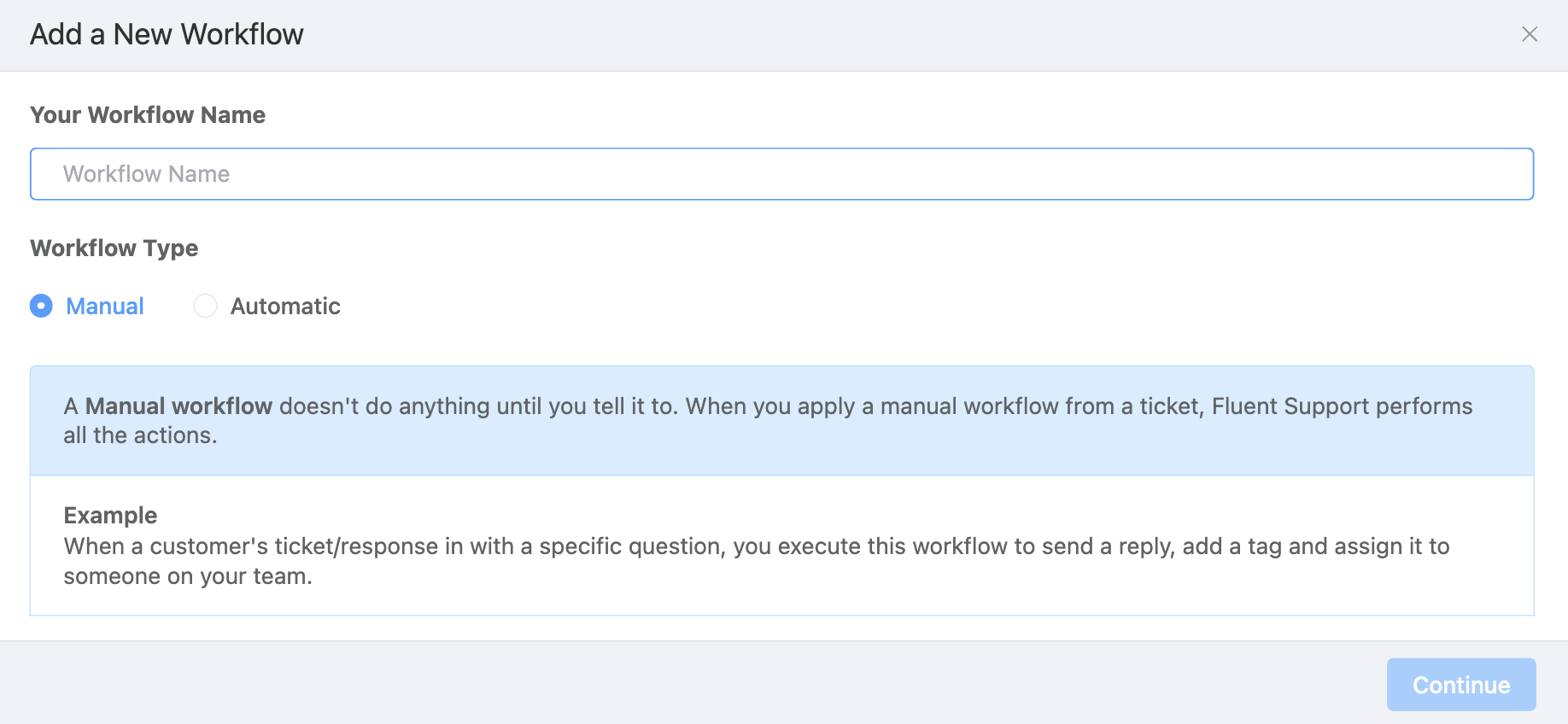
— Manual workflows
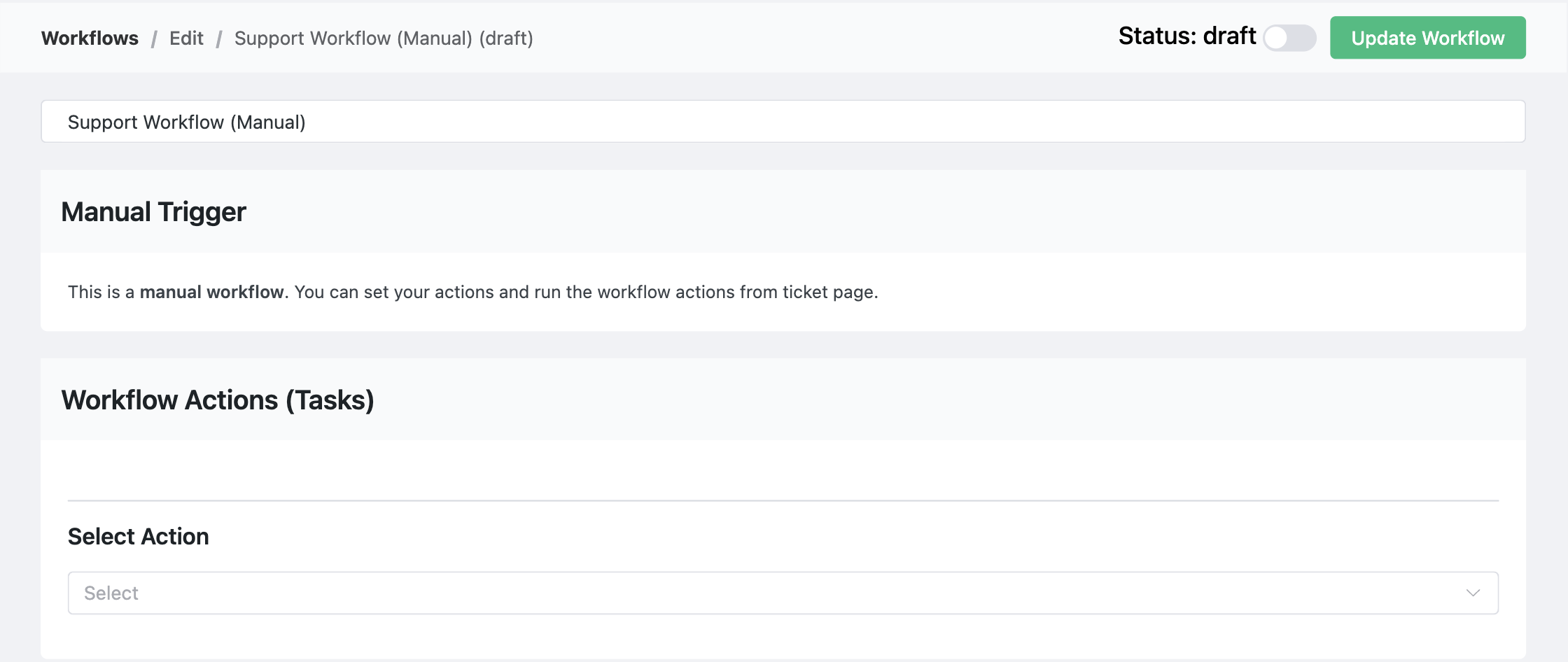
Manual workflows give your team a powerful shortcut. You can execute a predefined set of actions on selected tickets with just one click.
This is especially useful for tasks like assigning agents, adding tags, or sending a quick response to multiple tickets at once.
— Automatic Workflows
Automatic workflows handle your most important tasks without any manual work from your team. This ensures that every action is timely and consistent. The primary triggers for these workflows are:
- On ticket creation: Actions are initiated when a new ticket is submitted.
- On customer response: Workflows are triggered when a customer replies to an existing ticket.
- On ticket close: Actions are executed when a ticket is closed.
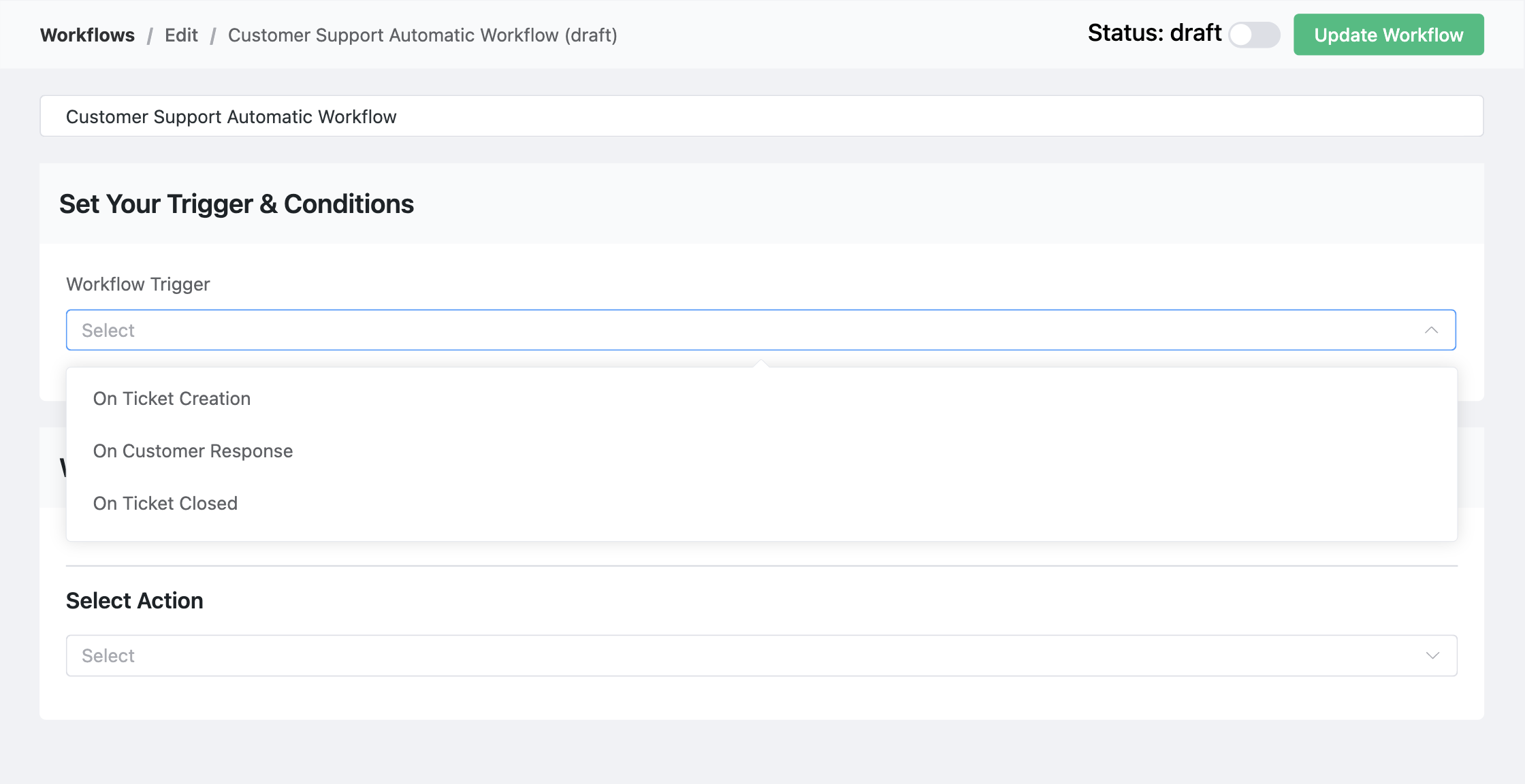
You can also refine each trigger using conditions to target specific scenarios.
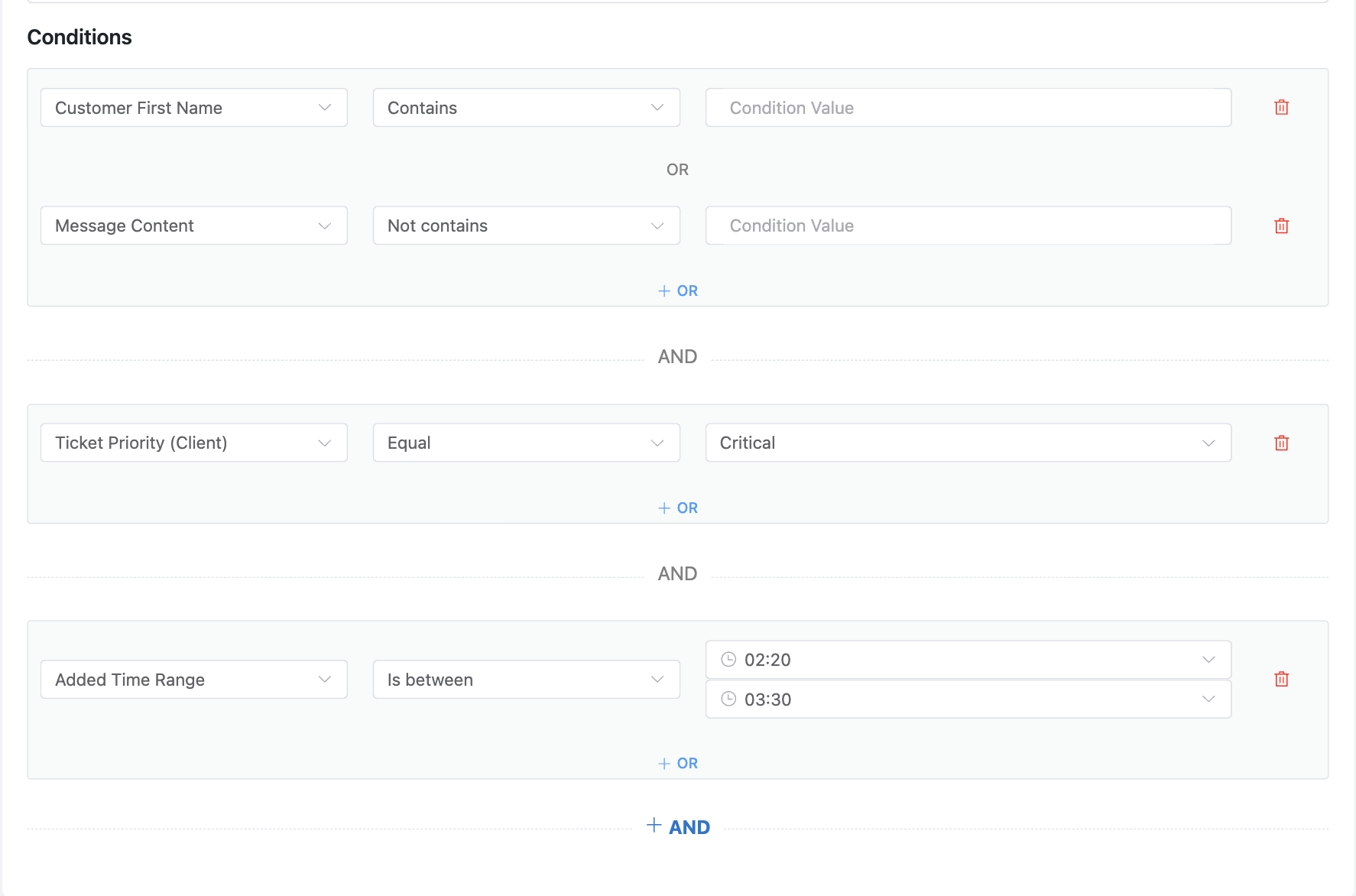
For instance, you can set conditions based on things like ticket priority, customer email, or the assigned product. This gives you precise control, making sure a workflow only executes when the right criteria are met.
— Automated actions
Once a workflow is triggered, it can automatically perform a variety of actions, including:
- Add response
- Add internal note
- Assign agent
- Close tickets
- Delete tickets
- Add and remove tags
- Block ticket submitter
- Add and remove bookmarks
- Change mailbox
- Trigger outgoing webhook
- Add and remove CRM tags
- Add and remove CRM list
- CRM email sequence automation
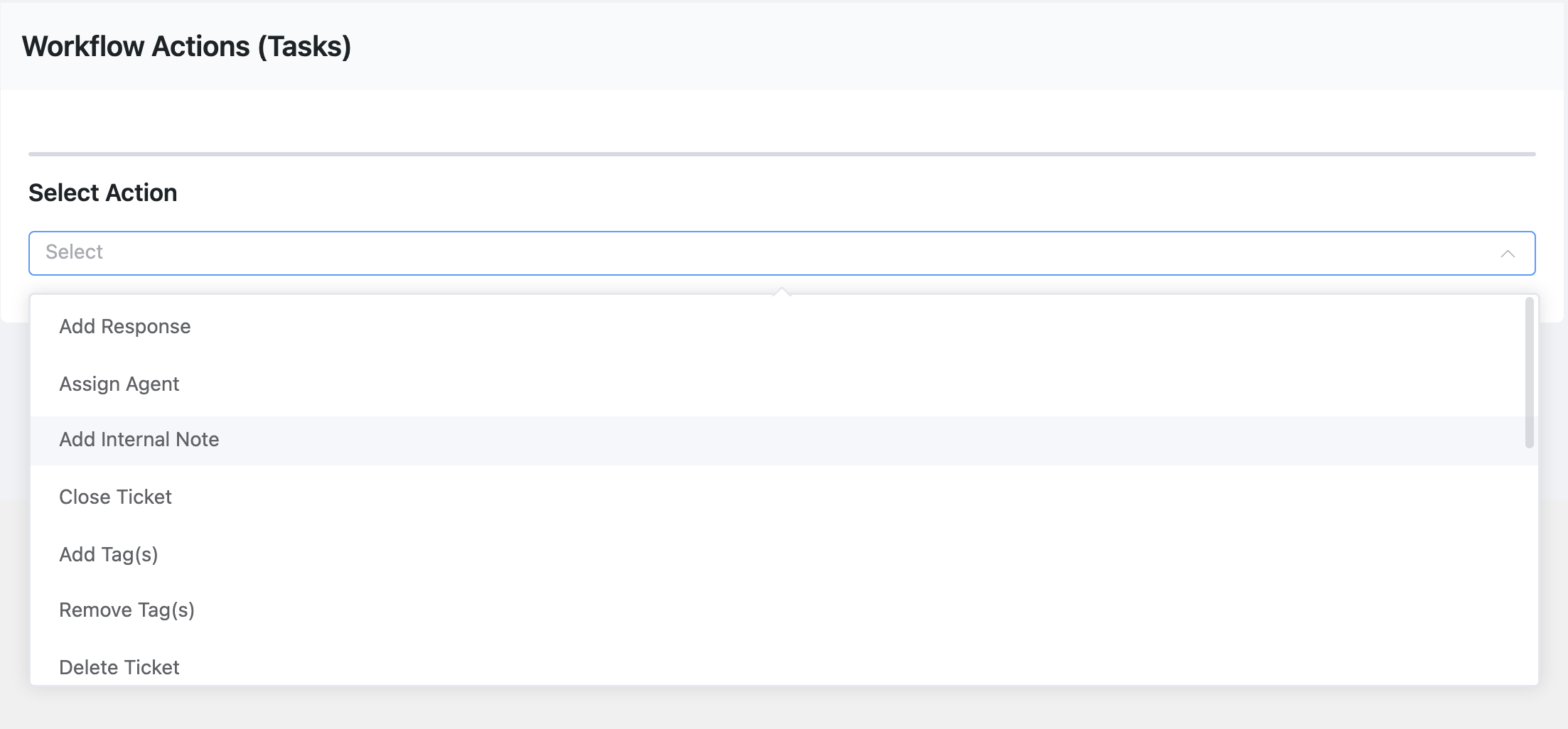
Ultimately, these automation capabilities help your team focus on delivering quality support and minimizing the manual workload.
– Webhooks for Automation
Fluent Support offers both incoming and outgoing Webhooks to make your support process more advanced.
Let’s look at both of them so that you can know how it actually works.
— Incoming Webhooks
Incoming webhooks are the perfect solution for creating tickets from outside platforms. This powerful feature lets you generate tickets from your favorite tools, so every support conversation stays in one place.
To set it up, go to Global Settings and find the Incoming Webhook option. From there, you just copy the unique webhook URL to use.
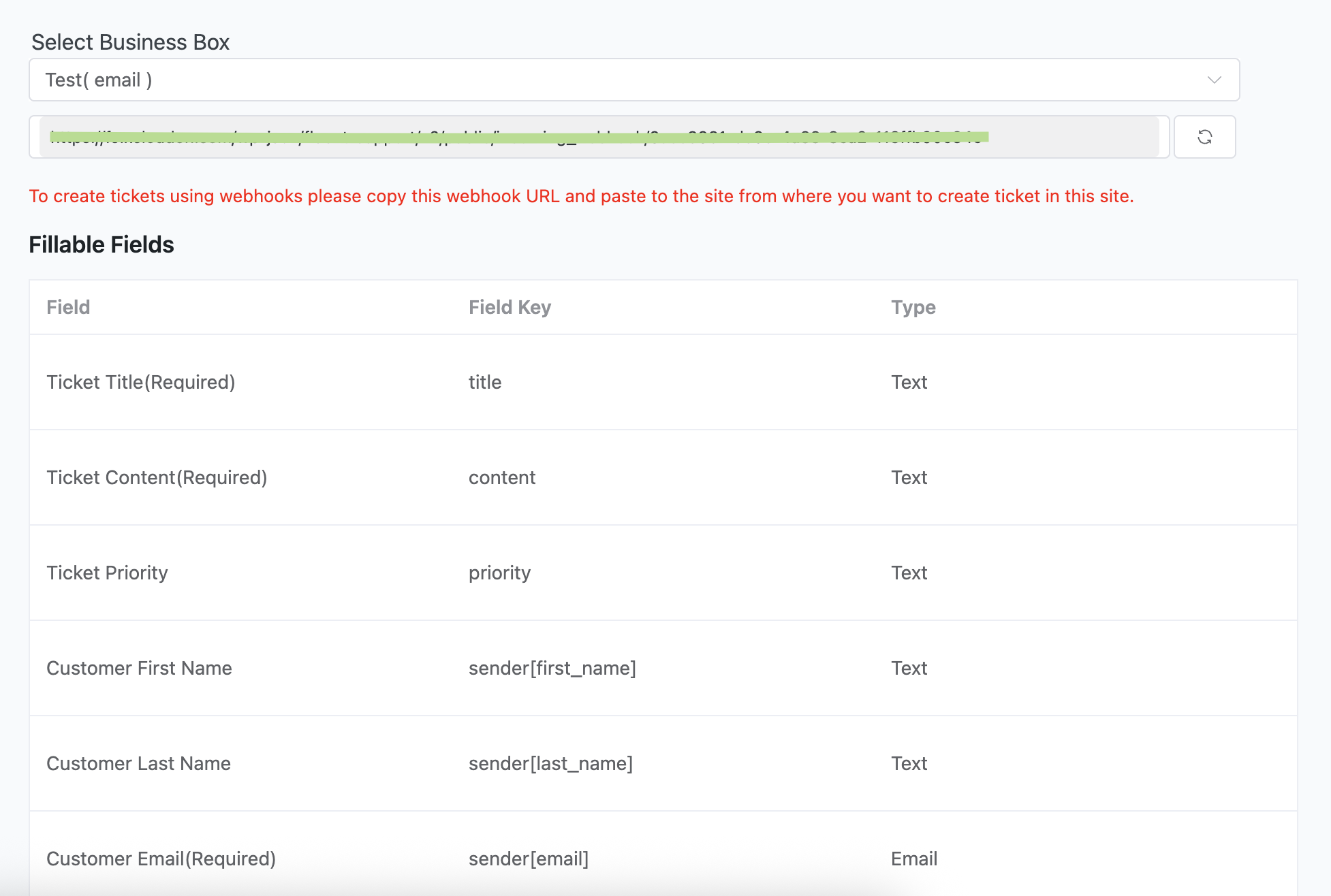
Now you can use any external platform that fits your workflow to send data. For a quick demo, we have done it using Postman.
Just set the request method to POST and the format to form-data.
Next, you will paste the webhook link you copied earlier. From there, you just map the key fields to match Fluent Support’s structure and fill in the values for your case.
Once everything is ready, just click Send. The ticket will then show up instantly in Fluent Support.
— Outgoing Webhooks
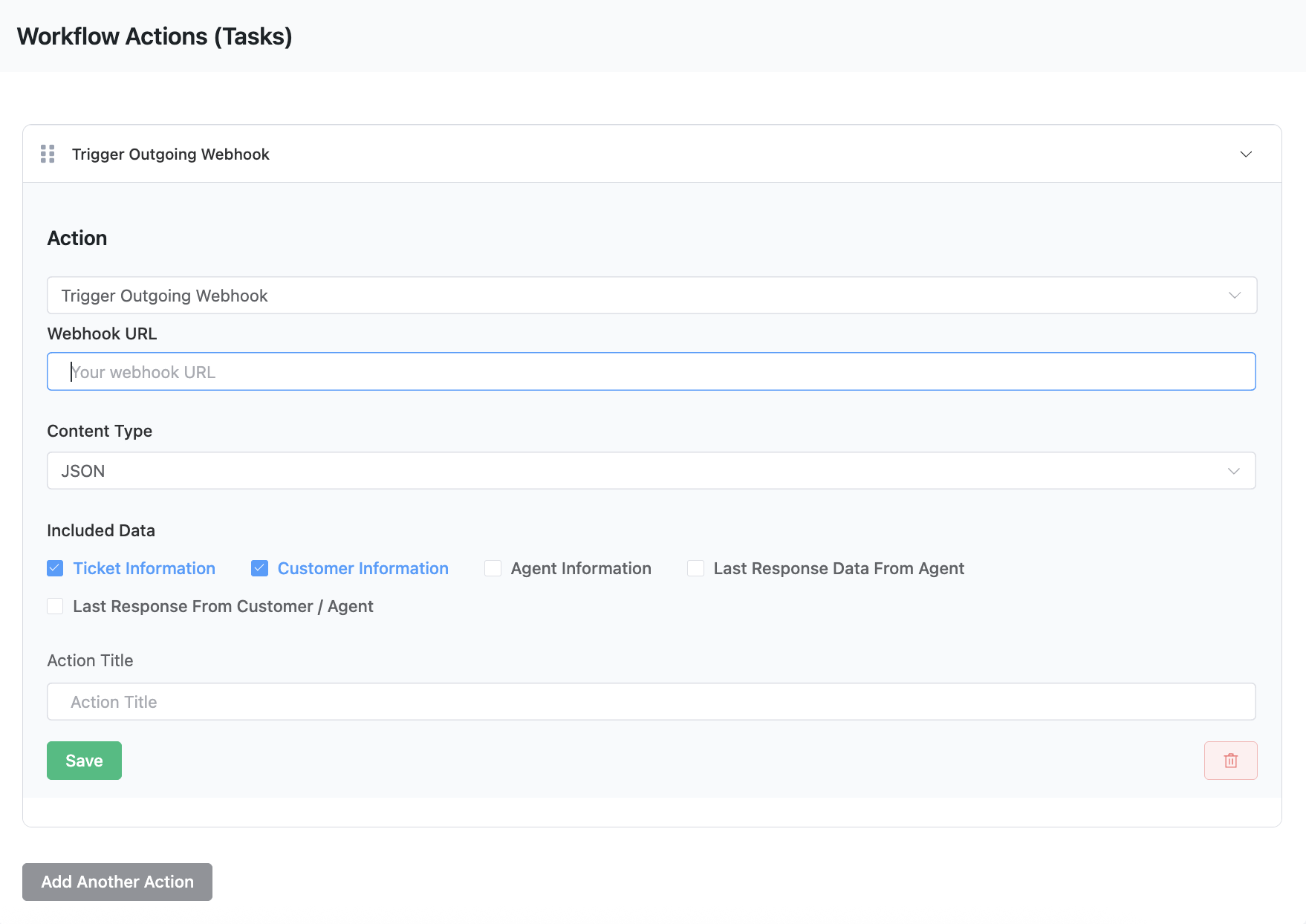
Outgoing webhooks let you push your ticket data to any external platform you need. This gives you the power to connect Fluent Support with a wide range of other applications.
To get started, you will select the Trigger Outgoing webhook from your workflows. Then, you just add your webhook URL and select the data you want to send.
AI Features
AI is now an essential part of modern support. Fluent Support’s tools are designed to make it simple. The plugin comes packed with powerful AI features that boost your team’s productivity and improve customer conversations. Here is a look at what each one does:
– AI Ticket Reply
Respond to tickets faster with AI-suggested responses based on the entire conversation. This gives agents a strong starting point and helps them reduce response time.
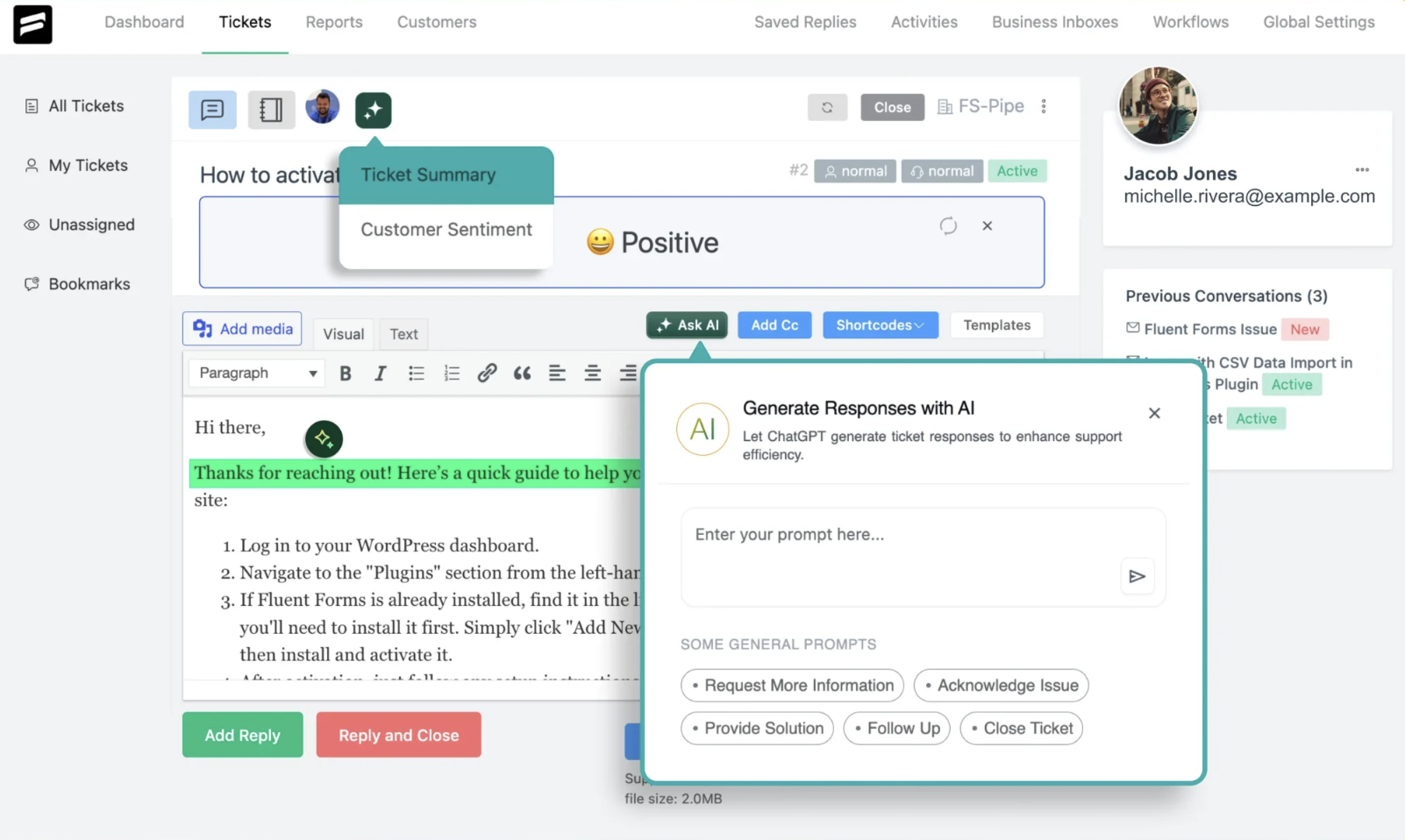
– Customer Sentiment
Detect the emotional tone of a ticket, whether it is positive, neutral, or negative. This allows agents to approach each case with the right mindset and empathy.
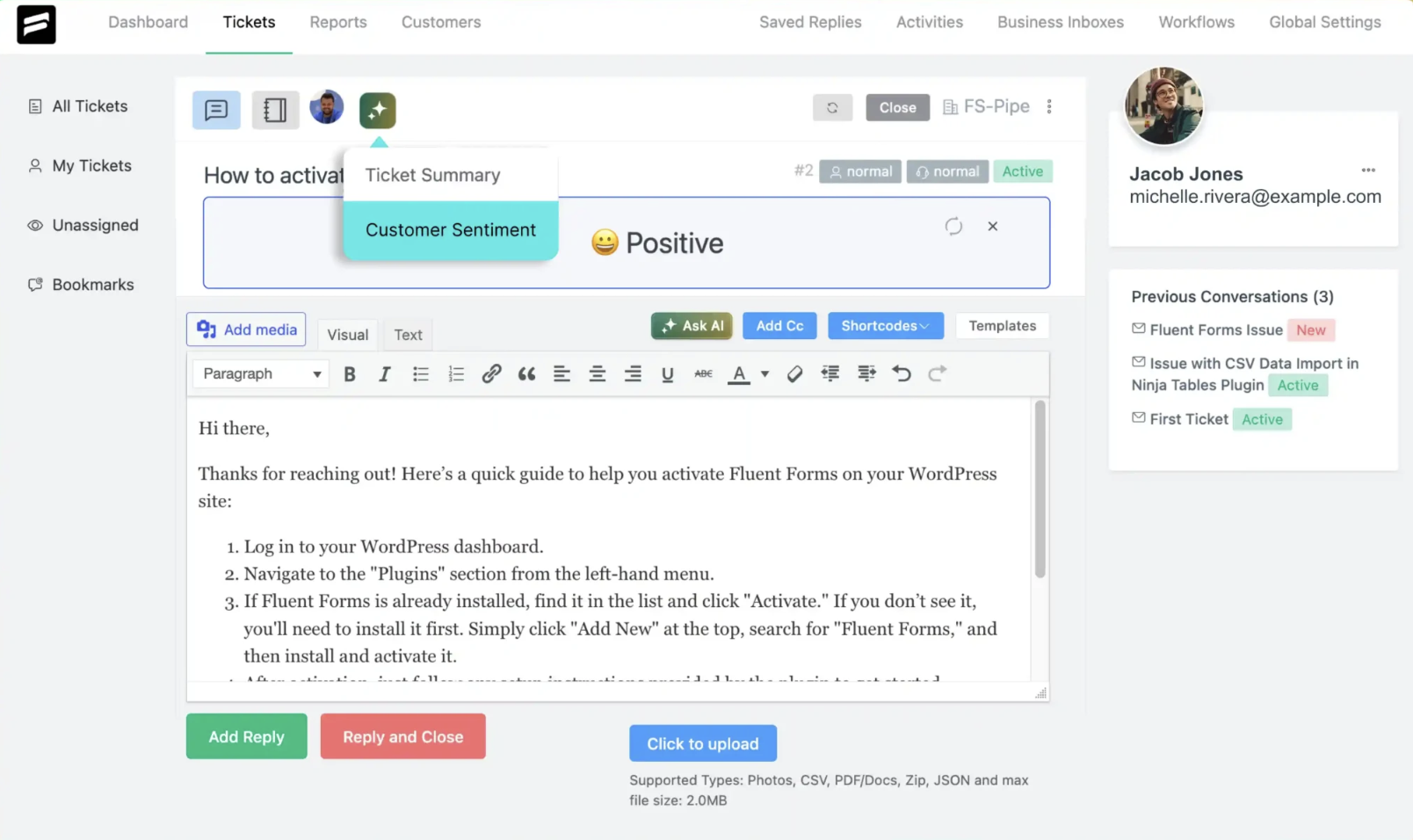
– Ticket Summary
Dealing with a long thread is no problem. Fluent Support can generate a quick summary of the entire conversation so agents can get up to speed in seconds and jump right in.
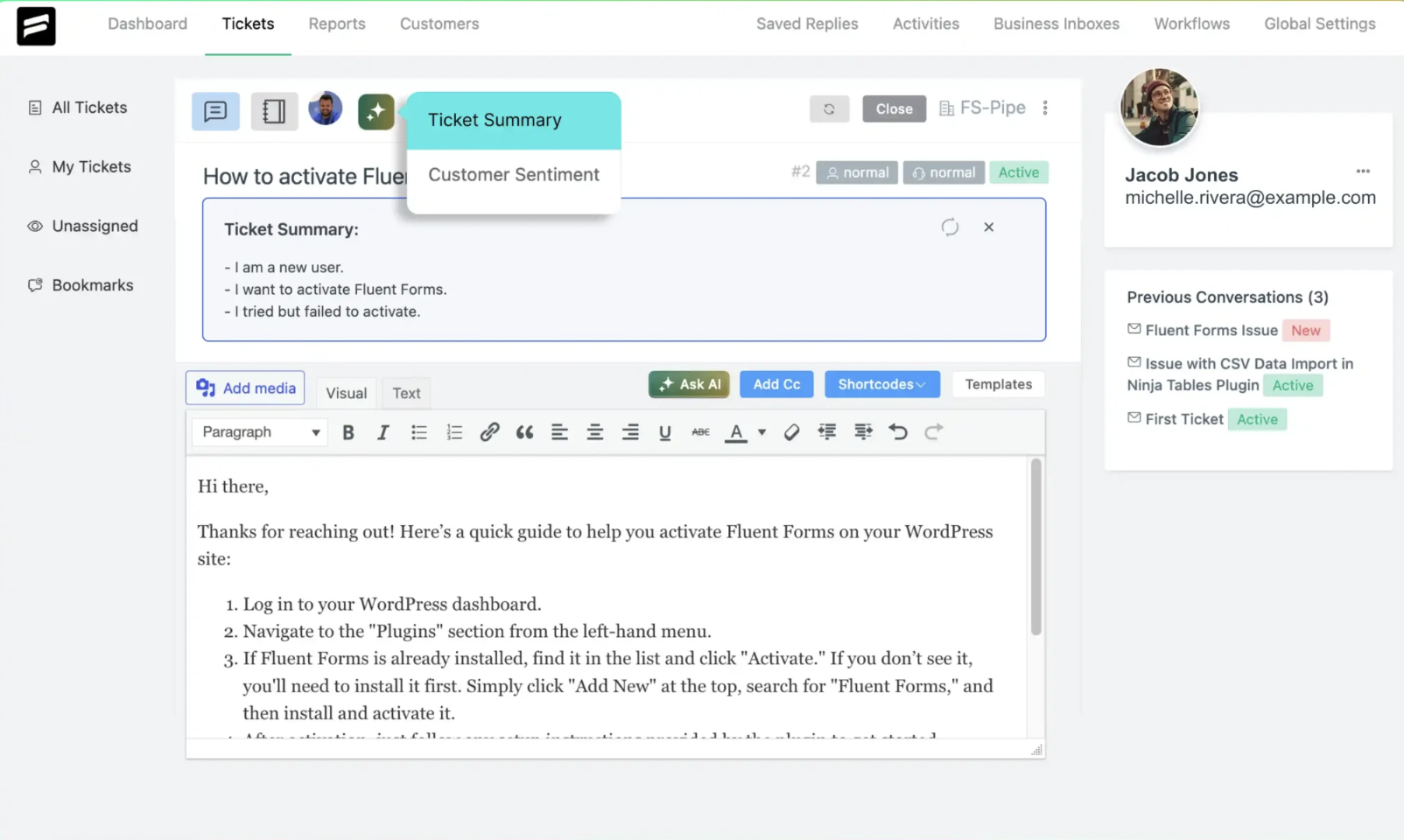
– AI Generated Reply
Allow AI to draft multiple response variations for a single ticket. Agents can then pick the best one or edit it for a more personal touch.
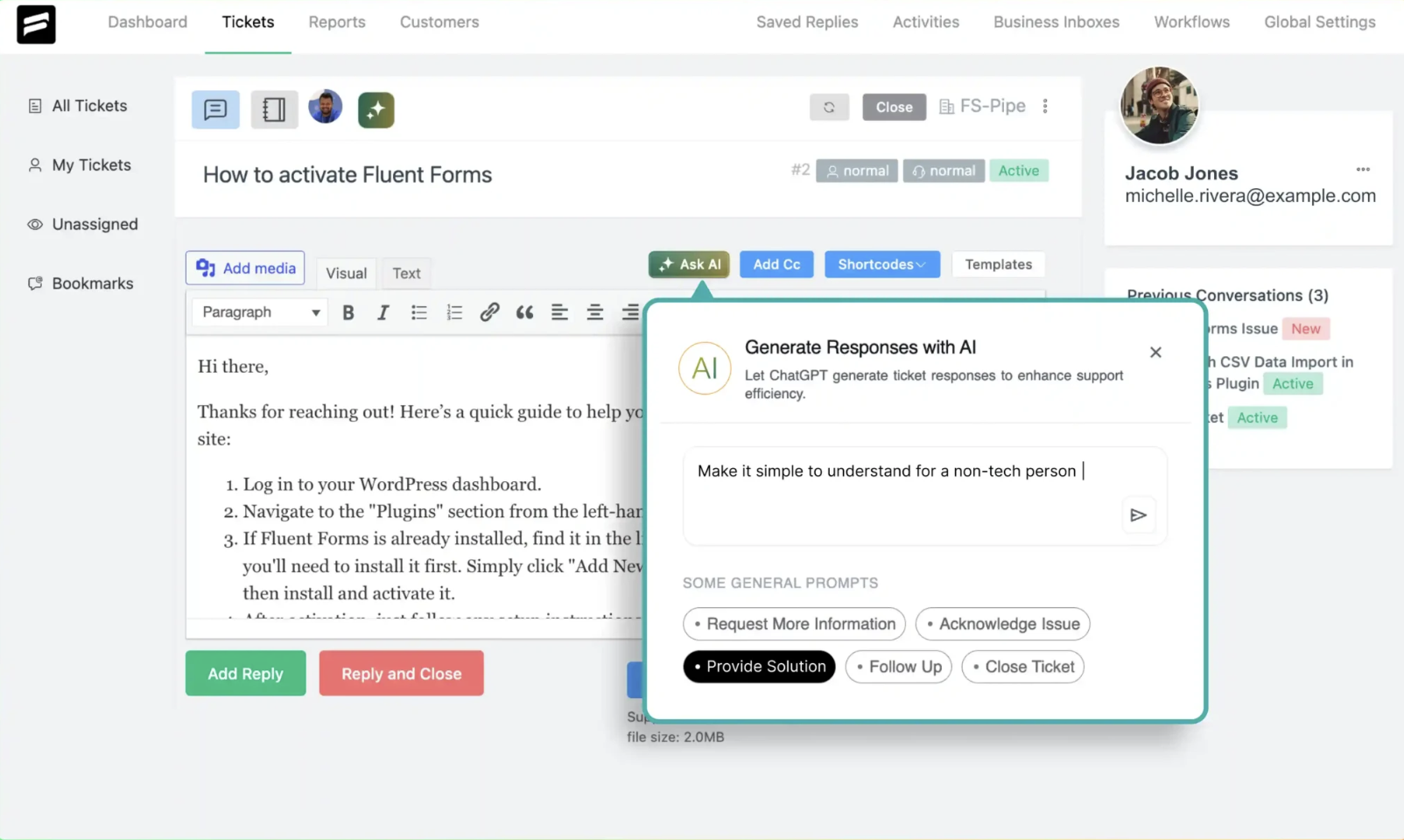
– Fine-Tune by AI
Agents can use this feature to instantly polish a pre-written message. It can make the response clearer, more professional, or match your brand’s voice.
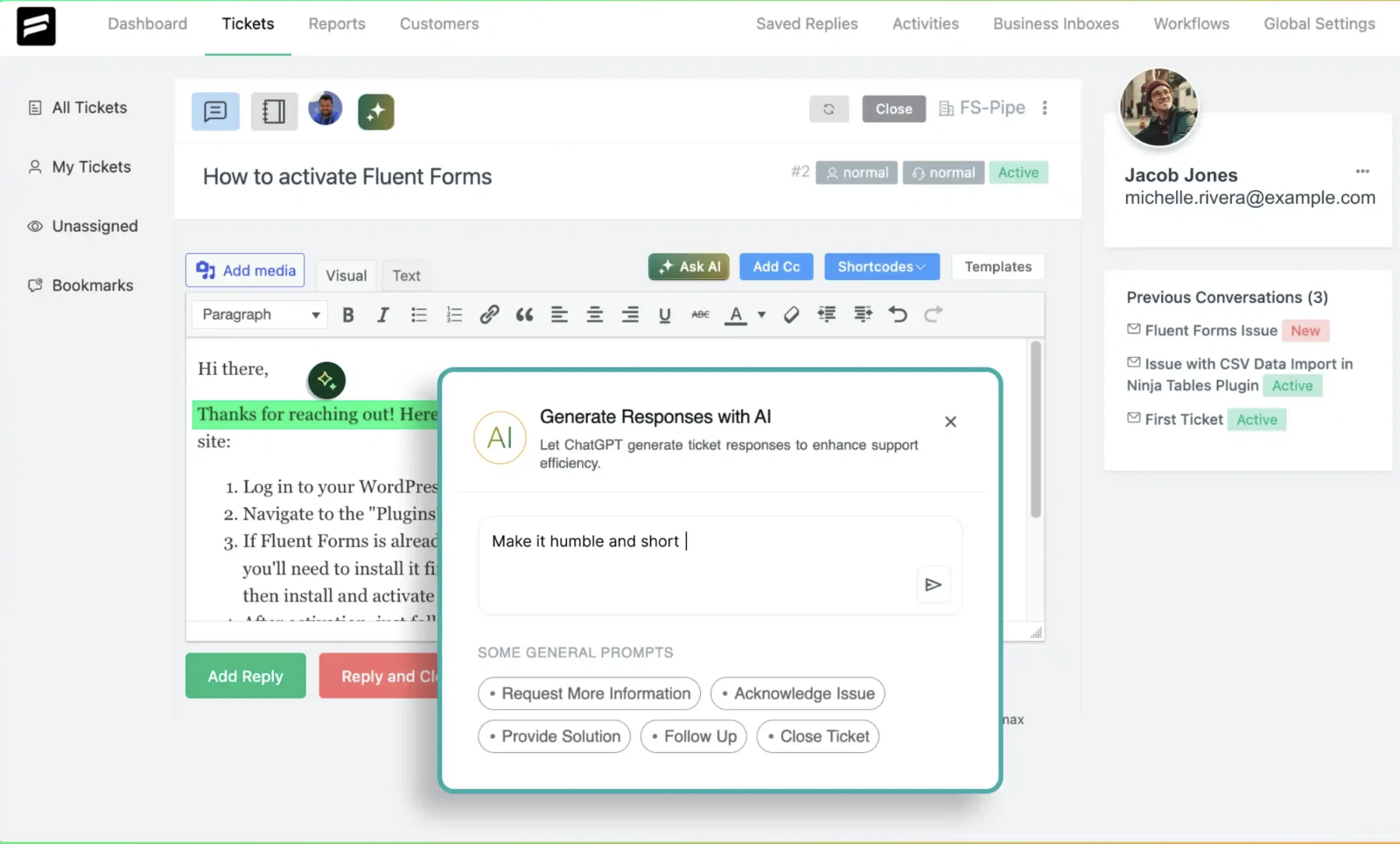
All of these AI features help your team respond faster, work smarter, and avoid burnout.
Activities and Reports
Now let’s explore the key metrics that give you a clear view of team performance. With the features included in activities and reports, you can easily monitor performance, track agent activities, and get a clear overview of every detail.
– Dashboard Overview
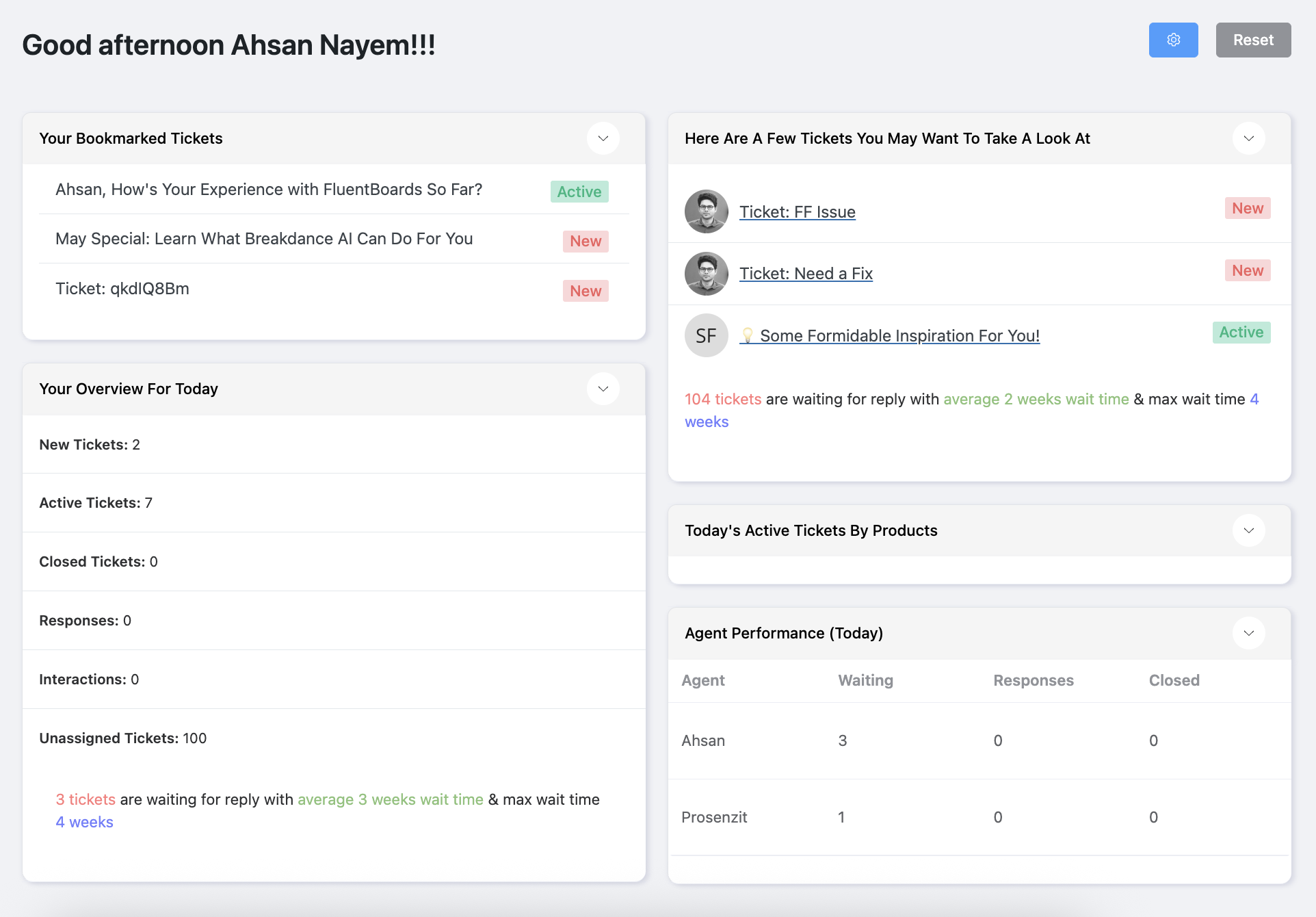
The Fluent Support dashboard gives you a quick snapshot of your support day. You get a clear overview of everything that matters with five key sections:
- Tickets to review
- Your daily overview
- Bookmarked tickets
- Active tickets by product
- Today’s agent performance
– Reports and Stats
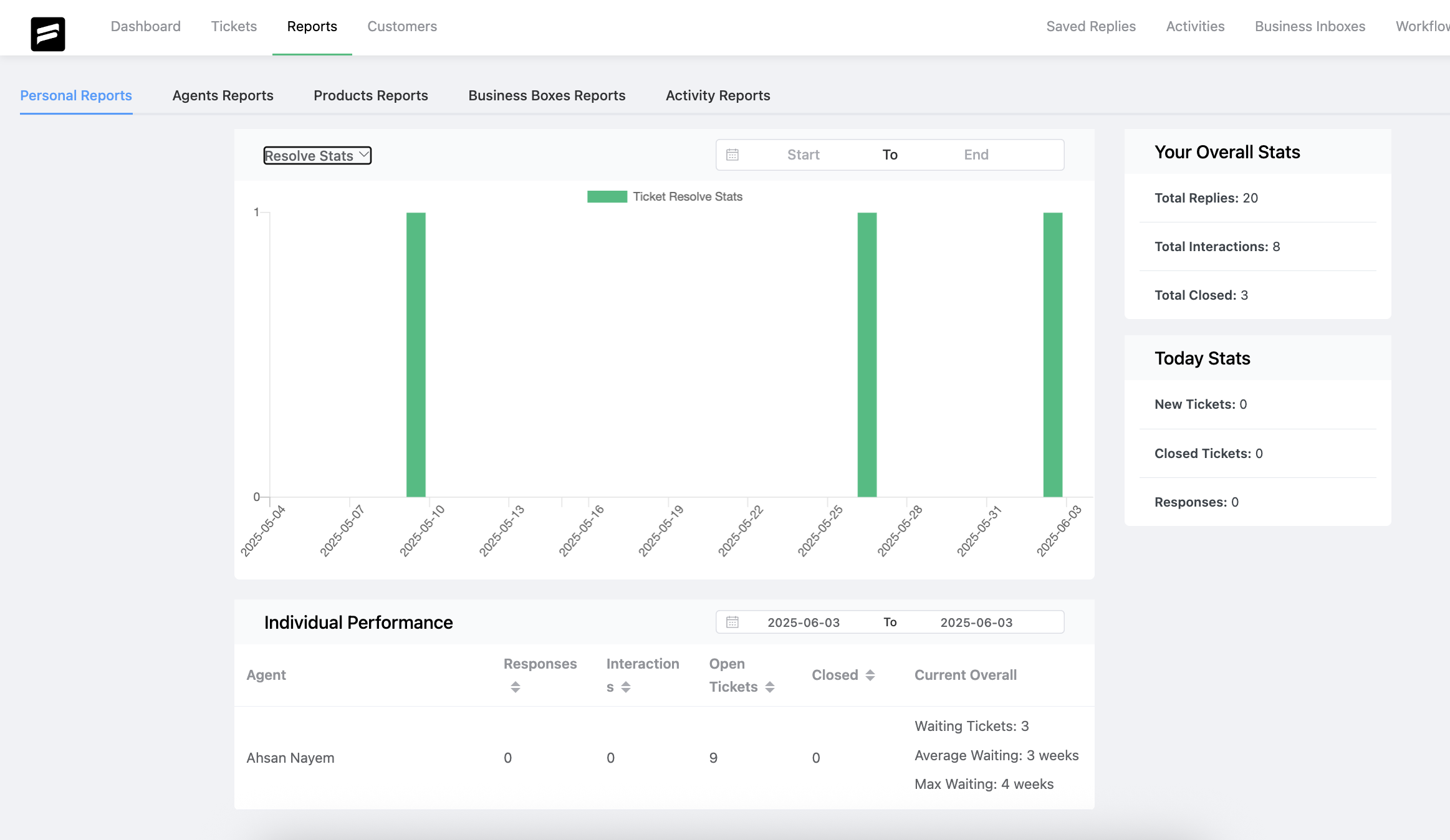
To truly measure your team’s success, you need the right data. Fluent Support’s advanced reporting dashboard gives you a detailed look at how your support team is performing. It’s neatly organized into five key sections to provide everything you need at a glance:
- Personal Reports
- Agents Reports
- Products Reports
- Business Boxes Reports
- Activity Reports
From team-wide stats to individual agent performance, the dashboard gives you everything you need to measure, track, and improve.
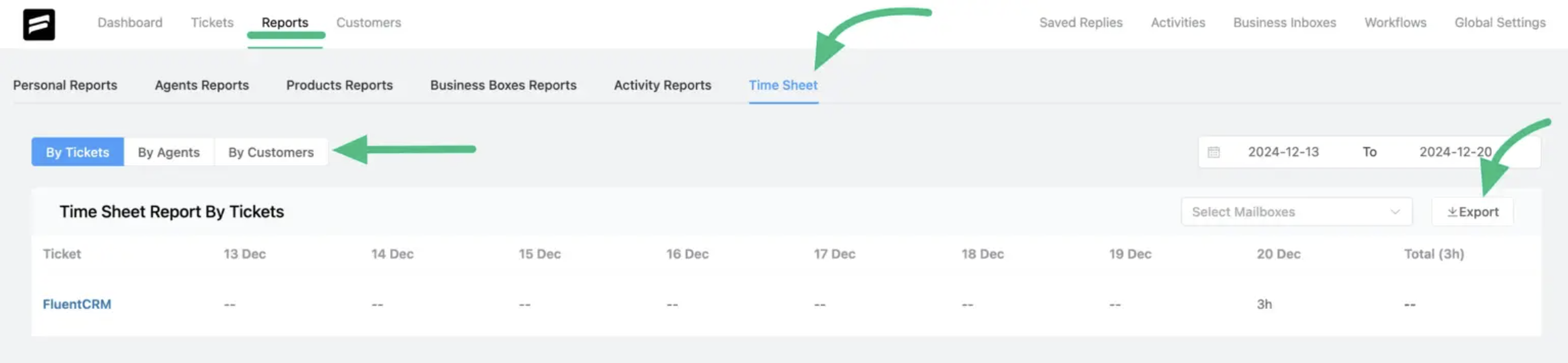
And when you enable the Agent Time Tracking feature, you will be able to see the time sheet for your agents.
– Overall Activities
Knowing what happens inside your support system is key. Fluent Support’s Overall Activities feature gives you a comprehensive log of every action taken.
This includes everything from new tickets and agent responses to internal notes and status changes. By accessing this log, you can easily monitor team performance, ensure accountability, and maintain transparency across your support operations.

– Dynamic Dashboard
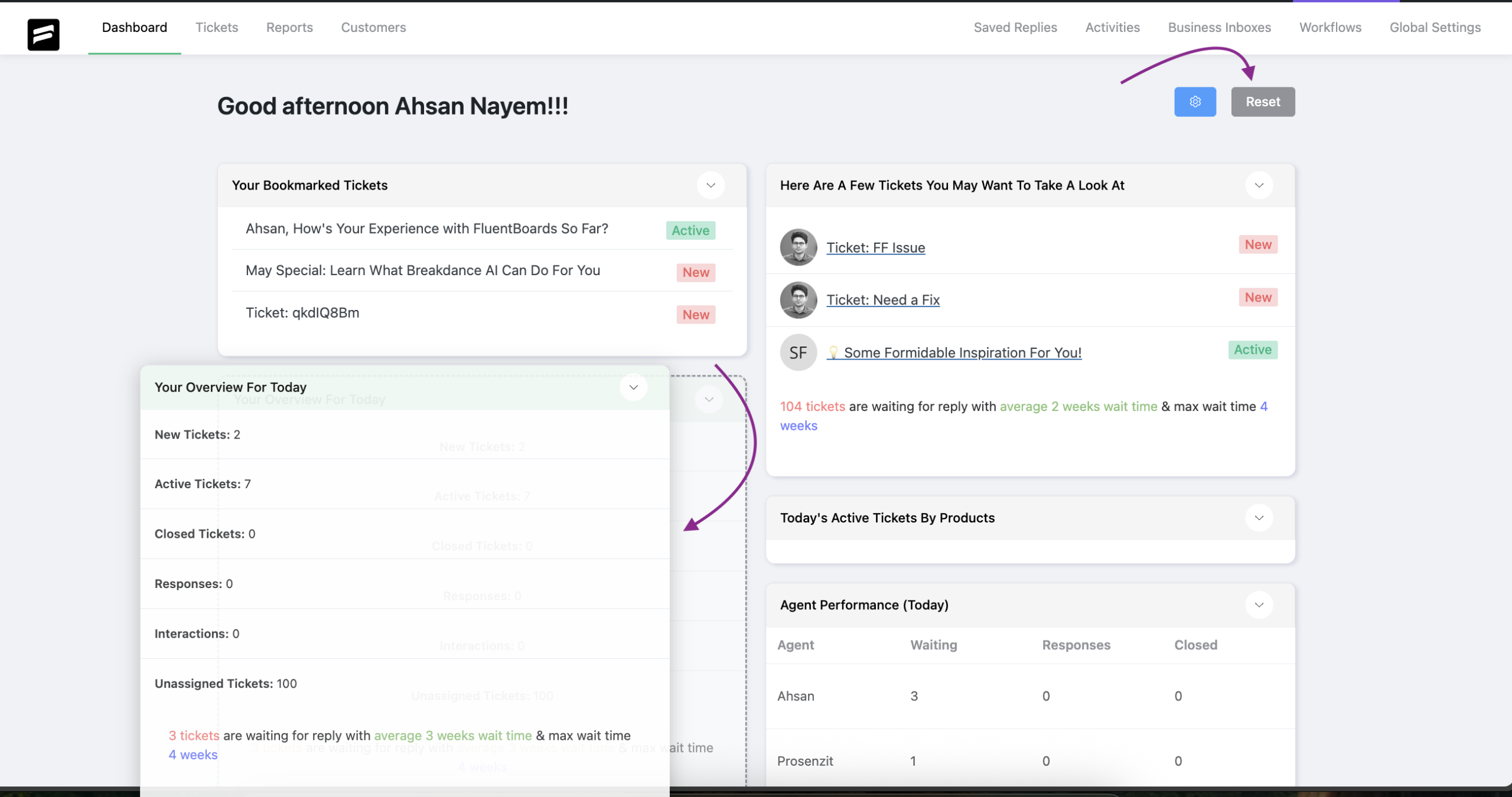
No two support teams are the same. Fluent Support’s dynamic dashboard lets you customize your view with simple drag-and-drop.
You can easily show, hide, or rearrange sections to focus on what matters most. If you ever need to, you can reset the layout with a single click.
– Collision Detection
In a busy support system, things can get messy when two agents jump on the same ticket.
Fortunately, Fluent Support has a solution: collision detection. It shows exactly who is viewing or working on a ticket in real time.
You will see the agent’s profile picture right on the ticket, so everyone knows who is handling it. This feature helps avoid duplicate replies, confusion, and wasted effort.

Easy Switching and Migration
Lastly, it’s time to discuss the option of switching from other ticketing systems to Fluent Support and the migration process.
So, let’s look into it.
– Ticket Importer
Okay. You’ve got the idea about how much jam-packed Fuent Support is for a custom support team.
And after seeing all these features, we are confident that you might be thinking about making a switch.
The good news is, Fluent Support makes it easy to bring your existing tickets with you if you are already using one. Its smooth ticket importing functionality ensures a seamless transition.
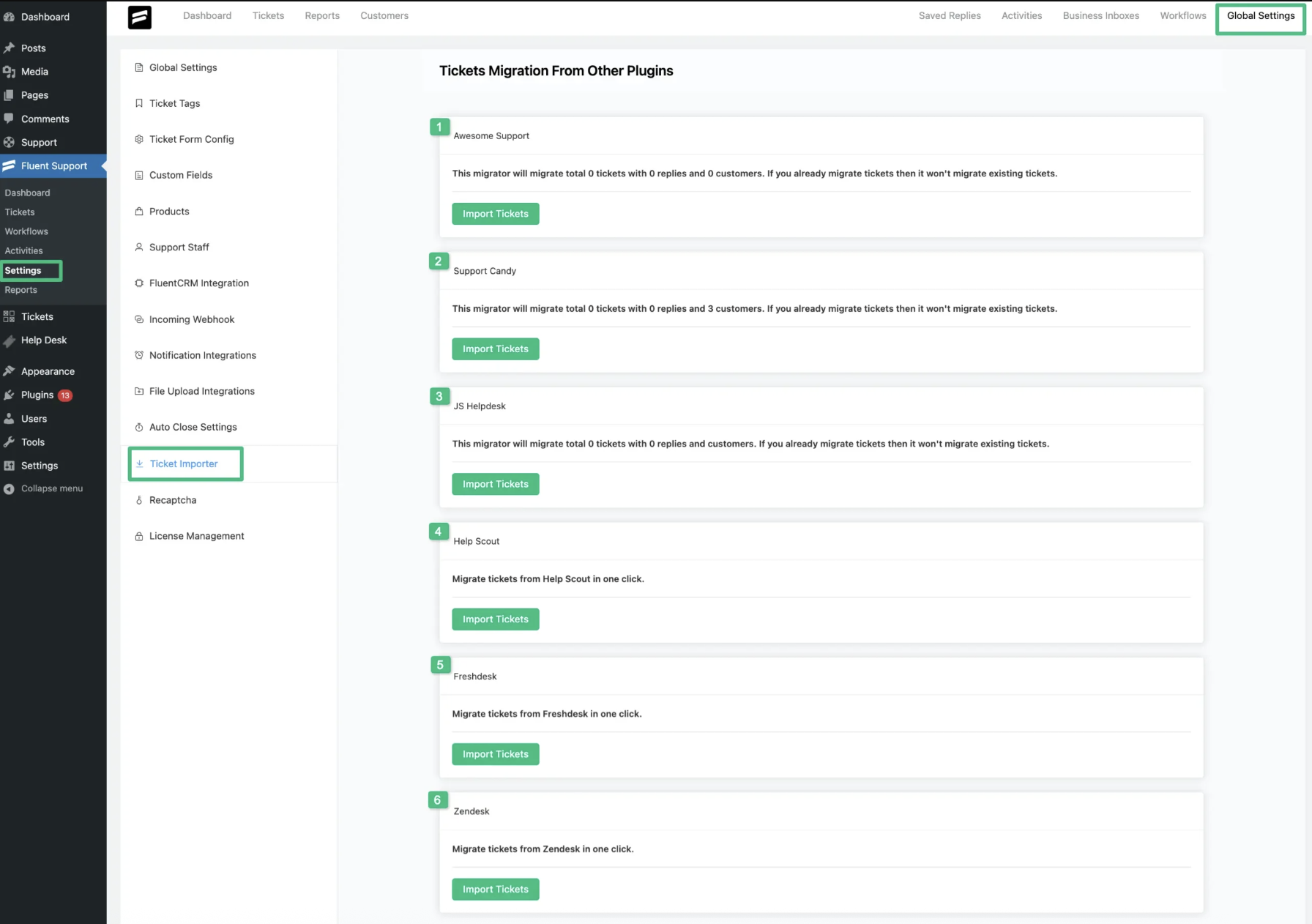
The Ticket Importer allows you to migrate your entire ticket database from platforms like Awesome Support, SupportCandy, JS Helpdesk, Help Scout, Freshdesk, and Zendesk.
However, the process is slightly different depending on the platform you’re coming from.
— For WordPress Plugins
For plugins like Awesome Support, SupportCandy, and JS Helpdesk, the process is straightforward: you just go to Global Settings, select your previous platform, and click Import Tickets.
— For Other Platforms
For platforms like Help Scout, Freshdesk, and Zendesk, a few additional configurations are needed, such as entering API credentials. Detailed guides are available for each platform to assist you.
Final Verdict: Is Fluent Support the Right Choice?
At the end of the day, a ticketing system is more than just a tool. It’s the home base for your support team. It should feel organized, empowering, and ready for anything.
After reviewing all its features, from its powerful AI to its no-growth-tax pricing, Fluent Support feels like a true home for support.
So yes, it is a confident choice for anyone ready to stop managing chaos and start mastering their support process.





