

















































Most notably, you should focus on security on your WordPress site. They (hackers) are desperate enough to get inside through hardly any means; the least of all is passwords. This is just what WordPress 2FA (two-factor authentication) is intended to do.
If one has access to a password, adding a second layer of security can still be helpful. WordPress 2FA does this by adding a security question or restricting access to certain IPs.
Here, you will find everything you need to know about WordPress Two-Factor Authentication: what it is, why you need it, and how to implement it.
What Is WordPress 2FA?
Two-factor authentication (2FA) is an extra step to verify if a user has access to the Web. You may think about it like a lock and a key system. The lock will be a password, and the second factor, perhaps a code sent to your phone, will be the key. Even if someone earns access to the password, they still cannot access your WordPress site without that second key.
For WordPress, this added layer of security (WordPress 2FA) is vital. Because stealing passwords through phishing, data breaches, or brute force attacks is now standard. WordPress 2FA Security helps set up a taller barrier against hackers.
Why Is WordPress 2FA Important?
According to Digital Silk, there are 1.1 Billion websites in the world (till 2024). Interestingly, more than 40% of these websites on the internet use WordPress, providing Cyber Attackers a reason to target it. 2FA serves several purposes in the following ways:
- Blocks Unauthorized Logins: This second layer of WordPress 2FA authentication prevents hackers from accessing your site even after a password.
- Cancel Out Brute Force Attacks: Hackers use automated tools to guess passwords. WordPress 2FA is one of the best methods to avoid it.
- Increases User Trust: When users see that you care about security, they feel safer interacting with your site.
- Compliance with Modern Security Standards: Many platforms, including Google, already require 2FA. Your WordPress site should follow suit.
How Does Two-Factor Authentication Work?
When the 2FA feature is enabled on your WordPress site, logging in takes two steps:
- Your username & password.
- Then, the person needs to put some time-based code from an authenticator app, a text message, or even a hardware key.
If either fails, access is denied. This simple but powerful system keeps your site safe from most cyber threats.
Methods to Implement WordPress Two-Factor Authentication
There are various ways of putting 2FA on your WordPress site. Let’s have a closer look at the most common methods below:
Authenticator Apps
Apps that will authenticate, namely Google Authenticator, Authy, or Microsoft Authenticator, generate unique time-sensitive codes, changing every thirty seconds.
To set this up, installing a plugin such as WP 2FA or miniOrange Google Authenticator is advisable. These plugins allow the creation of a QR code that you can scan through your app to link your account.
This is very much recommended, as it’s secure and easy.
Email-Based 2FA
Email-based 2FA will send a one-time code to your registered email address upon logging in. It is also good for those users who want to avoid the app.
Plugins like WP 2FA or Two-Factor Plugin provide this email-based WordPress 2FA solution. However, it is not as secure as authenticator apps because email accounts can be hacked using phishing techniques.
SMS-Based 2FA
SMS-based 2FA is a process that sends a confirmatory code to your mobile phone, mainly through text. It’s quite simple, but the SMS is prone to SIM swap attacks.
This can be turned on using the miniOrange Google Authenticator, which supports SMS-based verification.
Hardware Security Keys
Hardware keys such as YubiKey are at the top-most security level. These physical keys have to be plugged into your computer or tapped against your mobile during login.
This method, though very secure, is often less convenient and expensive, thereby better suited for high-security environments.
Best WordPress 2FA Plugins
Setting up Two-Factor Authentication for WordPress does not have to be a tedious task if one has the best plugin. The following are the top WordPress Plugins in this regard.
1. WP 2FA
This plugin is great for beginners. It’s extremely user-friendly, allows multiple authentication methods, and offers robust backup options. Its premium version includes additional features, such as WooCommerce integration.
2. miniOrange Google Authenticator
This plugin gives users flexible options: authenticator apps to hardware keys. Therefore, it is more of an advanced customization that is ideal for users.
3. Wordfence
Wordfence is famous worldwide for its all-in-one security features. It integrates 2FA with malware scanning and firewall protection, thereby offering a comprehensive solution.
4. Two-Factor Plugin
If you’re looking for something simple, this plugin gets the job done with minimal setup. It supports TOTP apps, email, and backup codes.
How to Set Up WordPress 2FA (Step-by-Step)
Let’s walk through setting up WordPress 2FA on your site using WP 2FA, one of the most popular plugins.
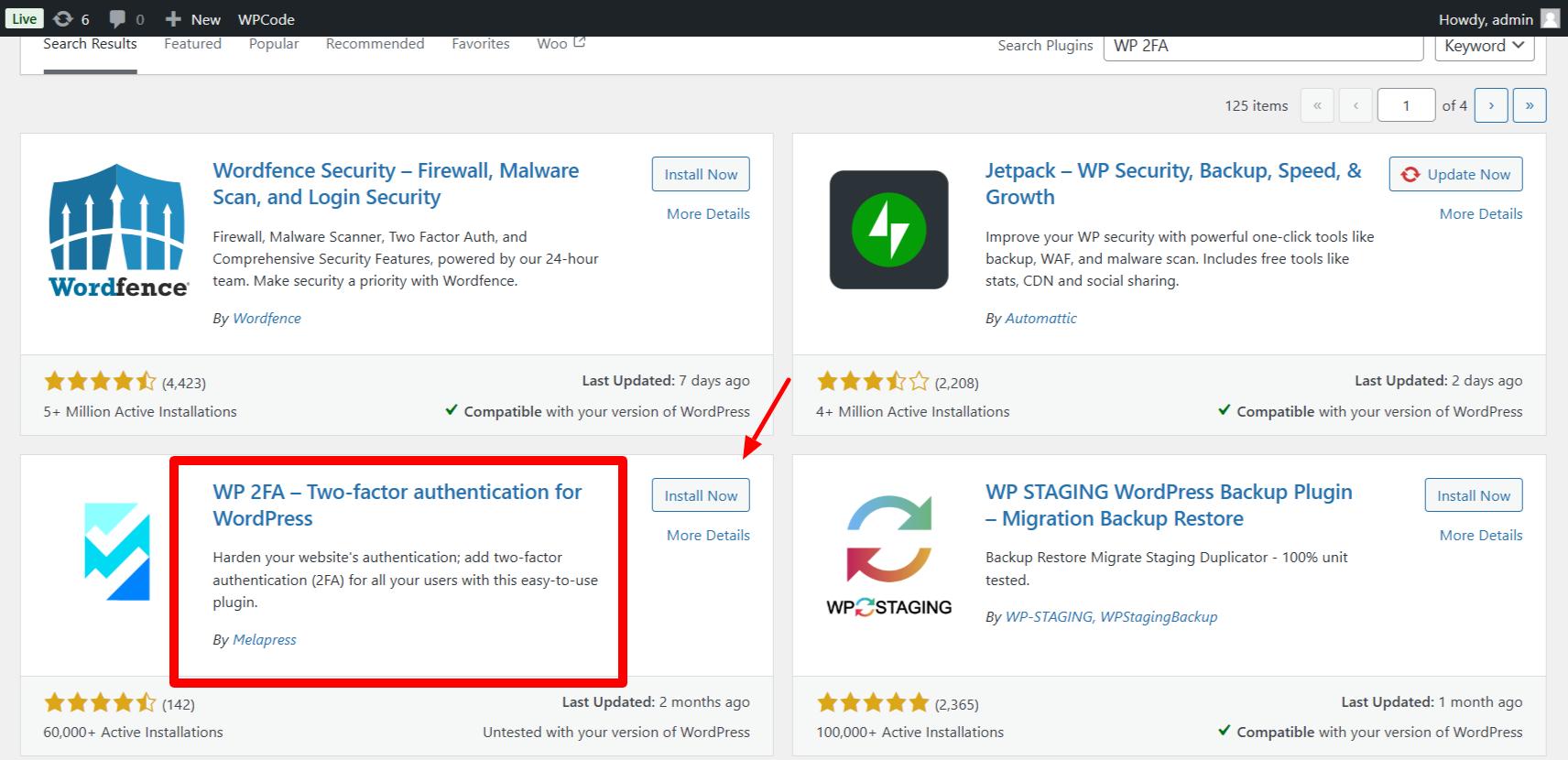
- Install the Plugin
Log in to your WordPress dashboard. Go to Plugins > Add New, and search for “WP 2FA.” Install and activate the plugin.
- Run the Setup Wizard
Now, you will see a wizard like the one below to guide you through the setup process.

Once you have completed WIZARD, the below window will appear.

Choose your preferred 2FA method, such as an authenticator app or email. Then, confirm your Email, and yes, you are ready with your WordPress 2FA method.
- Set Up Backup Methods
Enable backup codes or alternative methods to ensure you can access your site if your primary method fails.
- Test the Setup
Log out and log back in to verify that 2FA works correctly. Then, test your backup codes to ensure that they’re functional.
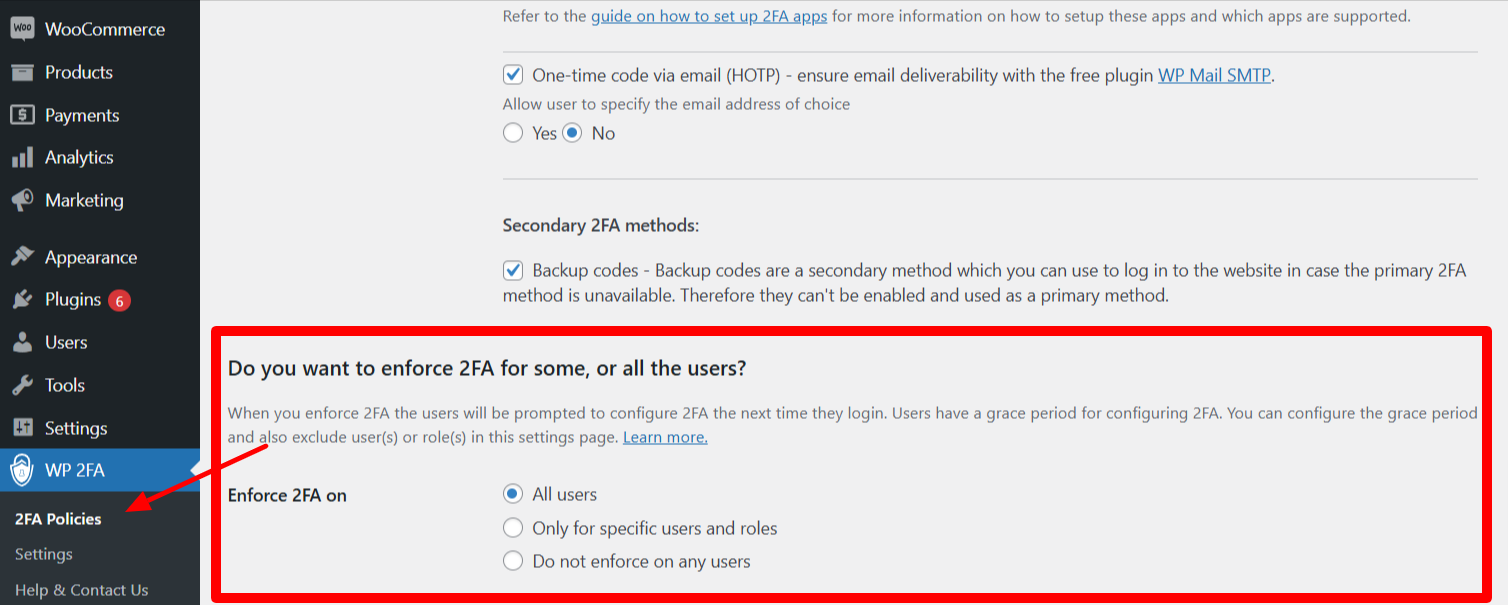
- Enforce 2FA for All Users
In the plugin settings, you can require certain user roles, such as administrators, to enable 2FA. This ensures your most sensitive accounts are protected.
Tips for Managing WordPress Two-Factor Authentication
Once you’ve set up WordPress 2FA, it’s important to maintain it properly. Here’s how:
- Educate Your Users: If your site has multiple users, provide them with clear instructions for setting up and using 2FA.
- Update Regularly: Keep your WordPress plugins and installed versions updated to avoid vulnerabilities.
- Monitor Backups: Regularly review and update backup codes to ensure they’re accessible when needed.
- Combine with Other Security Measures: Use WordPress 2FA in parallel with tools, like firewalls and malware scanners, for complete safety.
WPExperts: Your Safety Companion
If setting up WordPress 2FA security seems overwhelming to you, you can contact WPExperts. We specialize in the best WordPress development services and security solutions. Whether you need help implementing WordPress 2FA, setting up firewalls, or managing advanced security protocols, our team will handle it all. With WPExperts, you can focus on growing your website while they keep it secure.
Conclusion
Enabling WordPress Two-Factor Authentication on your site isn’t just a good thing; it’s like a must-have in today’s safety landscape. You can use authenticator apps and send email codes or hardware keys. Adding WordPress 2FA Security to your domain safeguards it from unauthorized access.
By following this guide, you have performed the first step toward a safer WordPress site.
Require expert assistance? Contact WPExperts, which will take care of your website’s security so you can devote more time to growing the business.
Act now. Secure your site with WordPress 2FA and sleep easy, knowing that your data is safe.




