



















































Do you frequently experience the HTTP 501 not implemented error on your WordPress website? We explain this server-side error for your convenience. Any HTTP error that starts with “5” highlights an issue with the server. Therefore, the 501 error occurs because of a problem associated with your web server.
However, issues related to a web browser or a computer can also result in the HTTP 501 not implemented error.
This blog post will thoroughly discuss the HTTP 501 not implemented error in WordPress. In addition, it will help you correctly fix the HTTP 501 error without difficulty.
What Do You Mean By the HTTP 501 Not Implemented Error?
The HTTP 501 not implemented error occurs when a browser makes a request, but the server does not respond to that request. In addition, the 501 not implemented error suggests that the web server lacks the functionality to display the desired information requested by the web browser. You can contact your web hosting provider to bypass this server-side error in this situation.
Different Variations of the HTTP 501 Not Implemented Error
Like other WordPress errors, the 501 error message appears differently on multiple web browsers. You will likely experience its different variations depending on the browser you use. These variations include:
- HTTP Error 501 Not Implemented.
- The server either does not recognize the request method or lacks the ability to fulfill the request.
- Error 501.
- HTTP 501.
Potential Causes Behind the HTTP 501 Not Implemented Error
Different reasons can potentially cause the HTTP 501 error on a WordPress site. Therefore, you must understand them before resolving the HTTP 501 not implemented error. These reasons are:
- Browser Cache.
- Incompatible Themes or Plugins.
- Incorrect Proxy Settings.
- Server Configuration Issues.
- Corrupted .htaccess file.
Browser Cache
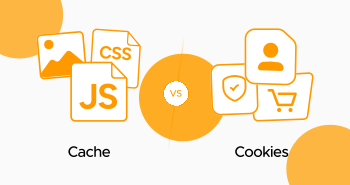
The browser’s cached version can be one of the primary reasons behind the 501 error. Thus, you should clear the browser cache to resolve this error.
Incompatible Themes or Plugins
There is a chance the themes or plugins installed on the WordPress site may conflict with the server’s settings, resulting in the 501 error.
Incorrect Proxy Settings
Incorrect proxy settings can result in the 501 not implemented error. Hence, you must check and fix these settings to see if it helps bypass the issue.
Server Configuration Issues
Sometimes, servers are not correctly configured and do not manage specific requests appropriately. This can result in the 501 error.
Corrupted .htaccess File
A misconfigured .htacess file can cause numerous server-side errors, including the HTTP 501 not implemented. Therefore, checking the .htaccess file may help you bypass this error on time.
How to Fix the HTTP 501 Not Implemented Error in WordPress?
You can benefit from various possible solutions when resolving the HTTP 501 not implemented error. These solutions are:
- Try Reloading the Page.
- Try Another Browser.
- Clear the Browser Cache.
- Check for DDoS Attacks.
- Conduct a Virus Scan.
- Contact Your Web Hosting Provider.
- Get Professional Help.
Try Reloading the Page
When users reload a page, they will likely bypass the HTTP 501 Not Implemented error. Therefore, there is no harm in loading a page again or performing a hard refresh using Ctrl + Shift + R on the Windows device.
This simple method may help you avoid the HTTP 501 Not Implemented error in the first place, enabling you to not go with other complex troubleshooting methods. Fortunately, the same solution allows you to eliminate the HTTP 500 internal server error.
Try Another Browser
Accessing the website on another web browser, like Microsoft Edge, Safari, Mozilla Firefox, Opera Mini, etc., can help you avoid seeing the 501 not implemented error in WordPress. For this purpose, you should open the website on any of the browsers mentioned above and check if it is opened.
If you access your desired site successfully on a different web browser, the problem lies with your browser, not your web server. So, you should remove the browser cache as a safety precaution to eradicate this 501 error.
Clear the Browser Cache
Clearing the browser cache is one of the most helpful solutions for users to resolve various errors, such as 429 too many requests, etc. Likewise, the same method can eliminate the 501 not implemented error. To clear the browser cache when resolving the 501 error, follow the below steps:
- Click the three dots provided at the top-right corner of your browser to access the settings panel. Then click the Delete browsing data option.

- You can select options such as Cookies, Browsing history, Cookies, and other site data, files, and Cached images. Click the Delete data option to remove the 501 error.
- Similarly, you can remove advanced data by hitting the ‘Advanced’ data tab.
- You can select options like Cookies and other site data, Download history, cached images and files, browsing history, etc.
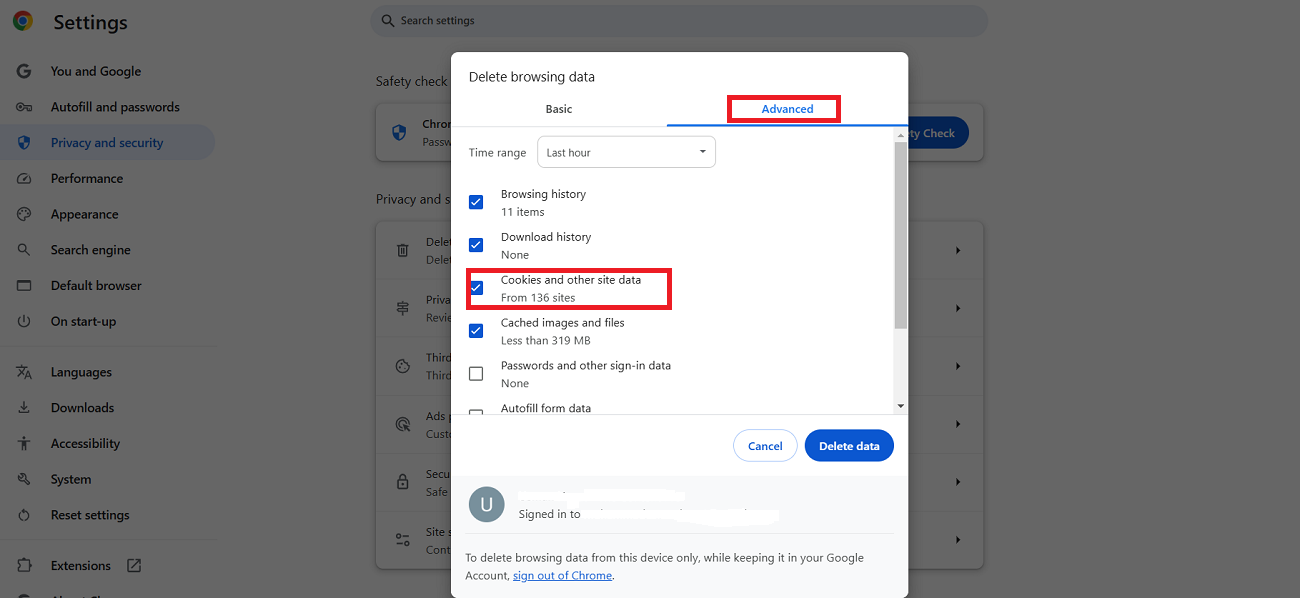
Hopefully, you will bypass the HTTP 501 not implemented error by pressing the Delete Data button. Clearing the browser cache allows you to resolve the Err_Cache_Miss error in Google Chrome. This method also helps bypass the WSoD (white screen of death) error.
Check for DDoS Attack
Checking for a DDoS attack is another way of removing the 501 not implemented error. During a DDoS attack, a hacker tries to crash the web server by sending numerous bots to the website. When you open your website amidst a DDoS attack, you will likely experience the 501 not implemented error.
Conduct a Virus Scan
Performing a virus scan can sometimes help you overcome the 501 not implemented error in WordPress. A virus can adversely affect the performance of a web browser. Moreover, it does not let the web browser communicate effectively with the web server and can cause the HTTP 501 not implemented error on the WordPress site.
Conduct a comprehensive virus scan to find out if your computer has a virus. You can benefit from the native Windows Defender software, which helps you perform a complete scan using a Windows device.
Contact Your Web Hosting Provider
There is a chance you may not resolve this annoying error despite trying out the above possible solutions. In this scenario, you should examine the issues related to your server instead of resolving your site’s backend problems.
Thus, you should reach out to your web hosting provider and ask them to test potential problems associated with your server. Doing so will likely help you avoid seeing the 501 not implemented error in the future.
Different web hosting providers offer helpful insights that can help resolve this server-side error. This will allow you to detect the best possible workaround.
Get Professional Help
You need professional support to resolve the 501 not implemented error smartly. This error can negatively impact you in the long run, decreasing conversions and sales, revenue loss, reputation loss, and more.
In this situation, the role of WPExperts, a renowned web development and digital marketing firm, becomes handy as it helps you professionally bypass this HTTP error without issues.
Wrapping Up
We expect you to appreciate our blog post that helps you understand the HTTP 501 not implemented error. The HTTP 501 not implemented error is not as difficult as you think. You need to follow the above troubleshooting methods in the right direction; that’s it.
However, you should create a website backup before implementing these troubleshooting methods to resolve the HTTP 501 not implemented error on a WordPress site. You can revert your site to the old version if anything goes wrong or causes disruption to the site.
We hope you will avoid experiencing this server-side issue, 501 not implemented, by following the above troubleshooting methods in the future.