



































 Usman Hayat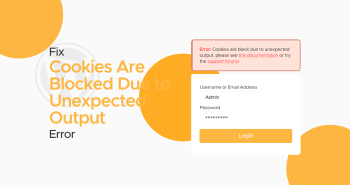
You might have experienced the “Cookies are blocked due to unexpected output” error at some point in your life when accessing the WordPress dashboard. It is an annoying error that mainly occurs due to server-side issues. However, client-side issues can produce this error at times.
Users experience this error after making a few changes in their sites’ backend, such as activating a plugin or editing a WordPress theme.
This blog post will thoroughly discuss possible reasons and solutions for the error “Cookies are blocked due to unexpected output.”
Various Causes Behind the Cookies Are Blocked Due to Unexpected Output Error in WordPress
This server-side error can be caused by different factors. Hence, you should be aware of these possible causes when eradicating it. For instance, an issue with a WordPress theme or plugin can produce the Cookies are blocked due to unexpected output error.
Apart from this, a problem with a custom code snippet can result in an output that prevents WordPress files from loading correctly. As a result, users can experience this error when visiting sites. Sometimes, server misconfiguration can lead to the Cookies are blocked due to unexpected output error.
How to Fix Cookies Are Blocked Due to Unexpected Output Error in WordPress?
You can benefit from various possible solutions when resolving the Cookies that are blocked due to unexpected output errors in WordPress. Here are these potential solutions, including:
- Deactivate WordPress Plugins.
- Use a Default WordPress Theme.
- Remove Extra Whitespace in PHP Files.
Deactivate WordPress Plugins
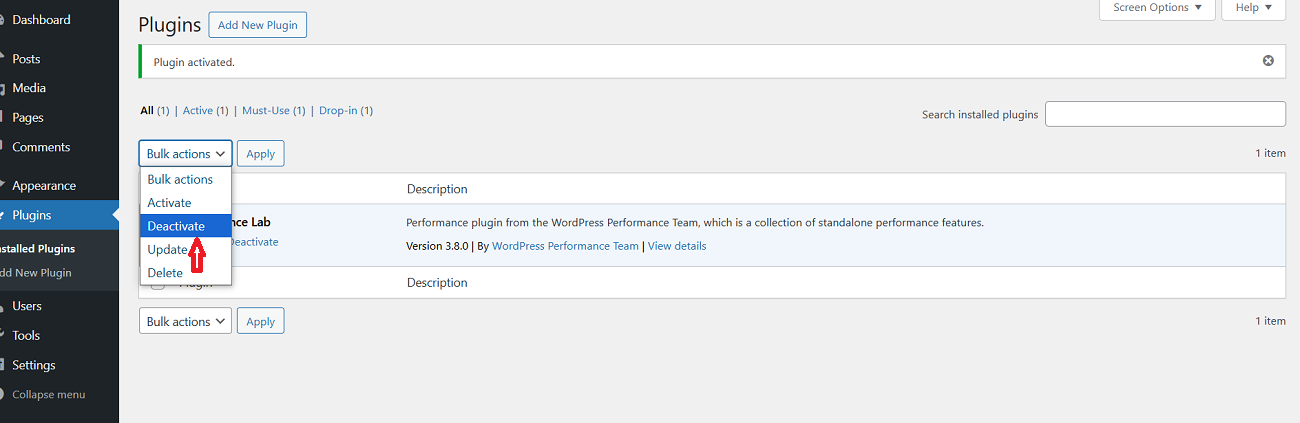
Deactivating WordPress plugins can help you bypass the Cookies are blocked due to unexpected output error. To disable WordPress plugins, follow the below steps:
- Using your WordPress admin dashboard, click the Plugins tab > Installed Plugins.
- Choose the plugin you want to disable or deactivate. Once you have chosen your preferred plugins, select the Deactivate option following the Bulk actions tab and click Apply. That’s it.
Once you have followed the above method, check if the Cookies are blocked due to unexpected output error has vanished. Furthermore, deactivating WordPress plugins can enable users to bypass the HTTP 429 Too Many Requests error.
The same workaround lets users overcome the “409 Conflict” error. In addition, disabling WordPress plugins allows you to remove the HTTP 404 Not Found error.
Use a Default WordPress Theme
Sadly, a newly configured WordPress theme can result in the “Cookies are blocked due to unexpected output” error. Thus, you must replace your current WordPress theme with the default one. This way, you can potentially remove this irritating error.
To use a default WordPress theme, visit the admin area and select the ‘Appearance’ tab. In addition, select the Themes tab available in the WordPress dashboard. Thus, you can easily activate the default WordPress theme. For example, you can choose the Twenty Twenty-Five theme.
If you can’t log in to your WordPress admin area, use your hosting account’s FTP client or File Manager app to change themes. Now, connect to your site with the help of an FTP client and go to the /wp-content/ folder.
You should click to choose the themes folder and change its name to themes-deactivate. This way, you can deactivate your existing WordPress theme. You must right-click and select your FTP client’s ‘Create directory’ option.
At this point, name this directory ‘themes’ to create a new empty themes folder. You should go to the WordPress.org theme directory and search for a default theme like Twenty Twenty-Five.
Once you have successfully detected the default WordPress theme, download it to your device. After downloading the theme, press the zip file and extract it. Now, you will have a folder with a theme name. Use your FTP client or the File Manager app to open the empty themes folder on your WordPress site.
You should upload the theme folder from your device to your site. After downloading the theme, WordPress will utilize the theme you downloaded in the themes folder.
Using a default WordPress theme can help you bypass this server-side error. If not, the issue is with your old theme.
Remove Extra Whitespace in PHP Files
As you know, extra whitespace in PHP files can result in the “Cookies are blocked due to unexpected output” error. Unfortunately, a single blank line is enough to cause this server-side issue. Therefore, you should fix it in the first place.
To remove this error, utilize your FTP client or benefit from the File Manager tool using your hosting control panel. This will allow you to use your site files. Once you are connected, find the wp-config.php file, as extra whitespaces usually appear here.
Now, detect the blank spaces or lines. You can search for them before the tags. If found, remove extra spaces or lines immediately. Remember, you must save all your changes and upload the file to your server again.
Once you have performed this step, open the site again to confirm if “Cookies are blocked due to unexpected output” has gone. If you witness this error on your screen, follow the steps above for other WordPress files like your theme’s function.php file.
If you have updated your WordPress theme recently, editing your theme’s function.php file is a good option.
What Should We Do to Prevent Cookies Are Blocked Due to Unexpected Output Error in the Future?

Fortunately, you can follow a few preventive measures that help you avoid the “Cookies are blocked due to unexpected output” error, such as:
- Make Sure Your WordPress Site is Up to Date.
- Add Custom Code with WPCode.
- Your Site Should Have Automated Backups.
Make Sure Your WordPress Site is Up to Date
You must update your WordPress plugins and themes regularly. Moreover, updating plugins and themes helps overcome compatibility problems and errors caused by outdated software. More importantly, you should not forget to install updates for WordPress Core.
Besides, consider getting WordPress maintenance services that help monitor all WordPress management tasks and hassles on your behalf.
Add Custom Code with WPCode
Instead of manually adding custom code into the theme’s function file, consider using WPCode, a notable WordPress code snippets plugin. Doing so will allow you to manage custom code snippets on your WordPress website perfectly.
Your Site Should Have Automated Backups
You should not underestimate the importance of WordPress backups at any cost. They play a crucial role in safeguarding your site from numerous security threats. Similarly, backups allow you to restore your WordPress sites if anything goes wrong or unexpected happens.
When backing up your WordPress site, you can use multiple WordPress backup plugins, such as UpdraftPlus, Duplicator, and more.
Wrapping Up
We expect this blog post to allow you to bypass the “Cookies are blocked due to unexpected output” error appropriately. To safeguard your WordPress site, you should protect the WordPress admin area from this and other WordPress errors.
The above possible workarounds can help you eliminate WordPress’s “Cookies are blocked due to unexpected output” error. That said, follow these easy solutions in the right direction to achieve your objective.


