









































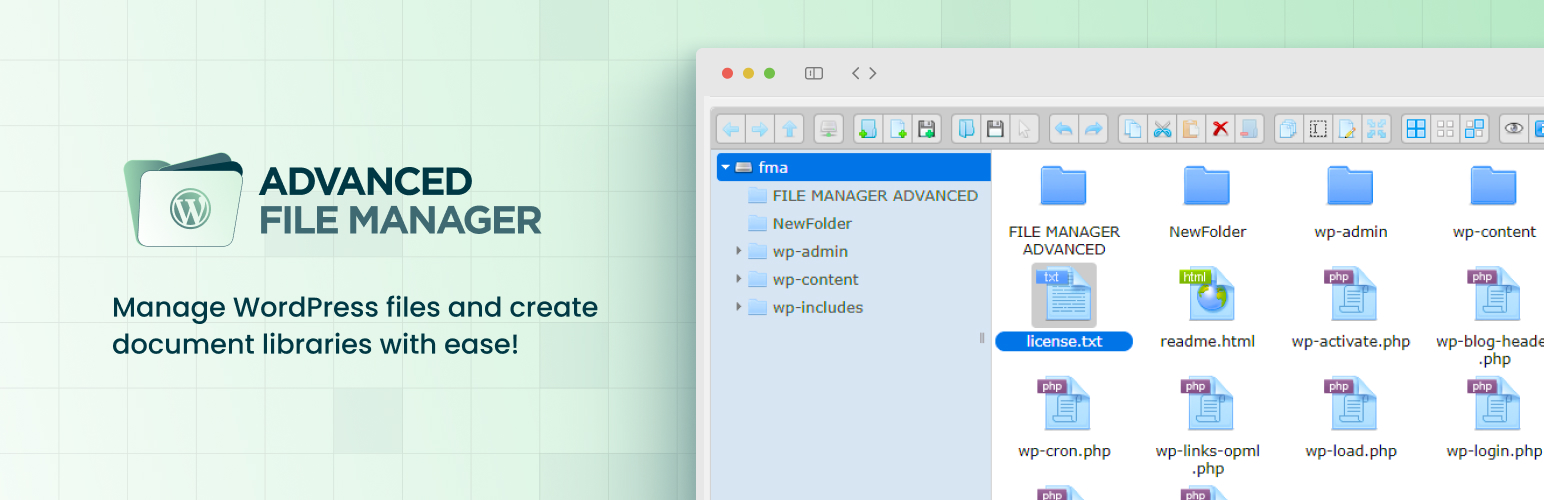
Are you looking for an easy way to access files in WordPress or simply tired of FTP clients or cPanels? If so, then don’t worry.
The Advanced File Manager plugin is the perfect solution for you!
With this file manager plugin for WordPress, you can manage essential WordPress files without leaving the WordPress dashboard. No hassle for accessing cPanels or FTP clients, just download the plugin and get into the core files with ease.
The plugin has everything you need. You can perform numerous actions, such as copy, paste, rename, edit, delete, upload, download, archive a file, and much more.
Now, you might be wondering what makes it better than cPanel or FTP clients. The following section provides a clear explanation.
Why Are FTP Clients Not a Good Choice?
Although FTP clients are often recommended for accessing the WordPress root directory but here’s why they are not a good choice for most WordPress users:
- Not Friendly for Beginners: FTP clients feature an outdated, overwhelming interface resembling a raw folder structure of your website without guidance. A single mistake, like moving a file incorrectly or deleting a core file, can take your entire site offline.
- Requires Additional Setup: To use an FTP client, you must enter FTP credentials in the FTP client, which can further cause other conflicts, such as connection issues, SFTP mismatches, or firewall blocks. This setup can be confusing if you don’t have immediate access to the hosting account.
- No Undo or Recovery: Unlike Advanced File Manager, FTP doesn’t offer a trash folder or undo feature. Once you delete or overwrite a file, it’s gone unless you have a backup.
- Security Risks: FTP could put your site at unnecessary risk if you’re not careful. For example, using standard FTP rather than secure SFTP transmits your credentials in plain text, making it susceptible to interception by malicious actors.
While FTP gives full access to your site files, it’s not ideal for casual users. Tools like Advanced File Manager provide a safer, user-friendly alternative for managing files directly from the WordPress dashboard.
Key Features in Advanced File Manager
Here’s what you can expect once it’s up and running:
- Flexible Root Directory Access: You can easily set and adjust the root directory path, allowing access to specific files tailored to your development needs.
- Access to Internal and External Directories: Take control of files stored within and outside your WordPress root directory, enhancing flexibility in file management.
- Full File Operation Suite: Copy, paste, rename, delete, edit, upload, download, zip/unzip, and much more without leaving WordPress.
- Access Beyond WordPress Root: Manage files both inside and outside your WordPress directory to build document libraries and download managers.
- FTP-Free File Management: Access and manage files securely from within WordPress.
- Path Privacy Protection: Conceal real file paths from users to boost security and secure sensitive data on your site.
- Drag-and-Drop File Interface: Upload and move files using a drag-and-drop interface.
- Icon and List View Options: Switch between icon and list views for easier navigation of files and folders.
- Directory Size Calculation: Accurately and instantly assess the size of directories to manage storage and optimize resources.
- Archive Management: Create or extract various formats, including ZIP, RAR, 7Z, TAR, GZIP, and BZIP2.
- Multiple Themes: Choose from multiple themes to create a visually appealing and comfortable user interface. (i.e., Mono, Material Dark/Light/Grey, Windows 10, Bootstrap).
- Keyboard Shortcuts: Enhance your file management by utilizing various keyboard shortcuts for frequently performed tasks.
- Modern and Intuitive UI: Clean, responsive design with drag-and-drop support, thumbnail previews, and multiple themes.
- Rich File Previews: Instantly preview PDFs, images, and media files without needing to download them first.
- Advanced File Navigation: Use powerful search, sorting, and multi-select tools for bulk actions and quick organization.
- Rich Thumbnails: View image thumbnails directly in the file manager, making it easier to quickly identify visual content.
- Image and File Editing: Edit images and files right in the plugin for swift adjustments, eliminating the need for extra tools.
- Clean File Naming: Cleans file names and paths automatically, removing invalid characters and converting text to the UTF-8 standard.
- Large Files & Folder Upload Support: Quickly upload large files and folders.
- Feature-rich Toolbar: Choose from tools using the feature-rich toolbox with a click.
- Multi-Selection: Select multiple files or folders to move or delete instantly, saving tons of time.
- Recent Directory Access: Easily return to folders you opened before, and save time by quickly navigating to your latest paths.
- Responsive Design: Adapts perfectly for all screen sizes on tablets and smartphones, offering a consistent experience across all devices.
- Detailed Library: Browse through detailed documentation to learn about each feature without second-guessing.
- High-Performance Backend: Lightning-fast, high-performance backend servers offer smooth and rapid file operations.
- Frontend File Management [Pro]: Allow logged-in and non-logged-in users to manage files via shortcodes or Gutenberg blocks, with role-based access control.
- Cloud Integration [Pro]: Seamlessly manage and sync files from Dropbox, Google Drive, OneDrive, and Amazon S3 directly within your WordPress admin.
Get shortcodes, advanced themes selection, database manager, private folder access, and more with Advanced File Manager Pro!
5 Reasons Why Advanced File Manager Is a Good Choice for WordPress File Manager
Advanced File Manager is not just another WordPress plugin. Here’s why it is the best choice for you:
Reason #1. Seamless File Control Without the Hassle

Tired of switching between FTP clients and the WordPress backend? Advanced File Manager lets you manage, move, edit, and optimize all your files from one place without any external software. Whether you’re handling files within or outside your WordPress directory, it’s all just a few clicks away.
Reason #2. Clean, Fast, and Visual Navigation

Managing files is made easier with intuitive layout views, instant thumbnails, and blazing-fast loading speeds. Navigating folders becomes effortless. You can bulk-select, sort, or search for files instantly.
Reason #3. Productivity That Feels Effortless

Keyboard shortcuts, drag-and-drop support, a feature-rich toolbar, and built-in file editing tools keep your workflow uninterrupted. No more bouncing between plugins or apps, everything you need is integrated and right at your fingertips.
Reason #4. Built-In Security and Customization

Advanced File Manager ensures perfect security with privacy safeguards and selective access controls, so you control who sees what. Regarding customization, themes, and responsive design, create an interface that looks amazing and perfect.
Reason #5. Built to Grow With You

Whether you’re a solo developer or managing a large team, the plugin scales with your needs. From frontend access for users to cloud integration for remote storage, it’s packed with advanced capabilities that evolve as your projects grow. And if you ever need help? You’ve got extensive documentation and a super-fast support team backing every move.
Use Cases For Advanced File Manager
Apart from quick access to the files, the plugin can actually do wonders. You can create learning management systems or download libraries without needing further plugins or software. Here are a few use cases of how our users have been utilizing the Advanced File Manager plugin:
Use Case #1: Organize Course Materials for Online Education Platforms
- Create structured folders for each course, module, or topic with the best WordPress document library plugin.
- Allow instructors to upload lecture notes, slides, and videos directly via WordPress.
- Grant students view/download-only access via role-based permissions.
- Enable media previews (audio/video) so students can quickly review content.
- Use drag-and-drop uploads to simplify WordPress document management.
Use Case #2: Developer Toolkit for Custom WordPress Projects
- Set custom root paths to manage project files outside of the standard WordPress directory.
- Upload large log files, backups, or custom scripts using chunked upload support.
- Use keyboard shortcuts and advanced sorting to work faster.
- Archive project folders or extract zipped code packages directly inside WordPress.
- Quickly edit config or text files within the dashboard.
Use Case #3: Public Document Repository or Download Center
- Display a document library on the front end using the Gutenberg block or shortcodes.
- Allow visitors (even non-logged-in users) to download public resources like reports, forms, or brochures.
- Choose themes that match your site’s look.
- Control who can upload or delete files to maintain security.
- Connect Dropbox or Google Drive for cloud-based document syncing and backup.
Use Case #4: Manage Client Files on a Business Website
- Let clients upload or download documents directly from a secure frontend interface.
- Assign private folders for each client using individual user access control.
- Restrict file operations based on user roles (e.g., clients can upload but not delete).
- Preview files before downloading to avoid sending emails back and forth.
- Keep paths hidden to protect sensitive business files.
Requirements
Advanced File Manager is compatible with the most commonly used WordPress plugins and themes. To install and use the plugin, make sure that your WordPress site meets the following minimum requirements:
- WordPress Version: 4.0 or higher
- PHP Version: 7.0 or higher
NOTE: For the premium version of the Advanced File Manager, you have the latest versions of WordPress and PHP.
Technical Documentation
Stuck with something? Waste no time and use our detailed technical documentation to fix the errors yourself. Learn everything you need to know about getting started, cloud storage integration, shortcodes, and advanced functionality.
Get Expert Assistance
Don’t want to fix the issues yourself?
Don’t worry! Our support team is here to help you overcome any complexity you may face while setting up the best file manager plugin for WordPress. Contact us here, report your problem in detail, and our representative will get in touch as soon as possible!
Frequently Asked Questions
Do I need technical knowledge to use Advanced File Manager?
Of course not! Anyone can use Advanced File Manager regardless of their technical knowledge. The plugin offers a clean interface and easy-to-understand options. Moreover, hovering over the tool in the toolbox helps identify the button’s purpose.
Can I allow users to upload or manage files from the front end?
Yes, you can use this plugin as a WordPress document library plugin to upload or manage files from the front end. Using the Gutenberg block or shortcodes you can display the file manager on any page you want and control access by user roles from the plugin’s settings.
What file operations can I perform within WordPress?
You can perform all the necessary file operations, including copy, paste, upload, download, undo, redo, sort files (with date, size, name, and more), file selection, and more.
Is it safe to access core WordPress files this way?
Yes! In fact, it is the safest way since Advanced File Manager prioritizes security. You can safely manage sensitive files with advanced permission controls.
Can I preview files before downloading them?
Yes! The plugin offers a rich built-in file previewer. You can view PDFs, images, and media without having to download them first.
Is the plugin compatible with popular themes and page builders?
Definitely, we are proud to say that Advanced File Manager is built to work smoothly with most WordPress themes and major page builders, such as Elementor, Divi, and Gutenberg.